House Party
- —
- —
- Installs
- 5.00K
- Price
- Free

Screenshots


Analysis by Reviewed APKs
House Party is a score-tracking app for friends who want to keep casual competitions organized, from board games to darts or trivia. I’d reach for it when a group wants a shared record of scores and wins without passing around a notebook or trying to remember who came out ahead last time. Its focus is practical: make different games trackable, then give the group a common leaderboard to check.
Game night, kept in order
When I picture using House Party, it’s at a recurring game night where the rules are familiar but the scorekeeping gets messy. Someone is tallying points on a scrap of paper, another person is asking who won the last round, and the group is already moving on to the next game. A shared house gives the players a place to track results and check the running record instead of relying on one person’s memory.
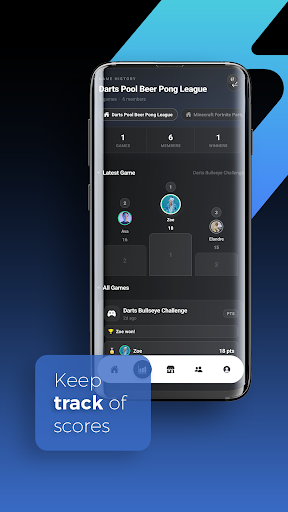
The app is built around creating a house, inviting friends, and recording games with a scoring method that fits the activity. Its description says scores update across devices, with player statistics, game history, and house leaderboards to follow. That makes it relevant beyond one evening: a group can see how a casual rivalry develops over several sessions, whether the competition is a family championship or a standing friend-group challenge.
A scorekeeper, not a hangout
House Party makes the most sense beside a physical game, sports session, or friendly tournament. A notebook can record a score, but it takes more effort to keep a group history and standings tidy; a group chat can share results, but old messages are not a dedicated leaderboard. House Party’s appeal is that it puts scores, player records, and game history together for a group rather than making one person maintain the whole archive.
I wouldn’t choose it as a general social network or a video-chat app. Its described job is tracking competition, not hosting conversations or supplying a catalog of games to play. You still need the activity and its rules; House Party provides a way to record outcomes. For friends who mainly want a shared record, that narrow focus is useful. For people who want the app itself to provide the entertainment, it may feel limited.
Make the record useful
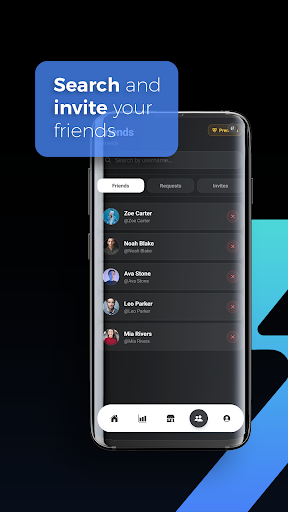
A small habit that would help is creating a house for a regular group rather than starting from scratch each time. Invite codes and QR code sharing are described as ways to bring friends into a house, while the friend system supports game invitations. Once everyone is in the same place, the group can use the same shared record for repeated sessions and check standings without rebuilding the participant list for every gathering.
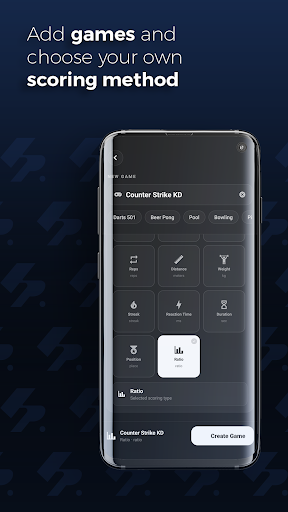
It also helps to settle on the scoring approach before a game starts. House Party describes multiple scoring types, including points, time, accuracy, distance, weight, rankings, and custom ratios. Picking a suitable method up front should make results easier to compare later. After a session, looking back at the game history and player statistics can turn a one-off score into a useful record of how the group’s competition has been going.
More From Our News Desk

Zoom Meetings, Google Meet, or Teams: Which Is Easiest to Join?

How I Build a Free Streaming Lineup With Tubi

Why Crunchyroll Is the Default Anime App for So Many Fans

YouTube TV: A Practical Guide to Cutting Cable

Rummikub and the Small Comfort of Phone Games

TeamViewer Remote Control or AnyDesk for Helping Family?
Who will enjoy keeping score
I’d recommend House Party to friend groups, families, and casual organizers who play different competitive games and want scores in one shared place. It suits people who enjoy a little friendly rivalry but don’t want to turn game night into a spreadsheet project. The ability to record different kinds of results gives it a broader role than a scorecard made for just one board game or sport.
It may not suit someone looking for video calls, built-in games, or a full event-planning tool; those are not the core job described here. It also depends on the group being willing to enter results as they play. If nobody wants to do that, leaderboards and history won’t be much help. House Party is most valuable when several people agree that keeping a record is part of the fun.
House Party is a social app from House Party Studios. It is free on Google Play and has more than 5,000 installs. The app is rated Everyone. Its version is shown as varying with device, so the version you see can depend on the device involved.
The supplied app details give a price of $0, no in-app purchases, and no ads. House Party was released on January 18, 2026. No last-update date or minimum Android version is provided in the available facts, so check Google Play for current device and availability details.
How House Party Handles Friendly Rivalries
A clear starting point
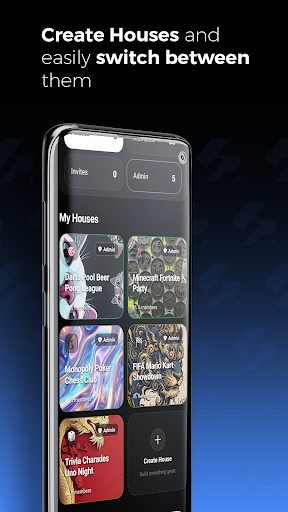
When I first opened House Party, the idea I’d want to understand is the house: a private group space where players share game results. That framing gives the app a straightforward purpose before anyone starts entering scores. Rather than being a general-purpose social feed, it is organized around a group’s competitions and the records that build up as they play.
Getting a group together is supported by custom houses with invite codes and QR code sharing. Those options give hosts a couple of ways to bring people into the same space, which is handy when some friends are already using the app and others are joining for the first time. The central setup task is choosing the group and getting its players connected.
The everyday scorekeeping
The central routine is recording a game and its result, then letting the group’s shared record reflect the outcome. House Party describes real-time score updates across devices, so players can follow the same competition rather than keeping separate notes. For a group that plays often, that shared view is the difference between a single tally and an ongoing record of who has won.
The app also describes game history and player statistics alongside house leaderboards with win-loss records. I like that these features serve different levels of curiosity: someone can check the current standing quickly, while a more competitive player can look back at previous results. The value depends on entering games consistently, but the structure makes repeated sessions easier to follow.
Flexible ways to compete
One standout is the range of scoring approaches described. House Party supports points, time trials, accuracy, distance, weight, position rankings, and custom ratios, so it is not restricted to games where everyone simply adds points. That flexibility could help a group track different kinds of challenges in one house without forcing every activity into the same scoring format.
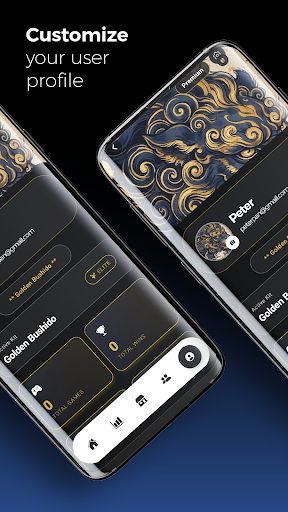
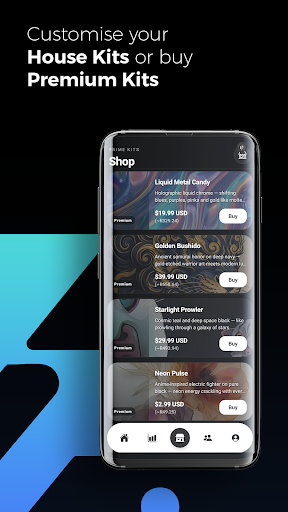
The description also mentions unlockable house kits and achievement badges, with customization options for houses. Those touches give a group a way to make its competition feel more personal alongside the practical score records. The main reason to use the app remains tracking results, but rewards and customization can add a little identity to a recurring group’s shared space.
A repeatable game-night routine
For a regular gathering, I’d start by using one house for the group, then invite the players who want their results included. Before each game, the group can agree on the scoring style that fits it. That simple pause is useful: it means everyone knows what the record will represent, whether the activity is a points-based board game, a time trial, or a ranking among players.
After a game, recording the result while it is fresh should make the history more dependable than trying to reconstruct it later. Then the group can check the leaderboard or player statistics when deciding on a rematch. Game invitations and the friend system are described as additional ways to connect players around activities, while QR sharing can make joining a house easier in person.
Keep the expectations modest
House Party can organize competition, but it does not replace the game itself. Players still need to decide what they are playing, understand the rules, and enter the results. Groups that prefer spontaneous sessions without scorekeeping may find that the app adds a step they don’t need. Its history and standings become worthwhile only when people actually keep the record up to date.
The app’s breadth of scoring is useful, though it also means a group should choose a method that makes sense for its activity. A leaderboard is only as clear as the results entered into it. House Party is best treated as a shared scorebook with social features around it, not as a substitute for a live conversation or a collection of ready-to-play games.
There is also a practical group consideration: everyone who needs to contribute or follow the shared results has to join the same house. Invite codes and QR code sharing help with that, but the group still needs to adopt a common routine. If only one person tracks results, the app may feel like extra work rather than a shared convenience.
House Party has a clear use: give a group one place to record games, compare results, and look back at its friendly rivalries. Its flexible scoring and shared house structure make it more adaptable than a single-purpose tally sheet, while its value still depends on people entering scores consistently.
I’d try it for a family game night, a recurring friend-group competition, or a casual tournament where keeping standings matters. If your group wants video chat or games supplied by the app, this isn’t the right fit. For people who want a shared, ongoing scorebook, House Party is a focused option worth considering.
House Party Frequently Asked Questions
What is House Party used for?
House Party is used to create private group spaces, track games, and follow shared results. Its described tools include flexible scoring, game history, player statistics, and house leaderboards. It is aimed at competitive activities such as board games, party games, sports, and tournaments, rather than providing the games themselves.
Which devices can run House Party?
House Party is an Android app distributed through Google Play. The available details do not give a minimum Android version, and compatibility can vary by device. Check the Google Play store entry for the requirements shown for your particular phone or tablet before installing.
Does House Party cost money?
The supplied app facts give House Party a price of $0 and say it has no in-app purchases or ads. The app description discusses free houses and customization, but store details can change, so check Google Play for the current offer and any terms that apply.
Can House Party track different kinds of games?
Yes. House Party describes scoring options for points, time trials, accuracy, distance, weight, position rankings, and custom ratios. That makes it suitable for a range of activities, but players still choose the game and enter its results. It is a tracking tool, not a built-in game collection.
Who should try House Party?
It may suit families, friend groups, and casual tournament organizers who want a shared record of results and standings. It may be less appealing to people who do not want to enter scores or who are looking for video chat or games to play inside the app. Its usefulness grows when the group tracks results regularly.
Pros
- Flexible scoring supports several styles of competition, not only point totals.
- Shared houses bring group scores, game history, and standings together.
- Invite codes and QR sharing offer convenient ways to join a house.
- Designed for recurring rivalries across different kinds of games.
Cons
- Players need to enter results for the history and leaderboards to stay useful.
- It tracks competitions but does not provide games to play.
- Groups must adopt the same house and scoring routine for shared records.
- Category
- Social