healow
- 735.24K
- 4.7
- Installs
- —
- Price
- Free

Screenshots

Analysis by Reviewed APKs
healow is a patient app for keeping up with appointments, medical records, lab results, and other information connected to a doctor’s office. It also includes tools for tracking weight and activity. I see it as a practical companion for people who want routine healthcare details in one place, especially when managing more than one account. Its usefulness depends on whether your doctor’s office works with it.
A Quieter Appointment Routine
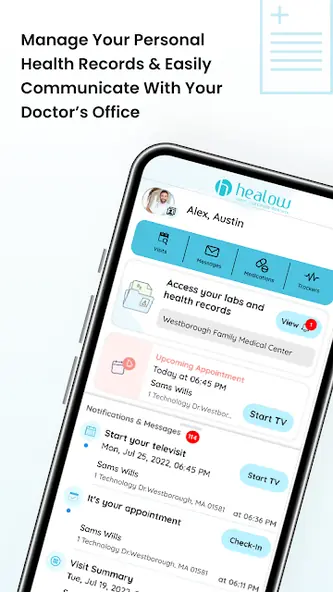
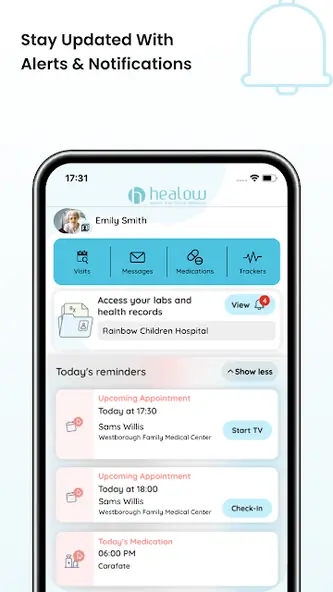
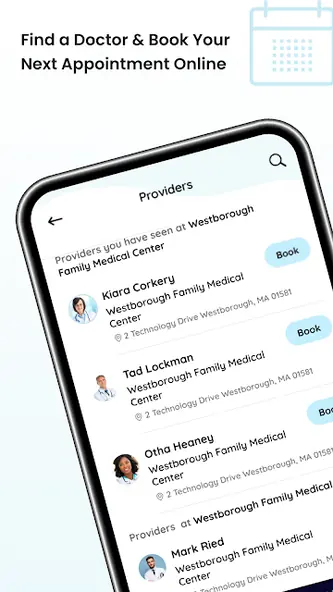
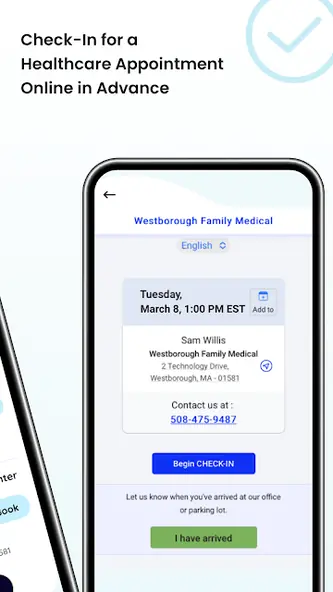
When I think about healow’s everyday role, I picture checking a clinic visit between errands rather than calling the office during business hours. The app lets users find a doctor and book an appointment, while also bringing appointment details and medical information together. That can make a routine task feel less scattered: instead of searching through messages for the next visit, I can turn to one place for the information the app supports.
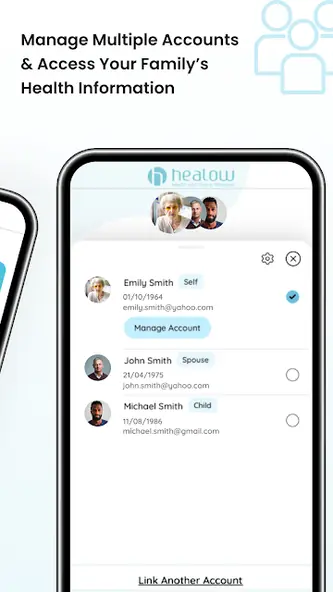
The same setup is useful after an appointment, when lab results, vitals, or medication information may be something I want to review later. I can also see why family account access could matter to someone helping keep track of relatives’ care. The appeal isn’t dramatic; it’s having useful details available when I need to check them, without making a phone call just to find an appointment time.
A Patient Portal Companion
Compared with a paper folder or a clinic’s patient portal in a browser, healow’s main draw is gathering several kinds of healthcare information and appointment access in an app. It also includes weight and activity trackers, so it reaches a little beyond record viewing. Those tools make it more of a practical organizer than a general wellness destination, and the doctor’s-office connection is central to what it does.
I wouldn’t treat healow as a replacement for a conversation with a healthcare professional or as a broad fitness app. Its purpose is to help users access information and communicate with a doctor’s office, not to provide medical interpretation. The description also makes clear that the experience is tied to participating office information. If your practice isn’t connected, the app’s usefulness for your care may be limited.
Small Habits That Help
A simple routine makes the app easier to use: check upcoming appointments when planning the week, then revisit the relevant records after a visit. If I were tracking weight or activity, I’d make entries regularly rather than waiting until I wanted to remember a longer stretch. The description says users can follow trends and share progress with a doctor, which gives consistent tracking a practical purpose beyond collecting numbers.
For someone managing family information, it may help to decide whose details need attention before opening the app. Multiple accounts are supported, so keeping that distinction in mind can make a quick check less confusing. I’d also make a habit of reviewing the information available after each appointment, rather than assuming every update will be something I need to act on immediately.
More From Our News Desk

Zoom Meetings, Google Meet, or Teams: Which Is Easiest to Join?

How I Build a Free Streaming Lineup With Tubi

Why Crunchyroll Is the Default Anime App for So Many Fans

YouTube TV: A Practical Guide to Cutting Cable

Rummikub and the Small Comfort of Phone Games

TeamViewer Remote Control or AnyDesk for Helping Family?
Who May Find It Useful
I’d recommend healow to patients who want a mobile way to access appointments and medical records connected to their doctor’s office. It may also suit people who help manage family medical information, since the app supports multiple accounts. Users who like keeping an eye on weight or activity trends may appreciate having those trackers alongside appointment and record access.
It may be less useful to someone whose doctor’s office does not work with the app, or to anyone looking mainly for a standalone fitness service. The app is focused on patient-office communication and personal medical information, so its value depends on that connection. People who prefer handling everything in person or on paper may not gain much from adding another place to check.
healow is developed by eClinicalWorks LLC and is available for iPhone and iPad through the Apple App Store. The App Store shows a 4.7-star rating from 735,235 ratings. It is free to download, and the provided store details do not give a separate price for optional purchases.
The listed version is iOS 7.6.5, and the app requires iOS 17.0 or later. Its release date is February 12, 2013, and the listed last update date is August 21, 2026. The App Store content rating is 17+.
Keeping Everyday Care in Reach
Getting Oriented
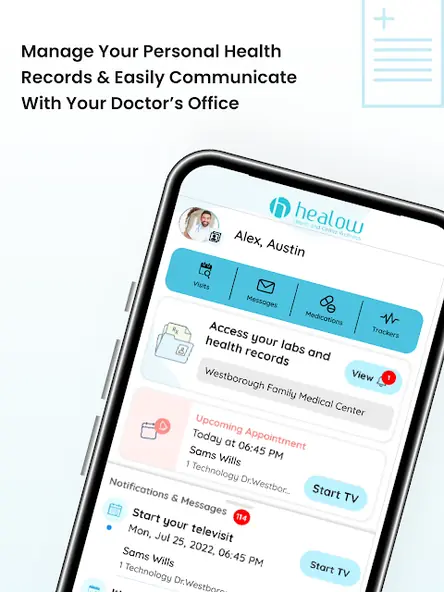
When I first open an app like healow, I want to know quickly whether it can connect the everyday pieces of care that otherwise live in different places. Its stated focus is clear: appointments, lab results, vitals, medication information, and other personal records, with tools for communicating with a doctor’s office. That gives the app a straightforward job rather than asking me to learn a broad health platform.
The first practical step is finding out whether the relevant doctor’s office and records are available through the app. Once that connection is useful, the different parts have an obvious reason to sit together. I’d start with the immediate task—checking an appointment or looking for a result—then explore the trackers if they fit my routine. That keeps setup focused on what I actually need.
The Day-to-Day Check-In
The core experience is about returning to information that matters at ordinary moments: checking when an appointment is coming up, reviewing a lab result, or looking over vitals and medication details. I like that these are concrete tasks rather than vague promises to improve my health. When I want to remember what is already available, having those records accessible through the app can be more convenient than relying on scattered notes.
I’d use healow as a reference point, not as a reason to keep refreshing a screen. A quick check before a visit or after receiving new information seems more useful than turning record access into a constant habit. The app’s role is to help people access and manage their information; what that information means is still a matter for the appropriate healthcare conversation.
More Than Record Viewing
Appointment booking is one of the clearest conveniences described for healow. Users can find a doctor and book an appointment through the app, which may spare them a call when they are trying to find a suitable time. It puts scheduling next to appointment and record access, so the app can be useful both before a visit and when following up afterward.
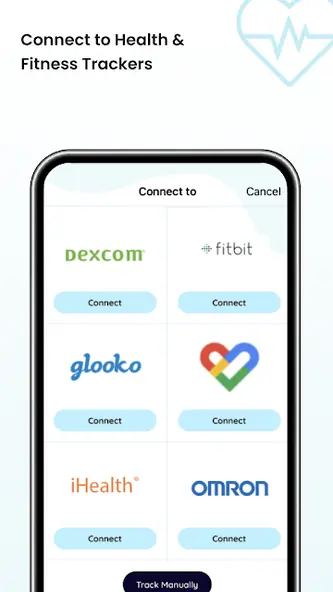
The weight management and activity trackers add another practical layer. Users can set goals, track progress, watch trends, and share that progress with a doctor. I appreciate that this feature is framed around observing changes and supporting healthy choices, rather than presenting tracking as a substitute for care. It gives people who already like recording their activity a reason to revisit the app between appointments.
A Simple Weekly Routine
A low-effort routine could start once a week with an appointment check. If a visit is coming up, I’d look at the available appointment information and note anything I want to ask the doctor. Afterward, I could return to the app to review records such as lab results or vitals when they become available. That rhythm gives the app a place in my week without turning it into another demanding task.
For tracking, I’d choose a goal that makes sense for my own routine and enter activity or weight information consistently enough to see a trend. If I manage more than one account, I’d pause to confirm whose information I’m viewing before checking details. These are modest habits, but they make the app’s records and trackers more useful as ongoing references.
Limits to Keep in Mind
The biggest practical limit is that healow’s value depends on access to the relevant doctor’s-office information. If that connection does not cover the records or appointments a person needs, the app cannot serve as a complete home for their healthcare details. I’d check whether the app fits my own office relationship before relying on it as the main place to look.
It also helps to keep its scope in perspective. The app gives users ways to access records, book appointments, manage medication information, and track certain goals, but it is not described as a source of medical interpretation. A list of results or a trend line is information to review in context, not a replacement for speaking with a healthcare professional about questions or concerns.
Finally, the interface may not suit everyone’s preferred way of handling care. Someone who rarely uses a phone for personal organization may find a paper calendar or direct contact with an office more comfortable. For others, the convenience of having appointments and records together will be worth building a small new habit around.
healow makes the most sense as a practical bridge between a patient and a doctor’s office: it brings appointment access, records, and basic tracking tools into one app. I like its focus on useful tasks, though its value rests on whether the relevant office information is available there.
I’d suggest trying it if you want to check medical details or appointments on your iPhone and your care is supported. If you’re after a general fitness app or medical guidance, this is not the right fit. For routine patient organization, it has a clear purpose.
healow Frequently Asked Questions
What is the healow app used for?
healow is used to access medical records and communicate with a doctor’s office. It can show appointments, lab results, vitals, medication information, and other personal data. Users can also find a doctor and book an appointment, manage multiple accounts, and use weight and activity trackers to follow goals and trends.
Which devices can I use healow on?
healow is available through the Apple App Store for iPhone and iPad. The listed minimum requirement is iOS 17.0. Check the App Store entry for current compatibility details before downloading, since device and operating-system requirements can change over time.
What iOS version does healow require?
The provided store details say healow requires iOS 17.0 or later. The listed app version is iOS 7.6.5. If you are unsure whether your device is compatible, check the current App Store entry, where requirements may vary as the app is updated.
Does healow cost money?
healow is listed as free to download on the Apple App Store. The provided details do not give a separate price for optional purchases. Check the store entry for current cost information, since pricing or available purchase details may vary.
Is healow suitable for managing family health information?
The app supports managing multiple accounts and accessing your own and family members’ medical information. That may suit people who help keep track of more than one person’s appointments or records. Its usefulness depends on the doctor’s-office information available through the app, so check whether it fits your needs.
Pros
- Combines appointment access with records such as lab results, vitals, and medication information.
- Supports multiple accounts for people managing their own and family medical information.
- Includes weight and activity trackers with options to follow trends and share progress.
- Free to download from the Apple App Store.
Cons
- Its usefulness depends on the relevant doctor’s-office information being available through the app.
- Requires iOS 17.0 or later, which excludes devices running older versions.
- Its tracking tools do not replace medical interpretation or a conversation with a healthcare professional.
- Category
- Medical
- Version
- iOS 7.6.5