myPhonak
- 109.34K
- 4.5
- Installs
- 1.00M
- Price
- Free

Screenshots
Analysis by Reviewed APKs
myPhonak is a companion app for people who use compatible Phonak Bluetooth hearing aids. It puts everyday controls, device information, optional health tracking and appointment-based remote support in one place. When I explored its feature set, the appeal was practical rather than flashy: it can make small adjustments easier to reach during the day. The main caveat is that what you can do depends on your hearing aid model.
A Day With Hearing Controls
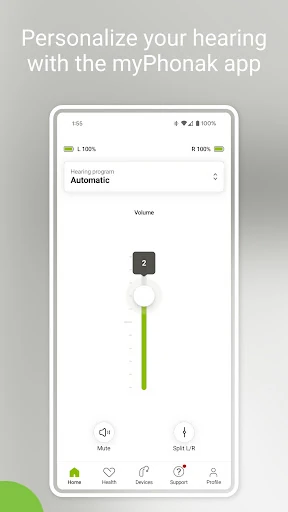
Picture getting ready for a busy morning, then moving from a quiet kitchen to a noisy commute. With compatible hearing aids connected, myPhonak’s Remote Control lets you adjust volume, select a preset program for a listening situation, and change settings such as noise reduction and microphone directionality. I like that these controls are designed for the moments when your surroundings change, rather than requiring you to wait until you can see a hearing care professional.
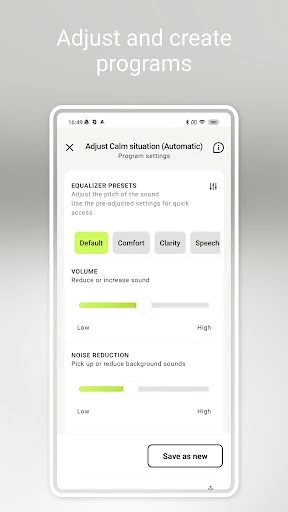
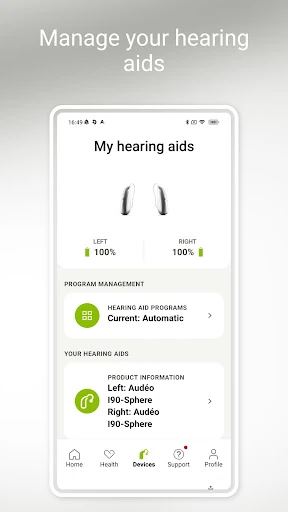
For a more personal adjustment, the sound equalizer offers presets such as comfort and clarity, along with bass, middle and treble sliders. I can see this being useful when a setting feels close but not quite right, or when I want to make a quick change without digging through a complicated process. The app also shows battery level and the status of connected hearing aids and accessories, which makes a quick check part of the same routine.
A Companion, Not a Replacement
The clearest comparison is with the controls built into a hearing aid or other device companion app. myPhonak brings adjustments and device information onto a phone, where changing volume or a program may feel more convenient. It also offers remote appointments with a hearing care professional, by appointment. That makes it more than a simple settings screen, but it remains tied to compatible Phonak hearing aids rather than serving as a general audio utility.
I would not treat it as a hearing test, a hearing aid itself, or a substitute for professional care. Its health section can track selected information on supported devices, but the available data varies by model. The app is most relevant if you already use a compatible Phonak Bluetooth hearing aid and want companion controls. If you use a different brand, or do not have a compatible device, its central functions will not fit your needs.
Small Habits That Help
A useful habit is to check the hearing aid and accessory status when you start the day, then make adjustments in the situation where you actually notice a need. The app offers different programs for listening situations and quick equalizer choices, so there is room to try a lighter touch before changing several settings at once. I’d keep the changes simple and pay attention to which adjustments feel comfortable in familiar environments.
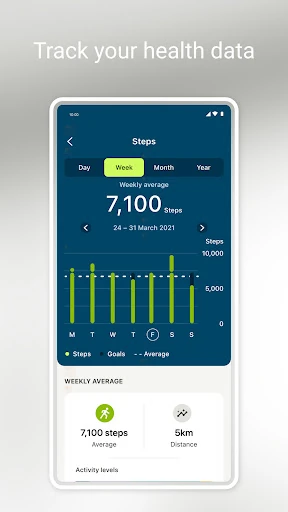
If your device supports it, the Health section can make steps or wearing time part of a regular check-in, and some models offer additional measures. Cleaning reminders and Tap Control configuration give the app a role beyond sound adjustments. I would set up only the options I expect to use, then revisit them after a few days. That keeps the app useful without turning every small change into a project.
More From Our News Desk

Zoom Meetings, Google Meet, or Teams: Which Is Easiest to Join?

How I Build a Free Streaming Lineup With Tubi

Why Crunchyroll Is the Default Anime App for So Many Fans

YouTube TV: A Practical Guide to Cutting Cable

Rummikub and the Small Comfort of Phone Games

TeamViewer Remote Control or AnyDesk for Helping Family?
Who May Find It Useful
I’d recommend myPhonak to people using a compatible Phonak hearing aid who want phone-based control over volume, programs and sound preferences. It is also a sensible companion for someone who likes checking device status or arranging remote support with a hearing care professional. The health tools may appeal to users whose particular hearing aid supports them, especially if they prefer to keep device and activity information close at hand.
It may not suit people without a compatible Phonak Bluetooth hearing aid, or anyone expecting a general-purpose hearing test or broad audio app. Some features depend on the hearing aid model, so two users may see different capabilities. I would check compatibility before relying on a particular control or health measure. People who prefer to have adjustments handled entirely in person may also find the app’s extra controls less important.
myPhonak is developed by Sonova AG. On Google Play, it has over 1 million installs and a 4.5-star rating from around 109,000 ratings. The app is free to download, with no in-app purchases and no ads. Its content rating is Everyone, and it requires Android 8.0 or later.
The current Android version is 7.3.0. Google Play gives its release date as April 16, 2018, and its most recent update as October 31, 2025. The app is designed to work with compatible Phonak hearing aids that have Bluetooth connectivity, and supported features depend on the particular device.
Everyday Adjustments, All in One Place
A Practical First Impression
When I first looked through what myPhonak offers, its purpose came across quickly: it is a phone companion for controlling compatible hearing aids and checking related information. The recent update notes mention pairing without internet and a redesigned Devices section. Those changes speak to the practical setup side of the app, where getting the right device connected is more important than browsing a long list of extras.
The first step is matching the app to a compatible Phonak Bluetooth hearing aid. After that, the available controls depend on the hearing aid. I would start by checking which device features apply, then focus on the controls I expect to use most. That is a more realistic approach than assuming every option described for the app will appear for every model.
Controls for Changing Situations
The day-to-day value is having hearing adjustments accessible from the phone. The Remote Control can change volume, adjust features such as noise reduction and microphone directionality, or select a preset program for a particular listening situation. I can imagine reaching for it when moving between a quiet room and a livelier setting, rather than accepting one sound profile everywhere.
There is also an equalizer for sound preferences. Presets offer a quick way to choose among options such as comfort, clarity or softer sound, while sliders allow changes to bass, middle and treble. I appreciate that the app provides both a simple starting point and more detailed adjustment. The important thing is that these are tools for personal preferences, not a promise that one setting will suit every situation.
Features Beyond Sound
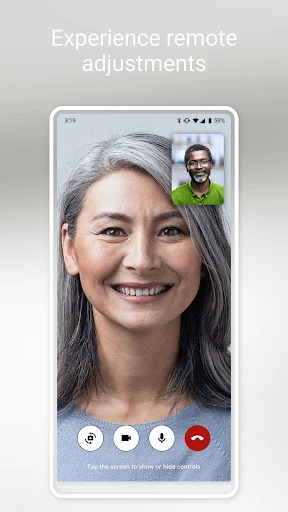
Remote Support lets users meet a hearing care professional by live video call and have hearing aids adjusted remotely. It is appointment-based, so I would think of it as a way to support a scheduled care interaction, not an instant help line. For someone who has an appointment arranged, being able to connect through the app could be a convenient addition to ordinary controls.
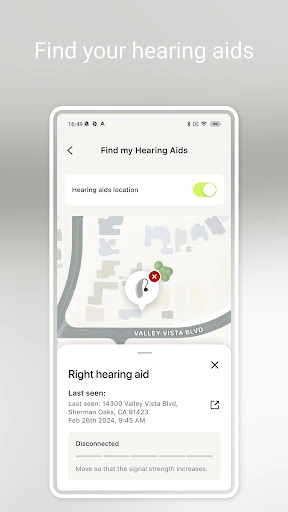
The app also includes Tap Control configuration, cleaning reminders, and information such as battery level and the status of connected hearing aids and accessories. Its Health section may include steps, wearing time, goals or activity levels, depending on the device. Heart rate is available on Audéo Fit, while distance walked and run is listed for Audéo Fit, Lumity and Infinio devices. Those distinctions matter when deciding which tools are relevant.
A Simple Daily Routine
A straightforward routine might begin with checking battery level and device status before leaving home. If the day includes different environments, I would use the remote controls when the need becomes apparent: adjust volume, try a suitable program, or make a small equalizer change. Keeping a note of which settings feel comfortable could help make later adjustments more deliberate, rather than repeatedly changing several controls at once.
At the end of the day, users with supported models can check wearing time or other available health information. Cleaning reminders can also help make basic device care easier to remember. Remote Support belongs in a separate, scheduled part of the routine because it is available by appointment. The app can gather these tasks in one companion experience, while the actual menu of options remains tied to the hearing aid.
Compatibility Sets the Limits
The biggest limitation is that myPhonak is not a universal hearing aid controller. It works with compatible Phonak models that have Bluetooth connectivity, and the supported list spans several product families. Some advanced controls and Remote Support are unavailable for the Audéo B-Direct. Before depending on a specific feature, it is worth checking the compatibility of both the hearing aid and the phone.
Health tracking also varies by device, so a user may not have every measure described in the app. Remote support requires an appointment, and the app’s role is to help manage hearing aids rather than replace professional advice. These are sensible boundaries, but they mean the experience can differ noticeably between users. Checking your own device’s capabilities is the best way to set expectations.
myPhonak makes the most sense as a practical companion for compatible Phonak hearing aids. Remote controls, device status, reminders and appointment-based support give it useful jobs in an ordinary day, while model-dependent health tracking adds value for some users. Its limits are clear: compatibility is essential, and not every feature is available on every device.
I’d recommend it to Phonak hearing aid users who want convenient phone controls and are willing to check which features their model supports. If you do not use a compatible hearing aid, there is little reason to install it. For the intended audience, it brings several helpful adjustments and checks into one place without asking users to treat it as a replacement for professional care.
myPhonak Frequently Asked Questions
What is myPhonak used for?
myPhonak is a companion app for compatible Phonak Bluetooth hearing aids. It can provide remote controls for volume, programs and sound preferences, show device and battery information, and offer features such as cleaning reminders. It also includes appointment-based video support with a hearing care professional and health tracking on supported hearing aid models.
Which phones and devices work with myPhonak?
The Android app requires Android 8.0 or later and is intended for compatible Phonak hearing aids with Bluetooth connectivity. Supported hearing aid models determine which controls and health features are available. Compatibility can depend on the specific phone and hearing aid, so check the Google Play information and Phonak compatibility details for your devices.
Does myPhonak cost money?
myPhonak is free to download on Google Play. It has no in-app purchases and contains no ads. You still need a compatible Phonak hearing aid to use its central controls, and the available functions depend on the model. Store details can change, so it is worth checking Google Play for current information.
What Android version does myPhonak require?
The Android version specified for myPhonak is Android 8.0 or later. The hearing aid also needs to be a compatible Phonak model with Bluetooth connectivity. Because compatibility involves both the phone and hearing aid, check the app’s Google Play information and the manufacturer’s compatibility details before relying on a particular feature.
Is myPhonak suitable for every hearing aid user?
It is intended for people with compatible Phonak Bluetooth hearing aids, not hearing aids from every manufacturer. Some controls and health measures are limited to particular models, and Remote Support is by appointment. It may suit users who want phone-based adjustments and device information, but people without a compatible device are unlikely to benefit.
Pros
- Combines hearing aid adjustments, battery information and accessory status in one companion app.
- Offers both quick equalizer presets and more detailed bass, middle and treble sliders.
- Includes appointment-based remote support with a hearing care professional.
- Some compatible models add health tracking, wearing time and activity information.
Cons
- Requires a compatible Phonak Bluetooth hearing aid to use its main controls.
- Available health measures and control features differ by hearing aid model.
- Remote Support is available by appointment rather than as immediate assistance.
- Category
- Medical
- Version
- 7.3.0