Philips HearLink 2
- 49.84K
- 4.5
- Installs
- —
- Price
- Free
Screenshots
Analysis by Reviewed APKs
Philips HearLink 2 is a companion app for people who use compatible Philips hearing aids, putting everyday adjustments and a few useful support tools on an iPhone. I like that it covers practical jobs such as changing volume, checking battery levels and switching programs without making the phone a replacement for professional care. It is most useful when paired with the right hearing aids, and some options depend on the model.
A Day With HearLink
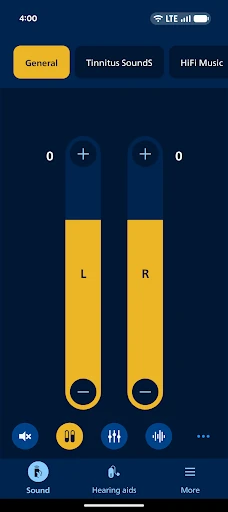
Imagine heading out for errands, then stopping for lunch somewhere busier than expected. With your hearing aids paired, HearLink 2 gives you a way to adjust their volume from your phone, together or one side at a time, and to mute surrounding sound when you want to focus. I can see this being easier than reaching for the hearing aids themselves, especially when a quick adjustment is all that is needed.
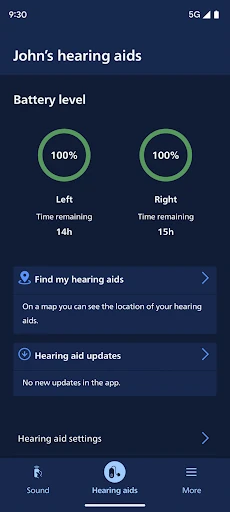
Before leaving home, I would check the battery level and select a program set by my hearing care professional. Later, if I wanted to listen to a call, music or a podcast, the app can support streaming directly to compatible hearing aids. Those small checks and changes make the app feel like a practical remote control for a routine, rather than something that needs constant attention.
A Companion, Not a Clinic
The obvious comparison is controlling hearing aids directly or relying on their existing programs. HearLink 2 adds a phone-based way to manage volume, switch among programs already set by a hearing care professional and check battery status. It also includes support and troubleshooting resources. For Apple Watch users, the companion app can handle discreet program and volume changes when the watch is within Bluetooth range.
This is not a general hearing test, a way to configure every hearing aid from scratch or a substitute for appointments with a hearing care professional. The app needs paired hearing aids, and the available controls vary by model. Some sound adjustments and extras are limited to particular HearLink ranges. I would treat it as a useful control surface around a hearing-care routine, not a standalone solution.
Small Habits That Help
A simple habit is checking battery levels at a convenient moment, such as before leaving for the day, then choosing the program that fits the next activity. If sound needs a quick change, adjusting each hearing aid separately can be handy when one side needs a different level. The goal is to make small, deliberate changes rather than repeatedly tapping through settings without knowing what helped.
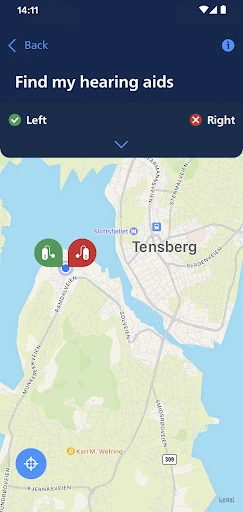
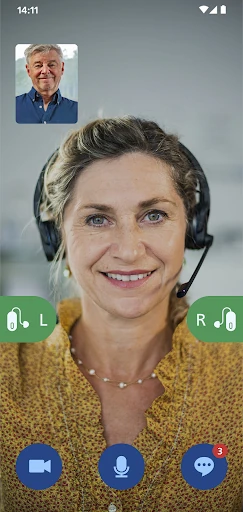
I would also keep the app and hearing aids in the loop during routine check-ups. The description recommends regular hearing aid updates through a hearing care professional. If a feature such as finding a misplaced aid matters to you, remember that it requires location services to remain turned on. For a remote appointment, the app supports an online visit with a hearing care professional by appointment.
More From Our News Desk

Zoom Meetings, Google Meet, or Teams: Which Is Easiest to Join?

How I Build a Free Streaming Lineup With Tubi

Why Crunchyroll Is the Default Anime App for So Many Fans

YouTube TV: A Practical Guide to Cutting Cable

Rummikub and the Small Comfort of Phone Games

TeamViewer Remote Control or AnyDesk for Helping Family?
Who May Find It Useful
I would recommend Philips HearLink 2 to someone who already uses compatible Philips hearing aids and wants convenient phone controls for ordinary situations: adjusting volume, checking battery level, changing a preset program or streaming audio. It is also worth considering for users whose hearing aid model supports the extra sound controls, progress tracking or accessory features described in the app.
It may not suit someone without compatible hearing aids, or anyone expecting one universal set of features across every model. Some options depend on the hearing aid, and streaming availability can depend on the phone. People who prefer not to use a phone or Apple Watch for routine adjustments may get less from it. The app is best viewed as a companion to the hearing aids and professional care.
Philips HearLink 2 is developed by SBO Hearing AS and is available for iPhone through the Apple App Store. The app is free to download. On the App Store, it has a 4.5 out of 5 rating from about 49,800 ratings. Its age rating is 4+. The supplied store details do not include an install count.
The supplied version is 1.8.0, with a release date of February 9, 2023, and a last update date of August 9, 2026. It requires iOS 15.0 or later. The app description recommends updating to iOS 18 or later for optimal performance. Hearing aid compatibility and feature availability vary by model.
Everyday Control, With Model-Specific Extras
A Straightforward First Step
When I first opened the idea of using HearLink 2, the important first step was clear: pair the hearing aids with the app. Until that is done, it cannot serve as their control panel. That makes the setup less like browsing a general sound app and more like connecting a specific accessory you already use.
The app is designed for Apple devices, and the description calls out an Apple Watch companion for discreet volume and program adjustments within Bluetooth range. Before relying on any particular feature, it is worth knowing that the hearing aid model matters. The app recommends iOS 18 or later for optimal performance, while the minimum listed requirement is iOS 15.
Useful Controls In Reach
The day-to-day controls cover the kinds of adjustments people may want to make without handling the hearing aids: raise or lower volume, adjust each side independently, mute surroundings and switch between programs chosen by a hearing care professional. Battery status is available too. I like this practical focus; the app centers on managing the hearing aids rather than asking users to build a new sound setup from scratch.
Streaming is another everyday use. Compatible setups can send calls, music and podcasts directly to the hearing aids, with availability depending in part on the phone model. The app also provides support and troubleshooting solutions. Taken together, these features make it useful across a day of changing tasks, while still keeping the controls grounded in the hearing aids already paired with it.
Extras Depend On Your Model
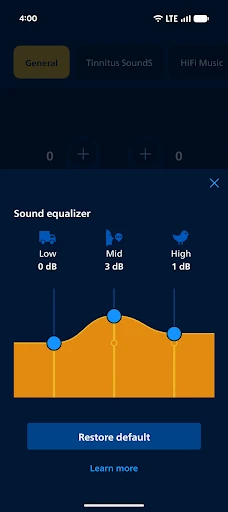
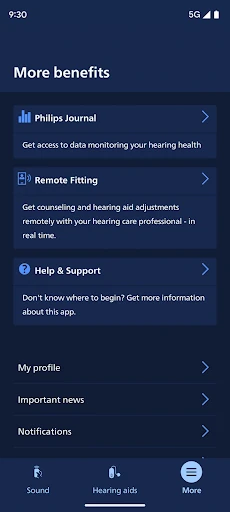
The broader feature set is where model differences become especially important. A streaming equalizer is available for hearing aid models other than Philips HearLink 00. A separate sound equalizer and the Philips Journal progress feature are described for HearLink 60, 50 and 40. HearLink 60 and 50 also support Auracast broadcast adjustments and reminders to replace wax filters.
There are a few more targeted tools. Streaming Balance, which reduces background noise while streaming, is available for HearLink 60. The app can also handle wireless accessories paired with the hearing aids, including TV Adapters and AudioClip. I would check which of these apply to a particular setup before building a routine around them; the app does not offer every extra on every model.
A Practical Daily Routine
A low-effort routine could start with a battery check before heading out, followed by choosing the program already set for the day’s activity. If plans change, a volume adjustment or mute control can help address the immediate situation. In the evening, streaming calls or a podcast may be convenient when the phone and hearing aid setup support it.
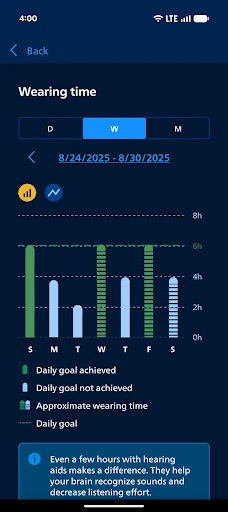
For users with supported models, the routine can include more than basic control: checking Journal progress, adjusting sound, or responding to a wax-filter reminder. If an accessory is paired, the app can help handle it as well. I would keep these checks occasional and purposeful. The main benefit is having relevant controls close at hand, not needing to monitor the app constantly.
Keep The Boundaries In Mind
The biggest limitation is compatibility. The app needs paired hearing aids, and some advertised tools apply only to specific Philips HearLink models. Streaming also varies with the phone model. Those dependencies mean the experience can differ considerably from one user to another, so the headline feature list should not be read as a promise that every control will appear for every setup.
Finding hearing aids requires location services to stay turned on, which is a practical condition to consider before depending on that feature. Online visits with a hearing care professional are by appointment, not an on-demand consultation. The app recommends regular hearing aid updates during routine professional check-ups, too. These boundaries make sense for a companion app, but they reinforce that it works alongside the hearing-care relationship rather than replacing it.
Philips HearLink 2 is a focused companion for compatible hearing aids, with useful everyday controls and a thoughtful spread of optional extras. I especially like the combination of simple adjustments, battery checks and streaming support. The main caveat is that the model-specific feature set can make one person’s experience look different from another’s.
If you use Philips HearLink hearing aids and want phone-based control, I would give it a try. Check that your hearing aid model and iPhone support the features you care about, and keep professional check-ups part of the routine. If you do not have compatible hearing aids, this app is unlikely to be useful on its own.
Philips HearLink 2 Frequently Asked Questions
What is Philips HearLink 2 used for?
Philips HearLink 2 lets users control compatible hearing aids from a mobile device. It supports volume changes, program switching, battery checks and muting surroundings, along with streaming and other features that can depend on the hearing aid model and phone. It also provides support resources and supports online visits with a hearing care professional by appointment.
Which devices can use Philips HearLink 2?
Philips HearLink 2 is available for iPhone through the Apple App Store and requires iOS 15.0 or later. The app recommends iOS 18 or later for optimal performance. It also has an Apple Watch companion for discreet volume and program changes within Bluetooth range. Hearing aid compatibility and feature availability depend on the model.
Does Philips HearLink 2 cost anything?
Philips HearLink 2 is free to download from the Apple App Store. The supplied app details do not specify in-app purchases. For current pricing or any store changes, check the App Store entry for your region, since details can vary.
Does every Philips hearing aid support all its features?
No. The app description says some features depend on the hearing aid model. For example, certain equalizer, Journal, Auracast, wax-filter reminder and Streaming Balance features are limited to specified HearLink models. Streaming availability may also depend on the phone. Check the App Store information and your hearing aid details for the features relevant to your setup.
Who should use Philips HearLink 2?
It is intended for people using compatible Philips hearing aids who want to adjust settings, check battery levels, switch programs or use supported streaming and accessory features from a phone. It is not useful as a standalone hearing app without paired hearing aids, and it does not replace care from a hearing professional.
Pros
- Adjust volume for both hearing aids together or individually.
- Battery checks, program switching and muting are handy everyday controls.
- Streaming and Apple Watch controls add useful options on compatible setups.
- Support resources and appointment-based online visits are included.
Cons
- Feature availability varies substantially by hearing aid model.
- Streaming availability can depend on the phone model.
- Finding hearing aids requires location services to remain turned on.
- Category
- Medical
- Version
- 1.8.0











