Oticon Companion
- 13.20K
- 4.3
- Installs
- 1.00M
- Price
- Free

Screenshots
Analysis by Reviewed APKs
Oticon Companion is a phone app for controlling compatible Oticon hearing aids, from adjusting volume to switching listening programs and checking battery levels. I see it as a handy everyday remote for people who already use those hearing aids, rather than a replacement for hearing care or a general sound-enhancement app. Its range of controls is useful, though which features you get depends on your hearing aid model and phone.
A quieter dinner out
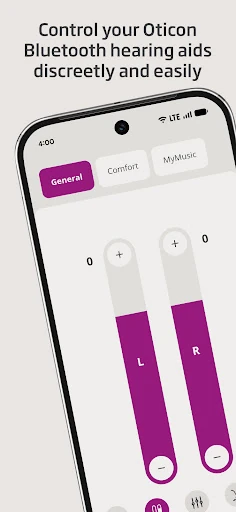
Picture settling into a busy restaurant and wanting to make a small adjustment without reaching for your hearing aids. With Oticon Companion, I can use my phone to change volume, adjust each hearing aid separately, or mute the surroundings. If my hearing aids have programs set up by my hearing care professional, I can switch between them from the app. That makes the phone a practical control point when the room, conversation, or my preference changes.
The useful part is not that the app makes every noisy place simple; it is that I can make an available adjustment without handling the aids directly. I can check battery levels before heading home, too. SpeechBooster can reduce background noise and enhance speech on supported models, although it is not available for Oticon Opn. The controls depend on the hearing aids I own, so the experience is most useful when I know which options my model supports.
A companion, not a fitting tool
Compared with reaching for the hearing aids themselves, the app gives me another way to make everyday adjustments. It also brings together controls for programs, streaming, and paired wireless accessories such as TV Adapters, Oticon EduMic, or ConnectClip. That can be more convenient than switching between separate controls for those tasks. The app is still tied to compatible Oticon hearing aids; it is not a general-purpose audio equalizer for any headphones or a tool for choosing hearing aid settings from scratch.
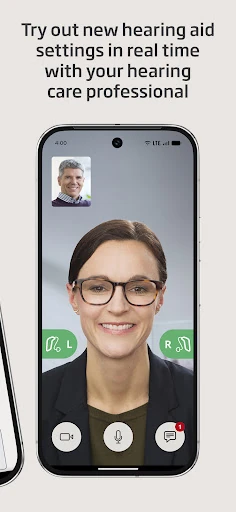
It also does not replace the hearing care professional who sets up programs or helps with hearing care. The app can offer an online visit with a professional by appointment, but that is a specific support option rather than a promise of instant help. Some features are limited to particular models, and streaming availability can depend on the phone. I would treat it as a useful companion to an existing hearing aid setup, not a universal hearing solution.
Small habits that help
I would make a quick battery check part of the routine before leaving home, especially on a day that includes a long commute or an evening out. Pairing the hearing aids before relying on the app matters, since it cannot control them until they are connected. Once paired, I can get used to where the everyday controls are and switch programs without having to figure things out in the middle of a conversation.
It is also worth learning which controls apply to a particular model. Streaming equalizer support excludes Oticon Opn and Oticon Siya, while sound equalizer and HearingFitness are available for Oticon Intent and Oticon Real. If I use a compatible feature, I can make it part of a familiar routine rather than expecting it to appear on every device. Keeping the phone and hearing aids updated during regular care checkups can help avoid preventable compatibility snags.
More From Our News Desk

Zoom Meetings, Google Meet, or Teams: Which Is Easiest to Join?

How I Build a Free Streaming Lineup With Tubi

Why Crunchyroll Is the Default Anime App for So Many Fans

YouTube TV: A Practical Guide to Cutting Cable

Rummikub and the Small Comfort of Phone Games

TeamViewer Remote Control or AnyDesk for Helping Family?
Who may find it useful
I would recommend Oticon Companion to people who already use compatible Oticon hearing aids and want a convenient way to adjust them from a phone. It is particularly appealing if you often switch programs, stream calls or music, check battery levels, or use paired wireless accessories. Someone who likes keeping routine controls within reach may appreciate having these options together instead of relying only on the hearing aids themselves.
It may be less useful if you do not have compatible Oticon hearing aids, or if you expect every feature to work with every model and phone. The app also depends on pairing, and some older hearing aids may need an update before they work with it. I would check the compatibility details for my specific setup before building a routine around a particular feature, especially streaming or model-specific sound tools.
Oticon Companion is developed by Oticon A/S. On Google Play, it has over one million installs and a 4.3-star rating from about 13,000 ratings. The app is free to download, with no in-app purchases or ads. Its content rating is Everyone. Those figures give a useful snapshot of the app, while the practical fit still depends on the hearing aids and phone being used.
The listed Android requirement is Android 8.0, and version 1.6.1 was released on January 17, 2023. The app was last updated on October 27, 2025. Oticon recommends Android 10 or later for optimal performance. Hearing aids from 2016–2018 may need a hearing aid update if they have not already been updated, so checking compatibility before pairing is sensible.
Everyday control for Oticon hearing aids
Pairing comes first
When I first opened Oticon Companion, the key point was straightforward: I need to pair my hearing aids before I can use the app to control them. That makes setup less like browsing a standalone utility and more like connecting a remote to the device it is meant to operate. If I am helping someone get started, I would begin with the hearing aids and compatibility rather than expecting the app to do anything on its own.
The Android requirement is version 8.0, but Oticon recommends Android 10 or later for optimal performance. Compatibility also varies by hearing aid model. For hearing aids from 2016 to 2018 that have not been updated, an update is required. I would treat a routine checkup with a hearing care professional as a good time to ask about those updates before troubleshooting a connection.
Controls for the day
The core experience is about making small changes when I need them: turning volume up or down, adjusting the left and right aids together or separately, muting surroundings, and moving between programs set by a hearing care professional. I like that this covers both quick adjustments and the more deliberate choice to switch listening programs. It keeps the app focused on controlling the hearing aids rather than filling the screen with unrelated tools.
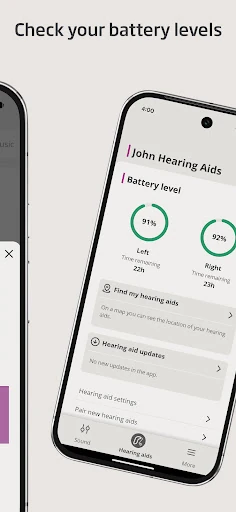
A battery-level check is another practical detail. It is the kind of information I might want while getting ready, rather than after I have already left home. Streaming calls, music, and podcasts directly to the hearing aids is also supported, though availability can vary with the phone model. That caveat matters: the app brings controls together, but the phone and hearing aids still determine what works.
Features with model limits
SpeechBooster is one of the more distinctive options: on supported hearing aids, it is intended to reduce background noise and enhance speech. It is not available for Oticon Opn models. Streaming sounds can be adjusted with a streaming equalizer, except on Oticon Opn and Oticon Siya. These model-specific details make it worth checking the exact aid rather than assuming that a feature described in the app applies to everyone.
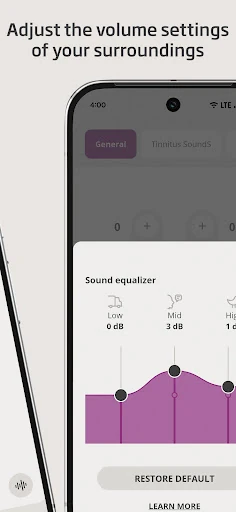
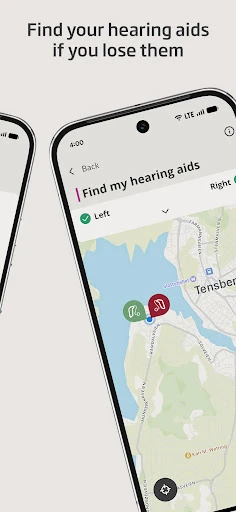
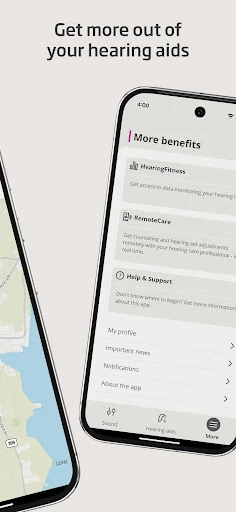
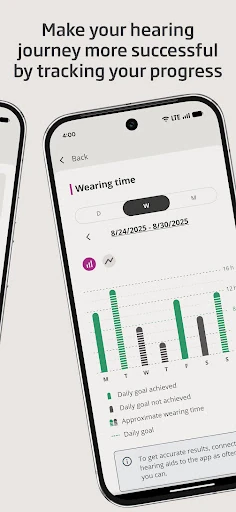
For Oticon Intent and Oticon Real, the app also offers a sound equalizer for adjusting sounds around you and HearingFitness for tracking progress. It can help locate hearing aids, but that function requires location services to remain on. There is also support and troubleshooting information, as well as online visits with a hearing care professional by appointment. The breadth is useful, but the features are not one-size-fits-all.
A simple daily rhythm
A practical routine could start with checking battery levels while getting ready, then using the app to select a program suited to the next part of the day. If a meeting or meal gets noisy, I can try an available adjustment such as volume, muting, or SpeechBooster on a supported model. On the way home, streaming a call or podcast may be an option if the phone and hearing aids support it.
I would also use the app when handling accessories already paired with the hearing aids. Oticon Companion can manage wireless accessories such as a TV Adapter, Oticon EduMic, or ConnectClip. If I cannot find the hearing aids, the find function may help, provided location services are always on. These are small conveniences, but they make the app more worthwhile when they fit into habits I already have.
Keep expectations grounded
The biggest limit is compatibility. Some controls only work with particular hearing aid models, and streaming can depend on the phone. The app needs the hearing aids paired to work as a controller, and older aids may need an update. So I would not choose a phone or change hearing aid routines based solely on a feature name; I would first check whether my devices support that specific option.
The app is also not a substitute for professional fitting or ongoing care. Programs are set by a hearing care professional, and remote visits are available by appointment rather than as immediate support. If I use the find feature, keeping location services on is a requirement. None of these limits makes the app unusual for a device companion, but they do shape how reliably it fits into daily life.
Oticon Companion makes the most sense as a practical remote for compatible Oticon hearing aids. I like the mix of everyday controls, battery checks, streaming options, accessory support, and help resources. The experience is strongest when I know my model’s capabilities and have already paired the aids; without that match, the list of features can sound broader than what I can use.
I would recommend it to Oticon hearing aid users who want convenient phone-based adjustments and are willing to check compatibility details. If you are considering it for a particular feature, verify that your hearing aids and phone support it first. For the right setup, it is a useful companion rather than an app that needs to take over your routine.
Oticon Companion Frequently Asked Questions
What is Oticon Companion used for?
Oticon Companion lets users control compatible Oticon hearing aids from a phone. It can adjust volume, switch programs set by a hearing care professional, check battery levels, and provide other features that depend on the hearing aid model. It also supports options such as streaming, accessory controls, and troubleshooting resources.
Which phones and devices work with Oticon Companion?
The app is available for Android, and the listed minimum is Android 8.0. Oticon recommends Android 10 or later for optimal performance. The hearing aids must be paired with the app, and compatibility varies by hearing aid and phone model. Check the Google Play details and Oticon compatibility information for your specific devices.
Does Oticon Companion cost money?
Oticon Companion is free to download on Google Play. It has no in-app purchases and contains no ads. The app is intended to control compatible hearing aids, so having the right paired device is central to using its features. Check the store page for current details, since store information can vary.
What Android version does Oticon Companion require?
The listed minimum is Android 8.0, while Oticon recommends Android 10 or later for optimal performance. Hearing aids from 2016–2018 may require a hearing aid update if they have not been updated already. Compatibility can depend on the model, so it is worth checking the store and Oticon’s compatibility information.
Is Oticon Companion suitable for every hearing aid user?
It is intended for people using compatible Oticon hearing aids, and individual features vary by model. It may suit users who want phone-based controls, battery checks, or supported streaming and accessory features. It is not a general hearing aid controller for every brand, so check your hearing aid and phone compatibility before relying on it.
Pros
- Puts volume, program switching, muting, and battery checks in one phone app.
- Supports streaming and control of several paired Oticon wireless accessories.
- Includes model-specific tools such as SpeechBooster and HearingFitness.
- Free to download, with no in-app purchases or ads.
Cons
- Feature availability varies significantly by hearing aid model and phone.
- Pairing is required, and some older hearing aids need an update.
- Finding hearing aids requires location services to remain on.
- Category
- Medical
- Version
- 1.6.1











