OctaApp - Donate Plasma
- 2.02K
- 4.3
- Installs
- 100.00K
- Price
- Free
Screenshots
Analysis by Reviewed APKs
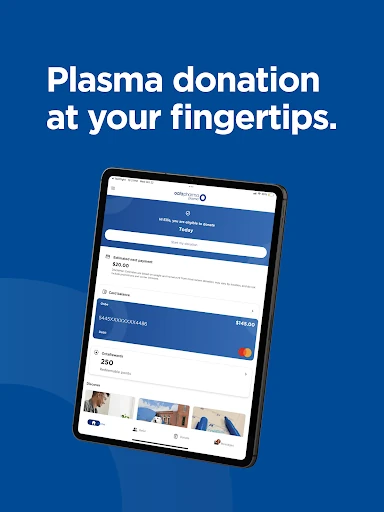
OctaApp - Donate Plasma is a companion app for people who donate, or are considering donating, at Octapharma Plasma centers. It brings practical details such as nearby locations, donation eligibility, earnings, card balance, and health questionnaire access together. I find its appeal easy to understand: it is built around the steps donors need to manage, rather than trying to be a general health or personal finance app.
Before a Donation Visit
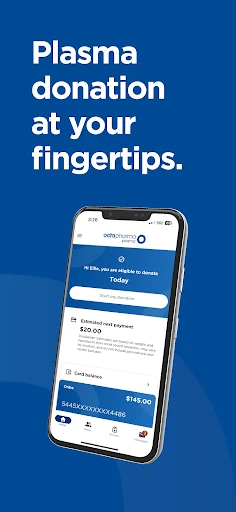
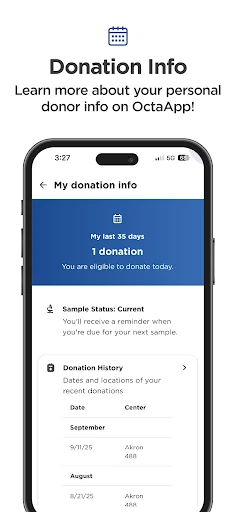
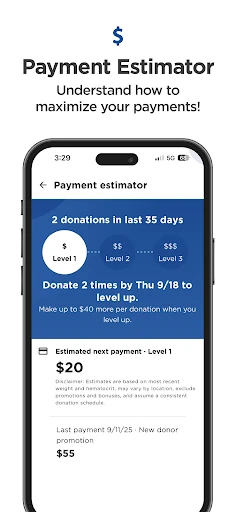
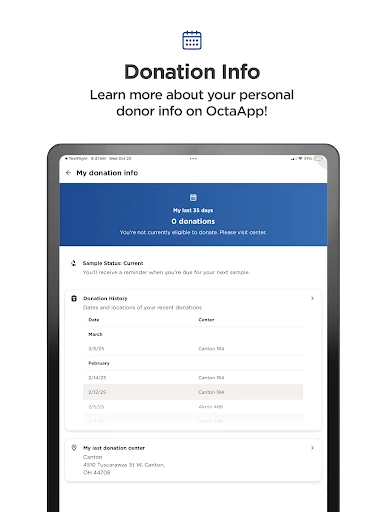
When I plan a plasma donation, the useful questions tend to arrive before I leave home: Where is a center? When am I eligible to donate again? What should I expect to earn? OctaApp puts tools for those questions in one place. I can look for nearby Octapharma Plasma centers, check my next eligible date, and review the earnings information associated with a donation without treating each detail as a separate errand.
The health questionnaire is another practical part of that pre-visit routine. OctaPass lets users complete it through the app, with the stated benefit of skipping the kiosk. That makes the app particularly relevant on a donation day, when even a small amount of preparation can help the process feel more orderly. It is not a substitute for the donation center itself, but it can help donors arrive with key information already at hand.
A Center-Specific Companion
The clearest comparison is with a general calendar, maps app, or banking tool. Those may help with isolated tasks, but OctaApp combines donation-related details: center locations, eligibility timing, questionnaire access, loyalty status, earnings, and plasma card activity. Its focus is narrower, which is a benefit if you donate through Octapharma Plasma and want those tasks gathered together.
That focus also defines what the app is not. It is not a broad medical reference, a way to donate at any plasma provider, or a replacement for a payment card’s own purpose. The features described are tied to Octapharma Plasma’s centers and programs. If you are looking for general health tracking or information about donation organizations beyond Octapharma, this is unlikely to be the app you want.
Small Habits That Help
I would make checking the next eligible date part of the same routine as planning a visit. Looking at it before arranging transport or setting aside time can keep the calendar side of donating straightforward. The location finder can then help identify a nearby center, while the earnings section gives donors a place to check the amount associated with a donation rather than relying on memory.
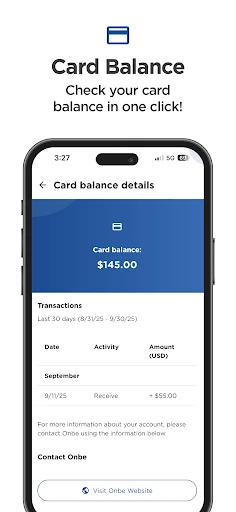
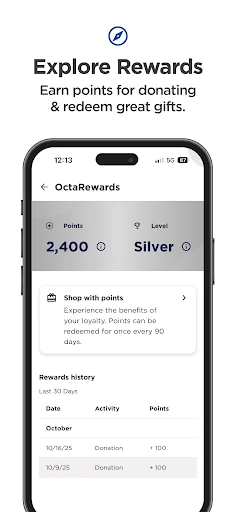
After a visit, the card balance and payment history can be useful to check alongside loyalty status and points. The app also includes updates and promotions, so a quick review now and then can surface information relevant to a donor’s next visit. Referrals have their own place too: users can refer friends and family for added bonuses. These are modest, task-based habits, not a reason to spend time in the app every day.
More From Our News Desk

Zoom Meetings, Google Meet, or Teams: Which Is Easiest to Join?

How I Build a Free Streaming Lineup With Tubi

Why Crunchyroll Is the Default Anime App for So Many Fans

YouTube TV: A Practical Guide to Cutting Cable

Rummikub and the Small Comfort of Phone Games

TeamViewer Remote Control or AnyDesk for Helping Family?
Who May Find It Useful
I would recommend OctaApp to people who already donate at Octapharma Plasma centers and want a single place for donation logistics and account-related details. The strongest fit is someone who checks eligibility before visiting, wants to find centers, or regularly looks at earnings and card activity. The health questionnaire and loyalty features add practical value for donors who use those parts of the Octapharma process.
It may be less useful if you rarely donate, use another plasma provider, or only need a general map or calendar. The app’s purpose is specific, and its features make most sense in the context of Octapharma Plasma. Prospective donors may find location and earnings information helpful, but the app is not presented as a general guide to plasma donation or a replacement for information from a center.
OctaApp - Donate Plasma is developed by Octapharma Plasma Inc. On Google Play, it has over 100,000 installs and a 4.3-star rating from 2,018 ratings. The app is free to download, with no in-app purchases or ads. Its content rating is Everyone, making the store’s age classification broad rather than restricted to an older audience.
The current version is 5.4.0. Google Play gives its release date as October 23, 2025, and its last update as October 5, 2026. An Android minimum version is not included in the available app details, so check the Google Play page on your device for current compatibility information before installing.
A Closer Look at Donation Day
A Focused First Impression
When I first considered what OctaApp needs to do well, the answer seemed refreshingly concrete: make useful donation information easier to reach. Its feature set stays close to that purpose, from finding centers to checking eligibility and card activity. Rather than asking users to build a complicated profile of habits, the app is organized around the practical questions that come up when planning or following up on a donation.
Getting started is most worthwhile for people connected to Octapharma Plasma, since the app’s tools are built around its centers and programs. The first useful checks are straightforward: look up a nearby location, review the next eligible date, and see where the app places the questionnaire and earnings details. I would explore those basics early, then return to the other features when they become relevant.
Useful Between Visits
Day to day, this is more of an occasional reference than an app that needs constant attention. A donor might open it while planning a visit, check eligibility, and confirm location details. After donating, the card balance and payment history offer a reason to return. That rhythm suits a service app: it has a clear job when needed, without requiring a daily check-in to make its main features useful.
I especially like that the listed tools cover both planning and follow-up. The next eligible date and center finder relate to what happens before a visit; earnings, loyalty status, points, and card activity relate to what a donor may want to review afterward. Keeping those steps in one app can reduce the need to remember which detail belongs where, even though each feature serves a distinct purpose.
Features With a Clear Job
OctaPass stands out because it addresses a specific point in the visit process: completing the health questionnaire in the app and skipping the kiosk. That is a more tangible convenience than a generic notification or informational page. The next eligible date is similarly practical. It gives donors a direct reference for timing their next visit rather than making them work it out from an old calendar entry.
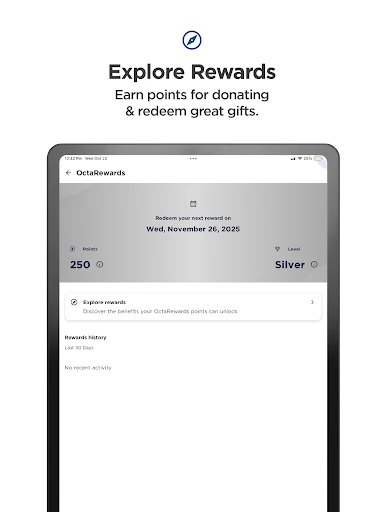
The loyalty program, earnings information, and plasma card balance round out the account side of the experience. Users can check their status levels, redeem points, see how much they will earn with each donation, and review balance and payment history. These details do not all need attention at once, but together they make OctaApp more than a basic center finder.
There are also referral and update features. Users can refer friends and family for added bonuses, and the app provides company updates and upcoming promotions. I would treat these as useful extras rather than the core reason to install it: location, eligibility, questionnaire access, and account details are the more regular tasks.
A Simple Visit Routine
A practical routine could start the day before a planned donation. I would check the next eligible date, use the location feature to confirm which center is convenient, and review the earnings information. Before the visit, I would complete the questionnaire in OctaPass if appropriate. That sequence gathers the app’s most visit-focused tools into a short preparation step instead of leaving each check until the last minute.
Afterward, I would return to the app for the details that matter after donating: card balance and payment history, plus loyalty status or points if I am following the program. Updates and promotions can be checked when I am already in the app, rather than becoming another daily task. This kind of light routine makes the features easier to remember without turning donation management into a project.
Keep the Scope in Mind
The main limitation is also the app’s defining choice: it is designed for Octapharma Plasma donors. That makes its tools less relevant to someone using a different provider, and the described features should not be mistaken for a general plasma donation directory. Even within its intended audience, not every user will need loyalty points, referral tools, or payment history, so the app’s value depends on which parts of the donor experience matter to you.
It is also best viewed as a convenient companion, not as a replacement for the donation center or a broad source of health guidance. The app offers a health questionnaire and eligibility information, but its described purpose is helping users manage donation-related tasks. People who want general medical information, or who do not donate through Octapharma, will probably get little from installing it.
OctaApp - Donate Plasma makes a specific routine easier to manage by bringing center locations, eligibility, questionnaire access, earnings, loyalty details, and card activity together. I like that its usefulness comes from practical tasks rather than a sprawling set of unrelated tools. For an Octapharma Plasma donor, it is a sensible companion to keep available for planning and checking in after visits.
I would recommend it most to regular donors who want these details in one place, especially those who use OctaPass or keep an eye on card activity and loyalty points. If you donate elsewhere or need a general health app, its narrow focus is a poor fit. For the audience it serves, though, that focus is exactly the point.
OctaApp Frequently Asked Questions
What is OctaApp - Donate Plasma used for?
OctaApp - Donate Plasma helps users manage donation-related details for Octapharma Plasma. Its features include finding nearby centers, checking the next eligible date, completing a health questionnaire through OctaPass, reviewing earnings and card activity, and checking loyalty status and points. It also includes referrals, company updates, and promotions.
Which devices can run OctaApp - Donate Plasma?
OctaApp - Donate Plasma is an Android app available through Google Play. The current app details do not specify a minimum Android version, and device compatibility can vary. Check the Google Play page from your device for the current requirement before installing.
Does OctaApp - Donate Plasma cost money?
OctaApp - Donate Plasma is free to download on Google Play. It has no in-app purchases and contains no ads. Donation earnings and referral bonuses are features described in connection with the plasma donation program, not a purchase price for the app.
What Android version does OctaApp - Donate Plasma require?
The minimum Android version is not included in the available app details. Requirements can vary as the app is updated, so check the Google Play page for OctaApp - Donate Plasma on your device to see whether your Android version is supported.
Is OctaApp - Donate Plasma useful if I use another center?
Its features are designed around Octapharma Plasma centers and programs, including center locations, OctaPass, loyalty points, and plasma card activity. It may not suit donors who use another provider or people looking for general health information. For Octapharma Plasma donors, it can be a useful place to manage visit-related details.
Pros
- Combines center finding, eligibility checks, questionnaire access, and account details.
- OctaPass lets users complete the health questionnaire in the app and skip the kiosk.
- Includes earnings, loyalty points, card balance, and payment history.
- Free to download, with no in-app purchases or ads.
Cons
- Its features are specifically geared toward Octapharma Plasma donors.
- Some users may not need loyalty, referral, or payment tracking tools.
- The available app details do not state a minimum Android version.
- Category
- Medical
- Version
- 5.4.0











