MyMercy
- 5.20K
- 3.6
- Installs
- 500.00K
- Price
- Free

Screenshots
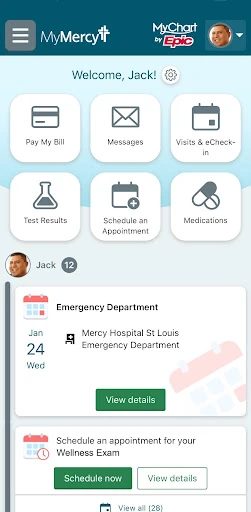
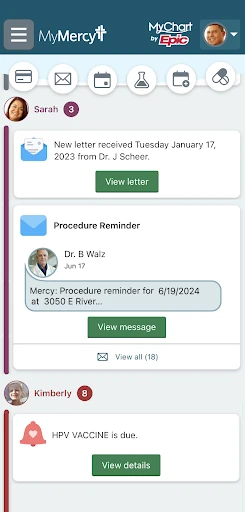
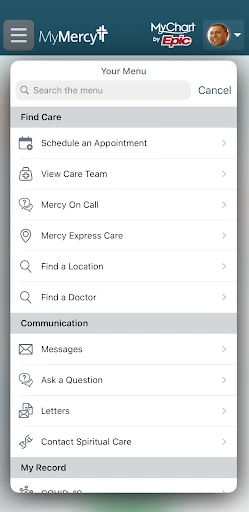

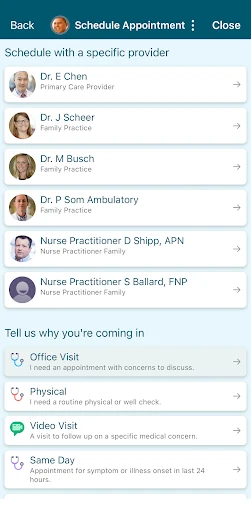
Analysis by Reviewed APKs
MyMercy is a mobile health app for people who already use Mercy’s patient portal and want to keep care information close at hand. It brings together records, appointments, billing and communication with a care team, with family health information available too. I see it as a practical companion to an existing care relationship, rather than a general wellness app. Its value depends on whether you use Mercy services.
A Day Around an Appointment
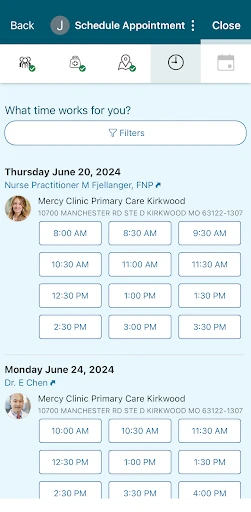
Imagine you have a visit coming up and want to check a test result from an earlier appointment before you go. With MyMercy, you can review results, medications and immunization history from your mobile device, then use the app to manage appointments or get in touch with your care team. The appeal is having several parts of your Mercy health information in one place instead of hunting through separate messages and paperwork.
I’d use it as a quick reference between visits: check the information I need, look at appointment details, and pay a bill when it comes due. If a family member’s health information is accessible through my account, that can make the same routine useful for keeping track of more than one person. MyMercy doesn’t replace a conversation with a clinician; it makes some everyday administrative and information tasks easier to handle.
A Portal, Not a Wellness App
The closest comparison is a mobile patient portal, not a broad fitness tracker or a standalone medical reference app. MyMercy focuses on information and tasks connected to Mercy care: records, appointments, bills and contact with the care team. That narrower purpose is useful if Mercy is already part of your healthcare routine. It gives you a single place to check relevant details without promising to cover every provider or health service you use.
I wouldn’t choose it as a general habit coach or as a substitute for professional guidance. The description mentions uploading health and fitness data, including Apple Health data, when enrolled in self-tracking programs, but that is tied to those programs rather than presented as an all-purpose tracker. Likewise, the app can help you stay in touch with your care team, but it is not a replacement for urgent care or an in-person appointment.
Small Habits That Help
A little consistency can make a patient portal more useful. I’d check MyMercy after a visit for new results or notes, and take a moment before an appointment to review the information already available in the app. Keeping those checks tied to routines I already have—such as reviewing a bill when handling other household paperwork—would make the app easier to remember without turning it into another daily obligation.
If you’re enrolled in a self-tracking program, it may also help to keep the app’s health information current and check whether the data you intend to share is supported by that program. Recent changes include Google Fit syncing for temperature and oxygen saturation tracking when a provider is helping you track those measures. I’d treat that as a specific care-team workflow, not a reason to expect every fitness metric to appear automatically.
More From Our News Desk

Zoom Meetings, Google Meet, or Teams: Which Is Easiest to Join?

How I Build a Free Streaming Lineup With Tubi

Why Crunchyroll Is the Default Anime App for So Many Fans

YouTube TV: A Practical Guide to Cutting Cable

Rummikub and the Small Comfort of Phone Games

TeamViewer Remote Control or AnyDesk for Helping Family?
Who Will Get the Most From It
I’d recommend MyMercy to Mercy patients who want a convenient way to review health information, manage appointments, communicate with their care team and handle bills from a mobile device. It may be especially handy for people who like checking details between visits or who help keep track of family health information. The app’s purpose is clear: bring pieces of an existing Mercy relationship together, rather than introduce a new health service.
It may be less useful if you don’t receive care through Mercy, don’t have a MyMercy account, or mainly want a fitness tracker, medication reminder or general medical reference. The app’s description says existing account holders can begin, and directs people who need help accessing or creating an account to MyMercy.net for support options. I’d also keep expectations modest: the Google Play rating is 3.6, so experiences may differ.
MyMercy is developed by Mercy and is available for Android. Google Play shows over 500,000 installs and a 3.6-star rating from about 5,200 ratings. The app is free to download, with no in-app purchases or ads. Its content rating is Everyone, and the listed minimum requirement is Android 9.
The current listed version is 11.4.3. MyMercy was released on November 12, 2015, and its most recent listed update was July 10, 2025. Those details give a useful snapshot of the app’s availability and maintenance, while the features themselves are aimed at people using Mercy’s health services and patient account.
A Practical Companion Between Visits
Getting Started
When I first opened MyMercy, the important point was that it works with an existing MyMercy account. That makes the app feel less like a service to explore from scratch and more like a mobile doorway into care information you already have. If you need help accessing or creating an account, the app points you to MyMercy.net for support options.
That account-first setup also shapes who should download it. If you’re already a Mercy patient, the app’s purpose is immediately understandable: bring records and practical care tasks onto your phone. If you’re not connected with Mercy, there’s less reason to expect it to be useful. I’d sort out account access before relying on it for an appointment or other time-sensitive task.
The Everyday Experience
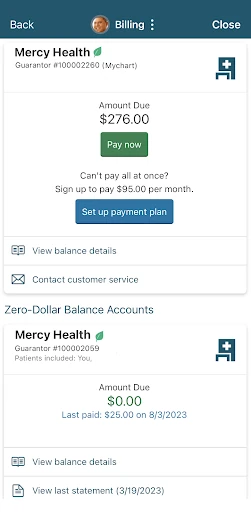
The core appeal is having several useful categories in one mobile app. You can review test results, medications and immunization history, manage appointments, contact your care team, and view or pay a bill. That mix covers the small checks and administrative tasks that often crop up around care, without making the app sound like a full replacement for every conversation or interaction with a provider.
I like that the app is built around information people may want to revisit between appointments. A result or medication detail can be easier to find on a phone than in a stack of papers, and billing sits alongside the health information rather than in an unrelated task list. The day-to-day value will depend on how much of your care and account activity is available through MyMercy.
Features With a Clear Purpose
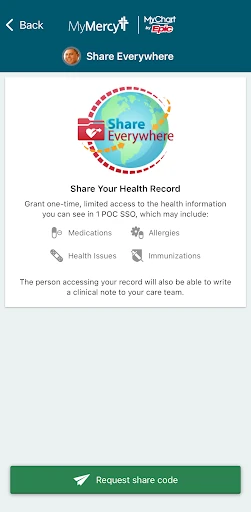
MyMercy’s strongest features are the connected ones: viewing health information, managing appointments and staying in touch with the care team. It also supports access to family health information. Together, these functions make the app useful for people coordinating the routine details of care, rather than for someone simply looking for generic health content.
There is also a self-tracking option for people enrolled in those programs. The description says users can upload health and fitness data, including data from Apple Health, when participating. A recent update adds Google Fit syncing for temperature and oxygen saturation tracking when a provider is helping with those measures. Those conditions matter: the tracking tools are linked to a care workflow, not presented as universal integrations for every user.
A Simple Weekly Check-In
A sensible routine would be to open MyMercy around appointments rather than checking it constantly. Before a visit, I’d review the information already available and make sure I know the appointment details. Afterward, I’d return to check for results or other updates, then use the app to contact the care team if I have a non-urgent question. That keeps the app tied to moments when it can be useful.
For household organization, the family health information feature could fit into a regular check-in as well. I’d review any available information, handle a bill if one is due, and leave the app until the next task comes up. People in self-tracking programs can add their own relevant checks, such as confirming that supported data is syncing when their provider has asked them to track it.
Keep Expectations Grounded
MyMercy is most useful when you have an active connection to Mercy and a working account. Without that, its central features—your care information, appointments, bills and communication—have little to connect to. It also isn’t described as a general medical advice tool or an all-purpose fitness app, so I’d avoid expecting it to cover those roles.
Some features depend on circumstances beyond simply installing the app. Health and fitness data uploads are described for people enrolled in self-tracking programs, and the Google Fit change applies when a provider is helping track specific measurements. The app’s 3.6-star Google Play rating is another reason to go in with practical expectations rather than assuming the experience will suit everyone.
MyMercy makes the most sense as a convenient extension of care you already receive through Mercy. I appreciate the mix of records, appointments, billing and care-team communication, along with family information and program-based tracking. It keeps its focus on practical patient-portal tasks rather than trying to become a catch-all health app.
I’d recommend it to Mercy patients who want those tasks available on Android and already have, or can access, a MyMercy account. If you’re looking for broad fitness coaching or a tool unrelated to Mercy care, it’s probably not the right fit. For the intended audience, it can be a useful place to check in between visits.
MyMercy Frequently Asked Questions
What is MyMercy used for?
MyMercy lets people with a MyMercy account review health information such as test results, medications and immunization history, manage appointments, contact their care team, and view or pay bills. It can also provide access to family health information. Health and fitness data uploads are available for people enrolled in self-tracking programs.
Which devices can run MyMercy?
MyMercy is listed as an Android app, with Android 9 as its minimum requirement. The description refers to using it on mobile devices and mentions Apple Health data for enrolled self-tracking programs, but that does not change the Android requirement for this version. Check the store listing for current device compatibility.
What Android version does MyMercy require?
The listed minimum is Android 9. If your phone runs an older version, check the Google Play listing for compatibility before relying on the app. Requirements can change with app updates and may also depend on your device, so the store’s current compatibility information is the best place to verify.
Does MyMercy cost money?
MyMercy is free to download on Google Play. The provided app details say it has no in-app purchases and contains no ads. Store information can change over time, so it’s worth checking the current Google Play listing before installing if cost details are important to you.
Is MyMercy a good fit for me?
It is best suited to people who receive care through Mercy and want mobile access to their health information and related account tasks. You’ll need a MyMercy account to get started; people who need help accessing or creating one can find support options through MyMercy.net. It may not suit someone seeking a general fitness or medical reference app.
Pros
- Brings records, appointments, billing and care-team communication into one mobile app.
- Includes access to family health information for people managing care details at home.
- Supports health-data uploads for users enrolled in self-tracking programs.
- Free to download, with no in-app purchases or ads.
Cons
- Its main features are most useful to people already connected with Mercy.
- Health-data tracking depends on enrollment in a self-tracking program.
- The 3.6-star Google Play rating suggests the experience may not suit everyone.
- Category
- Medical
- Version
- 11.4.3











