Modivcare
- 25.42K
- 4.5
- Installs
- 100.00K
- Price
- Free

Screenshots

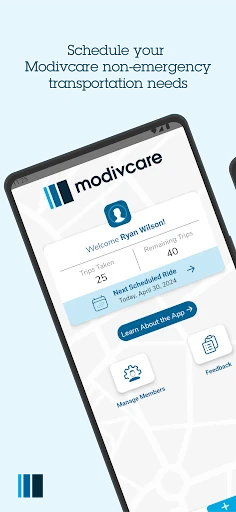
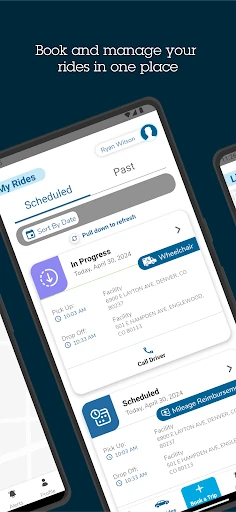
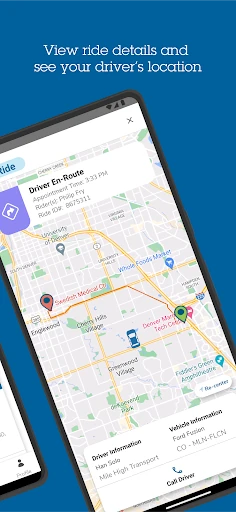
Analysis by Reviewed APKs
Modivcare is a transportation app for members with participating benefit plans who need to arrange non-emergency trips. I see its main appeal in handling ride scheduling and trip management without having to call a care center. Eligible members who drive themselves can also submit mileage reimbursement claims. It is a focused tool for getting to appointments, rather than a general-purpose travel or health-management app.
Planning an Appointment Trip
When I imagine using Modivcare in a normal week, the useful moment is before an appointment: I can open the app and schedule a non-emergency transportation trip instead of calling a care center. That makes the trip itself the focus, rather than leaving me to sort out the transportation separately. For someone coordinating several appointments, having a place to book and manage those trips could make the routine feel more organized.
The practical value depends on being an eligible member with a participating benefit plan. I would check that first, then use the app for the transportation task rather than expect it to arrange every part of an appointment. If I drive myself to an eligible appointment, the app also supports submitting a mileage reimbursement claim. That gives the app a second, narrower use beyond arranging a ride.
A Transport Tool, Not a Taxi App
Modivcare sits in a different lane from general ride-hailing apps. Its purpose is to schedule and manage non-emergency transportation tied to participating member benefits, not to serve as an all-purpose way to request everyday rides. That distinction matters: I would turn to it for benefit-related appointment travel, while using a general transportation service for unrelated errands. The app's usefulness depends on the member's plan, not simply on wanting a ride.
It is also not presented as a broad healthcare organizer. The stated jobs are arranging and managing transportation and submitting mileage reimbursement claims for eligible members who drive themselves. I would not choose it to manage appointments, create care plans, or access educational health resources. Keeping that scope in mind makes the app easier to judge: it is built around transportation logistics, not the full experience of receiving care.
Small Habits That Help
A simple habit I would adopt is opening the app when I know an appointment needs transportation, rather than waiting until the day of the visit. That keeps the booking task attached to the appointment-planning routine. Since Modivcare is for members with participating benefit plans, I would also confirm that I am using the right member access before relying on it to manage a trip.
For an appointment I drive to myself, I would make a separate note to submit the mileage reimbursement claim through the app if I am eligible. Those are distinct workflows: booking transportation for a trip and claiming mileage after driving oneself. One setup detail is easy to overlook: existing Member Services Website accounts do not work for logging in, so I would expect to establish app access separately rather than assume my website credentials will carry over.
More From Our News Desk

Zoom Meetings, Google Meet, or Teams: Which Is Easiest to Join?

How I Build a Free Streaming Lineup With Tubi

Why Crunchyroll Is the Default Anime App for So Many Fans

YouTube TV: A Practical Guide to Cutting Cable

Rummikub and the Small Comfort of Phone Games

TeamViewer Remote Control or AnyDesk for Helping Family?
Who May Find It Useful
I would recommend Modivcare to members whose participating benefit plans include non-emergency transportation and who want an app-based way to schedule and manage those trips. It also makes sense for eligible members who drive themselves to appointments and need to submit mileage reimbursement claims. In both cases, the app has a clear, practical purpose: it helps with the transportation side of getting to care.
It may not suit someone without a participating benefit plan, or anyone looking for a general ride service or a wide-ranging health app. I would also be cautious about assuming an existing Member Services Website login will work, since it will not. For a person who prefers calling a care center, the app's appeal may be smaller; its main convenience is handling transportation tasks through the app.
Modivcare is developed by Modivcare and is available on Google Play for Android. It has 100,000+ installs and a 4.5-star rating from 25,421 ratings. The app is free to download, with no in-app purchases and no ads. Its content rating is Everyone. The listed Android requirement is 7.0 or later, which is worth checking against the device before installing.
The listed version is 1.5.5, and the release date is August 4, 2021. The app was last updated on November 25, 2025. The recent update notes mention a change to the route type selection screen in Book a Trip, a new icon for At Pickup status, and minor enhancements and bug fixes. Those details give a useful sense of the app's current maintenance and the specific interface area that changed.
A Focused App for Appointment Travel
Starting With the Basics
My first impression is that Modivcare has a defined job rather than trying to cover every healthcare task. The description centers on scheduling and managing non-emergency transportation for eligible members. That focus helps set expectations early: I would approach it as a practical member tool for travel arrangements, not as a place to manage medical information or plan an entire care schedule.
The sign-in detail is worth knowing before the first appointment comes up. Existing Member Services Website accounts will not work for logging in to the app. I would plan for that rather than assume familiar credentials will get me through setup. After access is sorted out, the core task is straightforward in concept: use the app to schedule and manage trips covered by a participating plan.
The Day-to-Day Job
In daily use, the app's central value is having a way to handle non-emergency transportation without calling a care center. For someone arranging travel around appointments, that can be a useful change in routine. I would use it when I need to schedule a trip, then return to the app to manage that transportation rather than treating the booking as a one-and-done task.
That workflow is deliberately narrower than a general trip planner. Modivcare is for member transportation needs, with eligibility tied to participating benefit plans. The app does not replace the appointment itself or make the healthcare decision; it addresses the logistics of getting there. I like that the purpose is clear, though it also means its usefulness depends heavily on whether the member's plan applies.
Two Useful Trip Paths
The standout feature is the combination of trip scheduling and trip management for eligible members. Those tasks make the app relevant before and around an appointment, rather than only at the moment someone needs to request transportation. Recent changes include an updated route type selection screen in Book a Trip, which points to continued attention to the booking flow.
There is also a mileage reimbursement path for eligible members who drive themselves to appointments. I appreciate that this covers a different way of getting to care instead of assuming every member will use arranged transportation. The app's recent changes also mention a new icon for At Pickup status. I would keep that detail in perspective: the supplied information identifies a status icon, not a full set of tracking or driver communication features.
A Repeatable Appointment Routine
For a recurring appointment routine, I would start by checking whether my benefit plan participates, then make transportation planning part of preparing for each visit. If I need a non-emergency trip, I can use Modivcare to schedule and manage it. Keeping that step alongside the appointment details helps me remember that travel arrangements are their own task, not something automatically handled by the appointment booking.
If I drive myself instead, I would remember the separate reimbursement option and submit a mileage claim if eligible. I would not mix that up with booking transportation for a ride. The two paths serve different circumstances, and recognizing which one applies keeps the app useful without adding unnecessary steps. For a member who switches between arranged travel and driving, that distinction is especially practical.
Limits to Keep in Mind
The biggest limitation is eligibility: Modivcare is available to members with participating benefit plans. It is not a universal transportation app that anyone can use simply because they have an appointment. I would check plan participation before building a routine around it. The app also has a specific non-emergency transportation purpose, so people seeking general ride options should not assume it will meet that need.
A second small friction point is account access. Existing Member Services Website credentials do not work in the app, which can surprise someone who expects one login to cover both. I would make time to handle app access before a time-sensitive trip. Beyond that, the app's stated scope is focused: trip booking and management, plus mileage reimbursement for eligible self-driving members, rather than broader medical or care-management tools.
Modivcare is a focused option for eligible members who want to schedule and manage non-emergency appointment transportation through an app. The mileage reimbursement feature adds a useful alternative for members who drive themselves. I like the clarity of that purpose, even though eligibility and separate app login access are important considerations.
I would recommend it to members with participating plans who prefer handling transportation tasks on their phone. If you need a general ride service or a broader health organizer, this is not the right fit. Check plan eligibility and app access before relying on it for a trip.
Modivcare Frequently Asked Questions
What is the Modivcare app used for?
Modivcare lets members with participating benefit plans schedule and manage non-emergency transportation. Eligible members who drive themselves to appointments can also submit mileage reimbursement claims. Its focus is transportation for member needs, rather than general travel planning or a broad set of healthcare-management tools.
What devices can run Modivcare?
Modivcare is an Android app available through Google Play. The listed minimum requirement is Android 7.0. Check the store listing on your device for current compatibility details, since requirements and availability may vary over time.
Does Modivcare cost money?
The app is free to download, and the provided app details show no in-app purchases or ads. Eligibility to use its transportation services depends on having a participating benefit plan. Check the Google Play listing for current app details, and check your plan for applicable member benefits.
Will my Member Services Website login work in Modivcare?
No. Existing Member Services Website accounts will not work for logging in to the Modivcare app. I would plan to use the app's own access process rather than relying on website credentials. For current setup guidance, check the app and its Google Play information.
Is Modivcare a good fit for every patient?
It is best suited to members whose participating benefit plans cover Modivcare transportation, including eligible members who need to submit mileage reimbursement claims after driving themselves to appointments. It is not a general ride app. Plan participation and the services available to a member can vary, so check the relevant store and benefit information.
Pros
- Schedules and manages non-emergency transportation for members with participating benefit plans.
- Includes mileage reimbursement claims for eligible members who drive themselves to appointments.
- Free to download, with no in-app purchases or ads.
- Recent updates include booking-screen changes and minor bug fixes.
Cons
- Available only to members with participating benefit plans.
- Existing Member Services Website accounts do not work for app login.
- Its focused transportation role will not suit people seeking a general ride app.
- Category
- Medical
- Version
- 1.5.5











