Miracle-Ear App
- 21.98K
- 4.6
- Installs
- —
- Price
- Free

Screenshots
Analysis by Reviewed APKs
Miracle-Ear App is a companion for people using compatible Miracle-Ear hearing aids, with controls for everyday adjustments plus hearing-related guidance and support. I found its strongest appeal in bringing device management, care instructions, and a free hearing screening together in one place. It is not a general-purpose sound enhancer; it makes most sense if you already use compatible hearing aids or are exploring hearing care.
A Day With Hearing Aids
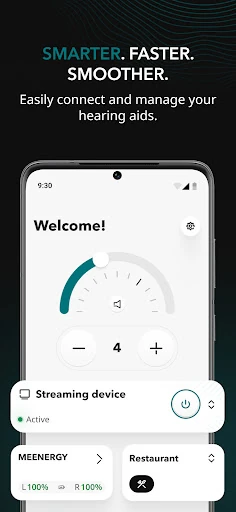
Imagine getting ready in the morning and wanting to check your hearing aids before heading out. With compatible Bluetooth hearing aids paired, the app lets you adjust volume, change programs, and manage background-noise levels. That makes it a practical companion for small listening adjustments, rather than a tool you open only when something goes wrong. I like the idea of having those controls alongside guidance about using and caring for the devices.
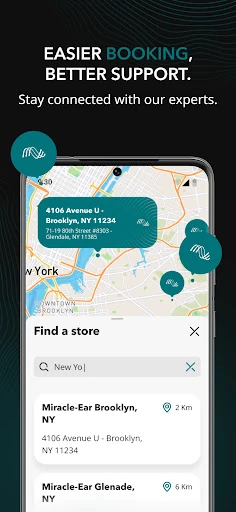
Later, perhaps you are unsure how to handle a routine maintenance task or want to see how regularly you have been wearing your aids. The app includes tutorials, daily care tips, and usage monitoring, so those questions can sit within the same hearing-care routine. It also provides a way to contact customer service. The experience is centered on helping you manage your hearing aids and stay connected to support, not replacing an appointment with a clinician.
A Companion, Not a Cure-All
Compared with relying on the hearing aids alone, the app adds phone-based controls and a place to find tutorials, usage information, and support. For someone already using compatible Miracle-Ear devices, that combination can make routine management feel more accessible. It also offers a free hearing screening and expert hearing-health content for people who are starting to explore their hearing care. Those pieces give the app some value before device management becomes the main reason to open it.
The distinction matters: this is not a standalone hearing aid, a general music equalizer, or a substitute for professional care. Its adjustment controls depend on compatible hearing aids, and the screening should not be treated as a diagnosis. If you do not use a compatible device and are not looking for hearing-health information or support, the app is likely to have less to offer than its feature list first suggests.
Make It Part of Your Routine
A useful approach is to make a quick check-in part of your existing morning routine. If your hearing aids are paired, you can adjust their volume or program before leaving, then use the app's care guidance when you need a reminder about day-to-day maintenance. Keeping the controls and instructions in one place may be easier than trying to remember how to handle every adjustment or care step from memory.
Usage monitoring can also give you a reason to check in periodically rather than only opening the app when you want a setting changed. I would treat those insights as a way to notice your own patterns, not as a score to chase. If a question needs more help, the customer-service contact option provides another step. For medical concerns, the app itself advises consulting a qualified health professional.
More From Our News Desk

Zoom Meetings, Google Meet, or Teams: Which Is Easiest to Join?

How I Build a Free Streaming Lineup With Tubi

Why Crunchyroll Is the Default Anime App for So Many Fans

YouTube TV: A Practical Guide to Cutting Cable

Rummikub and the Small Comfort of Phone Games

TeamViewer Remote Control or AnyDesk for Helping Family?
Who May Find It Useful
I would recommend Miracle-Ear App first to people who use compatible Miracle-Ear hearing aids and want phone controls, care instructions, or a simple way to check usage. It may also suit someone beginning to explore hearing care, since it includes a free screening and hearing-health content. The combination is particularly relevant if you prefer having device guidance and support close at hand instead of searching for separate resources.
It is less compelling for someone without compatible hearing aids who expects a broad audio-enhancement app, or for anyone hoping an app can replace professional evaluation and advice. The screening is one part of a wider care experience, not a medical conclusion. Because the app is available on iOS and requires iOS 15.0 or later, people using other platforms or older iPhones should check the App Store details before planning to use it.
Miracle-Ear App is developed by Miracle-Ear, Inc. and is available for iOS through the App Store. It requires iOS 15.0 or later and carries a 4+ age rating. The current version provided is 5.3.0. Its release date is July 7, 2025, and its most recent update date is November 4, 2026.
The app is free to download, with a listed price of $0.00. On the App Store it has a 4.6-star rating from 21,977 ratings. These store details can change over time, so it is worth checking the App Store page for the latest information before downloading.
How Hearing-Aid Control Fits Daily Life
A Clear Starting Point
When I first looked at what the app is designed to do, the appeal was its mix of hearing-aid controls and practical support. This is not just a remote for changing volume: the stated features also include a free hearing screening, hearing-health content, tutorials, usage monitoring, and access to customer service. That gives someone with compatible devices a few different reasons to keep it available on their phone.
The first practical step is pairing compatible Bluetooth hearing aids. Once that connection is in place, the app's device-management tools make sense as part of everyday use. I would start by exploring the controls and the care guidance at a comfortable pace, rather than changing several settings at once. The app is meant to support hearing care, so questions about what a setting should accomplish are best discussed with a qualified professional.
Useful Day-to-Day Controls
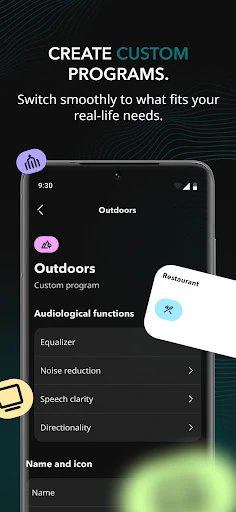
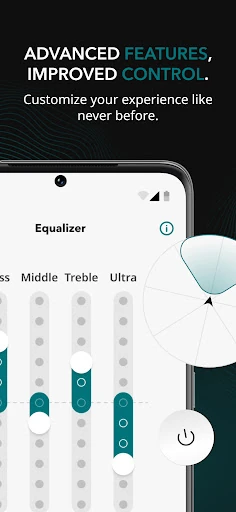
The central everyday job is straightforward: manage compatible hearing aids from the app. You can adjust volume, select programs, and change background-noise levels. Those are useful controls to have when your listening needs shift during the day. Rather than describing a specific automatic adjustment, the app puts the choice in your hands, which can suit people who want to make deliberate changes to their hearing-aid settings.
I can see this being helpful in ordinary moments, such as wanting to change a program before settling into an activity or make a volume adjustment without handling the device itself. The app also lets users monitor hearing-aid usage and track progress. That can help you review how the devices fit into your routine, though the value depends on whether you find those personal insights useful.
Guidance Beyond Settings
One feature that stands out is the presence of step-by-step tutorials and daily maintenance tips. Hearing aids involve more than choosing a volume, and having care guidance in the same app can make routine questions easier to revisit. I would expect this material to be most useful when learning a device or refreshing my memory about basic care, rather than as a replacement for personalized instruction.
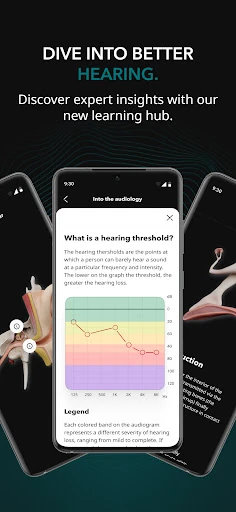
The app also brings together a free hearing screening and expert content about hearing health. That gives newcomers a way to begin exploring the subject, while existing users may appreciate having educational material nearby. The screening is not a diagnosis, and the app's own guidance is to consult a qualified healthcare professional for medical advice, diagnosis, or treatment.
Customer-service access rounds out the support side. When a question is about using or caring for the hearing aids, having a contact route within the app is a sensible convenience. It makes the product feel more like a companion to an ongoing hearing-care relationship than a one-purpose controller.
A Simple Weekly Check-In
A realistic routine could start with a brief morning adjustment when you put on your hearing aids. Use the app to set volume or choose a program that suits what you are doing, then leave the settings alone unless your listening needs change. Later, refer to the maintenance tips when a care task comes up. That keeps the app useful without turning every interaction into an extended session.
Once in a while, look at the usage information and consider whether it reflects the routine you intended. The point is not to treat progress tracking as a medical judgment; it is simply another way to stay aware of how you use your devices. If you run into a practical question, the customer-service option may help you find assistance, while health concerns belong with a qualified clinician.
Keep Expectations Grounded
The most important limitation is compatibility: the main management tools are for compatible Bluetooth hearing aids. Without those devices, the screening and hearing-health content may still be relevant, but the central control experience will not apply in the same way. It is worth checking whether your specific hearing aids work with the app before making it part of your routine.
The app also should not be mistaken for a treatment or a replacement for personal care. A screening can be a starting point, and educational material can be informative, but neither takes the place of professional advice. The app's focus is device management and support, which is useful when those are your needs and less suitable if you expect a standalone solution to hearing difficulties.
Finally, this is an iOS app requiring iOS 15.0 or later. That makes the platform requirement a practical consideration before getting started. I would also keep the App Store page handy for current compatibility and store details, since those can change and the right fit depends on your phone and hearing aids.
Miracle-Ear App brings together hearing-aid adjustments, usage monitoring, care guidance, educational content, screening, and support. Its strongest case is for someone already using compatible Miracle-Ear devices who wants those everyday tools in one place. I appreciate that its purpose is practical and specific rather than trying to be a universal audio app.
I would try it if I had compatible hearing aids and an iPhone running iOS 15.0 or later. If you are looking for diagnosis, treatment, or a general sound-enhancement tool, this is not the right fit. For hearing questions, use the app as a companion to care from a qualified professional.
Miracle-Ear App Frequently Asked Questions
What is Miracle-Ear App used for?
Miracle-Ear App is a companion for hearing care. With compatible Bluetooth hearing aids, it lets users adjust volume, programs, and background-noise levels, and monitor usage. It also includes a free hearing screening, hearing-health content, device tutorials and maintenance tips, and access to customer service. The screening does not replace professional medical advice or evaluation.
Which phones can run Miracle-Ear App?
Miracle-Ear App is available for iOS through the Apple App Store and requires iOS 15.0 or later. Its hearing-aid management features are intended for compatible Bluetooth hearing aids. Check the App Store information and your device details for current compatibility before downloading, since requirements and supported devices can vary.
What iOS version does Miracle-Ear App require?
The stated minimum requirement is iOS 15.0. If your iPhone runs an older version, check the App Store page for current requirements and whether your device can use the app. You will also need compatible Bluetooth hearing aids to use the app's hearing-aid control features.
Does Miracle-Ear App cost anything?
The app is listed as free to download, at a price of $0.00. Store pricing and any other purchase details may vary over time, so check the App Store page for the latest information. The app description identifies its hearing screening as free as well.
Is Miracle-Ear App right for someone without hearing aids?
It may still be of interest if you want to explore the free hearing screening or read hearing-health content. Its main management tools, including adjustments and usage monitoring, are for compatible hearing aids, so the app may be less useful without them. A screening is not a diagnosis; consult a qualified healthcare professional for medical advice.
Pros
- Combines compatible hearing-aid controls with tutorials, maintenance tips, and customer-service access.
- Includes usage monitoring and a free hearing screening alongside hearing-health content.
- Offers practical adjustments for volume, programs, and background-noise levels.
Cons
- The main device-management features depend on having compatible Bluetooth hearing aids.
- Available on iOS only, with iOS 15.0 or later required.
- The screening and educational content do not replace professional medical care.
- Category
- Medical
- Version
- 5.3.0











