Hearing Aid App for Android
- 11.90K
- 4
- Installs
- 1.00M
- Price
- Free
Screenshots
Analysis by Reviewed APKs
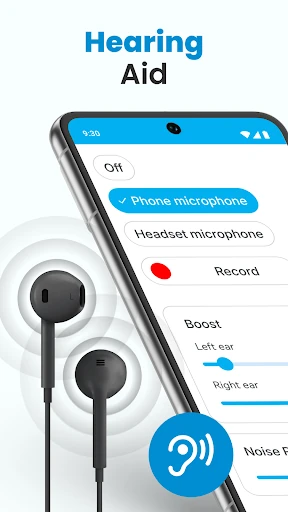
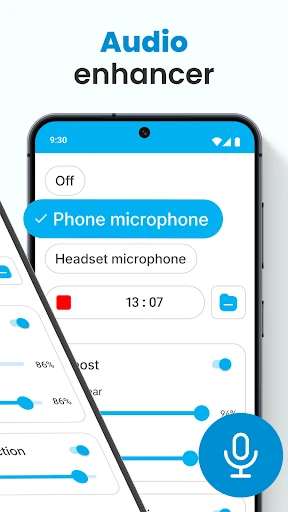
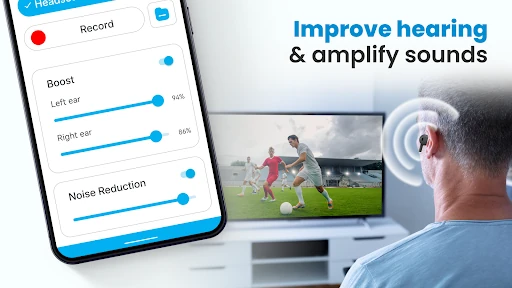
Hearing Aid App for Android by Firehawk uses a phone microphone and wired or Bluetooth earphones to make nearby sounds louder, with controls for noise, recording, and separate left- and right-ear levels. I see it as a practical listening aid to try in everyday conversations, meetings, or lectures, rather than a replacement for dedicated hearing equipment. Its range of adjustments is useful, though results will depend on your phone and headphones.
A clearer seat at the table
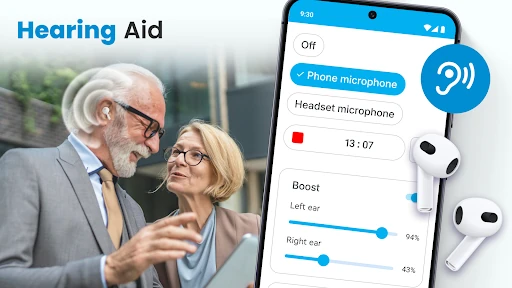
When I imagine using Hearing Aid App for Android at a small meeting, the appeal is straightforward: place the phone near the person speaking, connect earphones, and listen through the app. The microphone can be the phone’s or a selected headset microphone, so there is some flexibility in how I set things up. The app also offers sound amplification and noise control, which gives me a couple of ways to tune the listening experience to the room.
I’d approach it as a tool for a particular moment, not something I leave running without thinking. A lecture, a conversation across a table, or a quiet discussion might be easier to follow when the phone is positioned to pick up nearby speech. The description also says the app can run in the background or while the device is locked. That could help when I want to listen and use the phone for another task.
An aid, not a hearing device
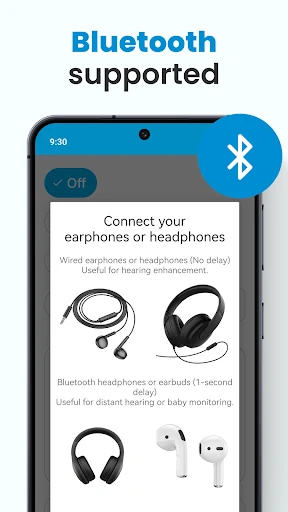
The obvious alternative is simply turning up the volume on a phone or asking someone to speak closer. This app takes a different approach: it captures surrounding sound through a microphone and routes it to earphones, with adjustments for volume and each ear. Bluetooth support gives me another listening option beyond wired headphones. For a basic, phone-based amplification setup, that is a more focused set of controls than the phone’s ordinary media volume.
Still, I wouldn’t treat it as a substitute for dedicated hearing equipment or professional care. It is described as an amplifier for general listening assistance, and the experience relies on a phone microphone and compatible earphones. That makes it most suitable for trying in specific environments, rather than expecting it to handle every listening need. It is not a music player or a broad audio library; its central job is passing amplified environmental sound to you.
Small setup habits help
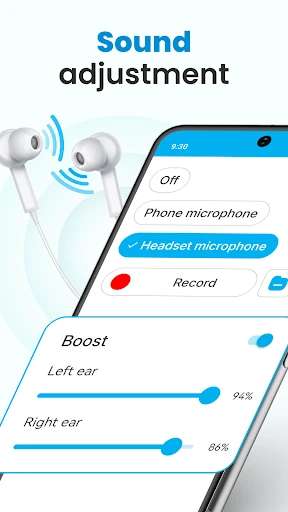
I’d start by choosing the microphone I plan to use, then make a modest volume adjustment before settling into a conversation. The app supports either the phone mic or a selected headset mic, and it allows separate left- and right-ear sound adjustments. Those controls make it sensible to test the setup in a quiet place first, where I can hear the effect of each change without having to troubleshoot while someone is speaking.
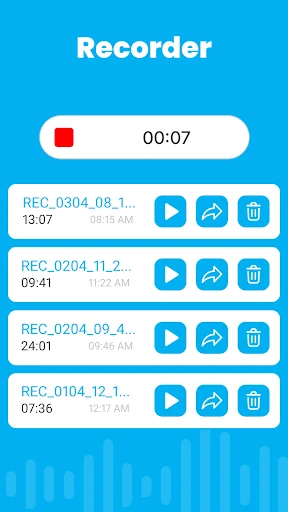
The saved environmental sound settings could be useful if I tend to return to the same kinds of places. I might keep one setup for a quiet room and another for a busier conversation, rather than changing several controls from scratch each time. The recorder is another feature to explore when I want to capture sounds. I’d keep the routine simple: connect, check the levels, and make sure the microphone is positioned sensibly.
More From Our News Desk

Zoom Meetings, Google Meet, or Teams: Which Is Easiest to Join?

How I Build a Free Streaming Lineup With Tubi

Why Crunchyroll Is the Default Anime App for So Many Fans

YouTube TV: A Practical Guide to Cutting Cable

Rummikub and the Small Comfort of Phone Games

TeamViewer Remote Control or AnyDesk for Helping Family?
Who may find it useful
I’d recommend giving Hearing Aid App for Android a look if you want a phone-based way to amplify nearby speech through earphones and are comfortable adjusting sound yourself. The separate left- and right-ear controls, support for wired and Bluetooth earphones, noise control, and saved sound settings offer useful flexibility. It may especially suit someone who wants to experiment with amplification during a meeting, lecture, or conversation rather than change how they listen all day.
It may not suit someone looking for a complete replacement for a dedicated hearing aid, or someone who expects the same result from every phone, microphone, and pair of earphones. The app depends on capturing sound through a device microphone, so setup and surroundings matter. I’d also be cautious about relying on an app alone for significant hearing needs. If you prefer a completely hands-off listening experience, its adjustment options may feel like extra work.
Hearing Aid App for Android is a free Android app from Firehawk. Google Play shows over 1 million installs and a 4.0-star rating from 11,898 ratings. The app contains no ads, but it offers in-app purchases. The listed price range for those purchases is $0.99 to $99.99 per item, so the free download does not mean every available purchase is free.
The app is rated Everyone on Google Play. Its current version is 2.1.2, with a release date of March 31, 2021, and a last update date of October 29, 2026. A minimum Android version is not included in the available app details, so check Google Play for device compatibility before installing.
Putting Phone-Based Listening to Work
A simple first setup
When I first opened the app, I’d focus on the basic chain of steps: choose a microphone, connect earphones, and adjust the amplified sound. The premise is easy to grasp because the phone acts as the listening point, rather than the app sending me to a separate audio service. The choice between the phone microphone and a selected headset microphone gives the setup a little room to match the equipment I already use.
I’d test it somewhere calm before trying it in a busy room. Small changes in volume and microphone placement can have a noticeable effect on what reaches the earphones, and a quiet first run makes those changes easier to judge. The app also provides left- and right-ear adjustment, so I can check each side rather than relying only on one overall level. That first bit of experimenting is part of getting comfortable with it.
Everyday listening
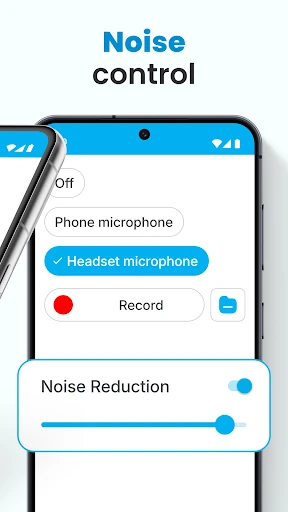
Day to day, the app’s main job is to capture external sound and play it through earphones at an increased volume. I can see that being handy when I want to focus on a nearby speaker without turning a conversation into a phone call or asking everyone to repeat themselves. Noise control is included to help reduce background disturbances, while the app description says speech and surrounding noise may both be amplified.
That distinction matters in practice: amplification is not the same as making every room quiet. I’d expect to adjust the settings based on where I am and what I’m trying to hear. A quiet conversation and a busy social setting are different listening situations. Background mode adds convenience when I want to listen while using the device for another task, or when the screen is locked.
Useful control options
The most notable feature is the combination of microphone choice and separate ear controls. I can use the phone mic or a headset mic, then adjust sound for the left and right ears individually. Bluetooth earphones are supported too. Together, these options make the app more adaptable than a single volume slider, especially for someone who already has a preferred pair of headphones and wants to try a phone-based listening setup.
I also like that the feature list includes noise control, sound recording, and saved environmental sound settings. Recording gives the app a use beyond live listening, while saved settings may reduce repeated adjustments when I return to a familiar environment. These are practical extras rather than a complicated collection of modes. The app’s core remains amplification of nearby sound, with the additional controls helping shape that experience.
A routine for meetings
For a meeting, I’d arrive with the phone charged and my preferred earphones ready, then place the phone where it can pick up the speaker. I’d select the microphone, start with a comfortable volume, and make small adjustments once people begin talking. If one side needs a different level, the separate left- and right-ear controls are available. This approach keeps the phone’s role clear: capture the room and send sound to my ears.
For a recurring setting, I’d try saving an environmental sound configuration so I have a starting point next time. I’d still check it rather than assuming the room sounds exactly the same from one visit to another. Background mode may help if I need to use the phone while listening. A short check before the meeting begins seems more useful than trying to change several settings while following the discussion.
Keep expectations grounded
The biggest practical limit is that this is a phone-and-earphone listening setup. Its results can depend on microphone placement, the room, and the earphones being used. The description includes noise control, but I wouldn’t assume that every surrounding sound will disappear or that speech will always be easy to separate. It is worth taking a moment to test the controls in the environment where I intend to use them.
I’d also keep its role in perspective. The app is presented as a general hearing amplifier, not as a replacement for dedicated hearing equipment or individualized support. Its feature list includes a recording function and adjustment tools, but the main experience is still listening to amplified external sound. People with different hearing needs may find the same settings work differently, so I’d treat it as an option to try rather than a universal solution.
Hearing Aid App for Android has a clear, useful idea: use a phone microphone to pick up nearby sound, then listen through wired or Bluetooth earphones with control over volume and each ear. Noise control, saved sound settings, recording, and background listening add flexibility without changing that central purpose. I’d give it credit for offering several practical ways to tailor a simple phone-based setup.
I’d recommend trying it if you want an adjustable listening aid for particular conversations or environments and are willing to test the setup. I wouldn’t recommend treating it as a complete substitute for dedicated hearing equipment. Start in a calm place, learn how the controls affect your listening, and decide whether the results suit your own routine.
Hearing Aid Frequently Asked Questions
What is Hearing Aid App for Android used for?
Hearing Aid App for Android captures external sound through a phone or selected headset microphone and plays it through earphones at an increased volume. It includes noise control, left- and right-ear adjustment, sound recording, saved environmental sound settings, and background listening. It is described as a general hearing amplifier for situations such as conversations, meetings, and lectures.
Which phones and devices can use Hearing Aid App for Android?
Hearing Aid App for Android is an Android app. Its description says it works with wired and Bluetooth earphones and can use either the phone microphone or a selected headset microphone. The minimum Android version is not provided in the app details here, so check Google Play for the current compatibility information for your device.
Does Hearing Aid App for Android cost money?
The app is free to download and contains no ads, but it offers in-app purchases. The listed purchase range is $0.99 to $99.99 per item. Available purchases and prices can change, so check Google Play for the current details before buying anything.
What Android version does Hearing Aid App for Android require?
The minimum Android version is not included in the app details available here. Requirements can vary with app updates and device compatibility, so check the Google Play page for Hearing Aid App for Android before installing it. The app supports wired and Bluetooth earphones according to its description.
Who is Hearing Aid App for Android best suited to?
It may suit Android users who want to experiment with amplifying nearby sounds through earphones during conversations, meetings, or lectures. Its controls allow adjustments for each ear and offer noise control and saved settings. It may not suit someone seeking a replacement for dedicated hearing equipment; the app is described as a general listening aid.
Pros
- Supports wired and Bluetooth earphones, with a choice of phone or headset microphone.
- Separate left- and right-ear adjustments offer more control than one overall volume setting.
- Includes noise control, saved environmental settings, recording, and background listening.
- Free to download and contains no ads.
Cons
- The experience depends on microphone placement, earphones, and the surrounding environment.
- In-app purchases range from $0.99 to $99.99 per item.
- It is a general phone-based amplifier, not a replacement for dedicated hearing equipment.
- Category
- Medical
- Version
- 2.1.2











