FollowMyHealth®
- 119.25K
- 4.8
- Installs
- —
- Price
- Free

Screenshots
Analysis by Reviewed APKs
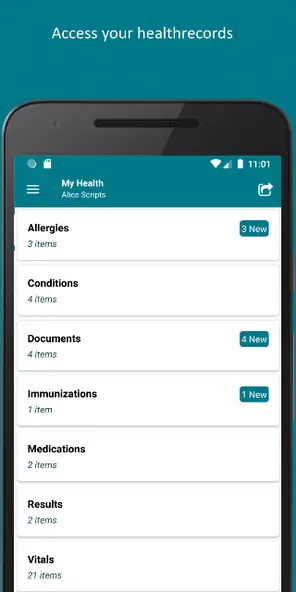
FollowMyHealth® is a health-record and care-management app for people whose healthcare organizations connect with the service. It brings together items such as test results, appointments, billing and messages, so routine tasks can be handled from an iPhone rather than scattered across calls and paperwork. I like its practical focus: it is most useful as a companion to your existing care team, not as a substitute for one.
A Quicker Check-In
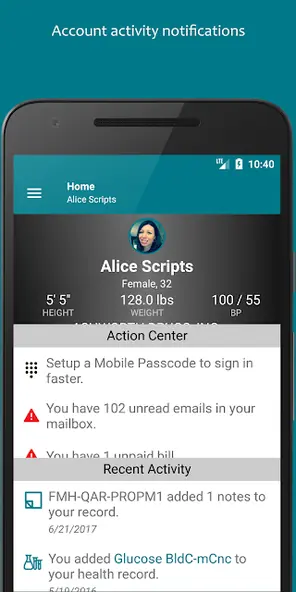
When I first opened FollowMyHealth®, I pictured using it between appointments: checking whether a result had arrived, confirming a reminder, or looking up a detail before calling the clinic. The home screen is intended to put a health summary, reminders and recent account activity within reach. From there, the app provides access to a medical profile and, when authorized, profiles for family members.
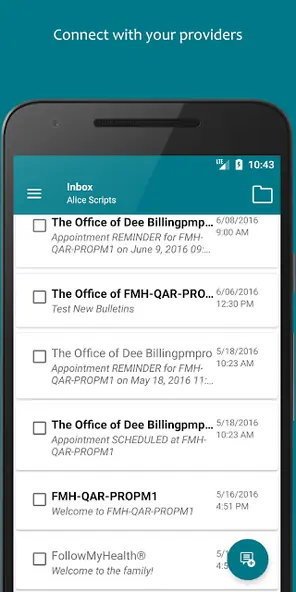
That can make a busy day a little easier to organize. If I needed to arrange a visit, the app offers appointment scheduling; if a question came up afterward, it offers a way to communicate with the care team. I could also check billing history or request a prescription refill. These are practical extensions of an existing care relationship, rather than features that work independently of a connected healthcare organization.
A Companion, Not a Clinic
Compared with keeping paper records or calling an office for every administrative task, FollowMyHealth® gives users a mobile place to access several kinds of health information and interact with providers. It can be useful for people who want results, appointment access, messages and billing details in one account. The benefit is less about replacing familiar care and more about having another route to information and routine requests.
It is not a general fitness tracker, a source of medical diagnoses, or a replacement for talking with a clinician. Its usefulness depends on the healthcare organizations connected to the account, and some functions may not be available through every organization. I would think of it as a portal for managing parts of care, not a universal record that automatically includes every provider or health service.
Small Habits That Help
A quick check of the home screen can make the app more useful than opening it only when something goes wrong. I would use reminders and recent account activity as prompts to look for updates, then visit the relevant section when a task needs attention. Notifications can also arrive as push alerts, text messages or email, depending on the account settings and options in use.
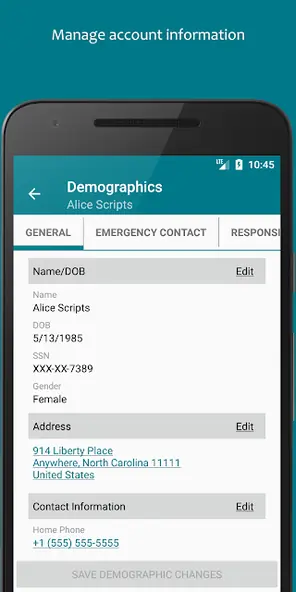
It also helps to keep the underlying profile current. FollowMyHealth® includes tools for managing contact details, demographic information, insurance policies and a preferred pharmacy for prescription renewals. If Apple Health is part of your routine, the app can import blood pressure, steps, weight and glucose readings from it. I would treat that as a convenient way to bring readings into the account, not a reason to stop checking where information came from.
More From Our News Desk

Zoom Meetings, Google Meet, or Teams: Which Is Easiest to Join?

How I Build a Free Streaming Lineup With Tubi

Why Crunchyroll Is the Default Anime App for So Many Fans

YouTube TV: A Practical Guide to Cutting Cable

Rummikub and the Small Comfort of Phone Games

TeamViewer Remote Control or AnyDesk for Helping Family?
Who Might Find It Useful
I would recommend FollowMyHealth® to people whose healthcare organizations use the service and who want a mobile way to keep up with everyday care administration. It makes the most sense for someone who regularly checks results, needs to manage appointments, communicates with a care team, or wants billing and profile details close at hand. Authorized family profiles may also help people who are involved in managing a relative’s information.
It may be less useful if your providers are not connected, or if you want a standalone wellness tracker with broad tools for exercise, habits or coaching. The app’s available features can depend on the connected organization, so the experience may differ from one user to another. I would also avoid treating a notification or record entry as a substitute for discussing health questions directly with a care professional.
FollowMyHealth® is published by Allscripts Healthcare Solutions, Inc. on the Apple App Store for iOS. The store shows a 4.8-star rating from about 119,000 ratings. It is rated 12+ and requires iOS 17.0 or later. The supplied release date is March 7, 2012, with the latest update dated October 22, 2026.
The app is free to download, with a listed price of $0.00. No in-app purchase details are provided in the supplied store facts. The current version is 2026.10.21. These details describe the iOS app; features such as appointment access, messaging and records depend in part on the healthcare organizations connected to an account.
Making Everyday Care Easier to Manage
A Clear Starting Point
My first impression is that FollowMyHealth® is built around getting to account information quickly. Its home screen brings together a health summary, reminders and recent activity, with paths to a personal profile and authorized family profiles. That is a sensible starting point for an app whose job is to help users check on care, rather than introduce a separate set of wellness goals.
Getting value from it begins with an account connected to a healthcare organization. Once that connection is in place, the app can serve as a mobile route to the information and interactions that organization makes available. I would take a moment to review the account details and notification options, then see which sections are actually relevant to my care instead of expecting every feature to appear for every provider.
Useful Between Visits
The day-to-day appeal is having several routine tasks in one place. I could check for test and lab results, look at reminders, schedule an appointment, or send a message to my care team without treating each task as a separate phone call. The app also supports prescription refill requests and lets users manage the preferred pharmacy used for renewals.
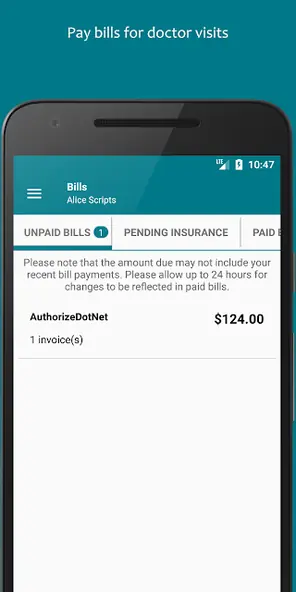
That convenience matters most in the gaps between visits, when I might want to check an update or deal with a small administrative task. FollowMyHealth® also includes outstanding bill payment and billing history, along with tools for contact, demographic and insurance information. It is a broad mix of practical account functions, though the actual selection depends on what a connected organization supports.
Features With a Purpose
A useful detail is the range of information the account can cover: health summaries, results, profile data and insurance information sit alongside communication and appointment options. That mix gives the app a role beyond simply displaying records. It can help users act on information by contacting a care team, requesting a refill or handling an outstanding bill when those options are available.
The iOS version also supports push notifications and app badges for new account information, and it can provide access to notifications and Action Center items on Apple Watch. For accessibility, it supports Apple VoiceOver. These are specific conveniences rather than reasons everyone needs a smartwatch or a particular workflow, but they can make updates easier to notice or access.
A Simple Weekly Routine
I would make a short weekly check-in part of my routine: open the home screen, scan reminders and recent activity, then follow up on anything that needs attention. If a result appears, I can review it in the account; if I have a non-urgent administrative question, I can use the care-team communication option. This keeps the app tied to practical tasks instead of encouraging constant checking.
For someone who uses Apple Health, importing blood pressure, steps, weight and glucose readings can bring those measurements into the FollowMyHealth® account. I would check which readings matter to my own care and avoid assuming that every connected provider will use them in the same way. The app also lets users manage a preferred pharmacy, which is worth reviewing before making a refill request.
Keep Expectations Grounded
The main limitation is that FollowMyHealth® is tied to participating healthcare organizations. A feature may be present in the app but unavailable through a particular organization, so users should not assume that every appointment, result, bill or message will show up. That dependence is central to the experience, not a minor technical detail.
I would also keep its role clear: this is a channel for health information and care-related tasks, not a diagnostic tool or a replacement for direct clinical guidance. Imported readings and account updates can be useful context, but the app’s description does not promise a complete picture of someone’s health. A little patience while checking what your provider supports will help set realistic expectations.
FollowMyHealth® is a practical iOS companion for people whose healthcare organizations connect to it. Its strongest idea is straightforward: bring records, results, appointments, messages and billing tasks into one mobile account. I appreciate that focus, though the experience depends on what a user’s organization makes available.
I would try it if I already receive care through a connected organization and want easier access to routine account tasks. If you are looking for a universal health tracker or a service that works independently of your providers, this is not the right fit. Check which functions your organization supports before building a routine around it.
FollowMyHealth® Frequently Asked Questions
What is FollowMyHealth® used for?
FollowMyHealth® is used to access health information and manage some routine care tasks through connected healthcare organizations. The app can provide a health summary, results, appointment scheduling, care-team communication, prescription refill requests and billing information. Which options are available can depend on the organization connected to your account.
Which devices can run FollowMyHealth®?
The supplied store information covers the iOS version of FollowMyHealth®, available through the Apple App Store. It requires iOS 17.0 or later. The description also mentions Apple Watch access to push notifications and Action Center items. Check the App Store for current compatibility details, since device and software requirements can vary.
What iOS version does FollowMyHealth® require?
FollowMyHealth® requires iOS 17.0 or later according to the supplied store facts. If you are unsure whether your iPhone or iPad meets the requirement, check its software version and the current App Store information before downloading. The app’s supported features can also depend on your connected healthcare organization.
Does FollowMyHealth® cost money?
FollowMyHealth® is free to download, with a listed price of $0.00. In-app purchase details are not included in the supplied facts, so check the Apple App Store for current information about any purchase options or changes. Access to particular services may depend on your connected healthcare organization.
Is FollowMyHealth® right for me?
It may suit you if your healthcare organization connects to FollowMyHealth® and you want mobile access to records, messages, appointments or billing tasks. It may be less useful if your providers do not use the service or you want a general fitness app. Available features vary by connected organization, so check what your provider supports.
Pros
- Combines health information with practical appointment, messaging and billing tasks.
- Supports prescription refill requests and preferred pharmacy management.
- Can import selected readings from Apple Health.
- Offers push notifications, VoiceOver support and Apple Watch access.
Cons
- Available functions depend on the healthcare organizations connected to the account.
- It is a care portal, not a general-purpose fitness or diagnostic app.
- Some users may find little value if their providers are not connected.
- Category
- Medical
- Version
- 2026.10.21











