Express Scripts
- 40.62K
- 4.6
- Installs
- 1.00M
- Price
- Free

Screenshots
Analysis by Reviewed APKs
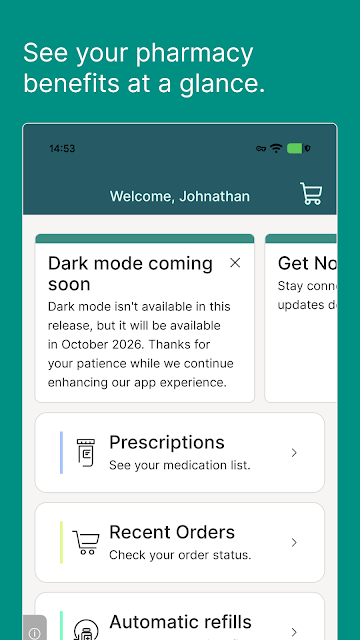
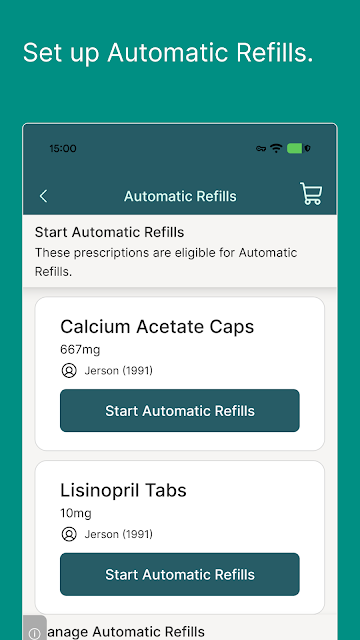
Express Scripts puts a few useful prescription tasks in one place: finding a preferred pharmacy, requesting a refill, and checking an order’s status. I can see the appeal when medication errands are competing with the rest of the day. My take is practical rather than glowing: it’s a handy companion for people with an Express Scripts prescription benefit, but it isn’t a general-purpose pharmacy app for everyone.
A refill between other errands
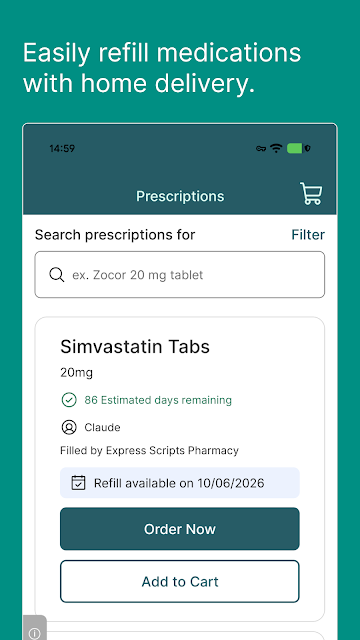
Picture the moment you notice you’re running low while making a grocery list. Instead of setting the thought aside, you can open Express Scripts and handle a refill request while it is on your mind. That is the kind of small job where a phone app makes sense. I like having a direct route to the task rather than treating a prescription as one more thing to remember later.
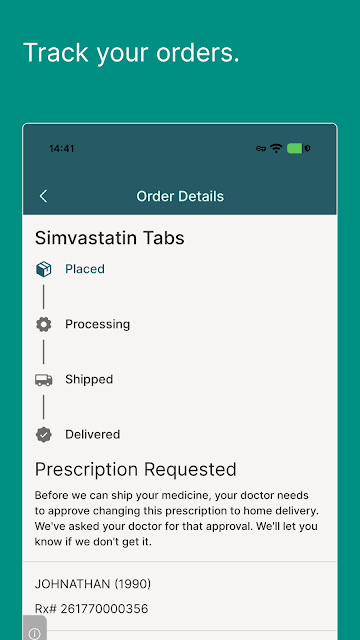
The same approach applies after an order is placed. When I want to know where things stand, checking its status is more useful than trying to reconstruct when I last dealt with it. Express Scripts also lets me find a preferred pharmacy, which helps when I need to sort out where to go. None of these jobs is flashy, but together they cover a familiar stretch of prescription upkeep.
A benefit tool, not everything
I would put Express Scripts beside other ways of keeping track of prescriptions, not in place of every health tool on a phone. A note or calendar entry can help me remember a task, but it cannot itself request a refill or show an Express Scripts order status. The app is most useful when I need to act on a prescription benefit, rather than simply make a personal checklist.
It is also different from opening a pharmacy website just to look up a location. The preferred-pharmacy finder sits alongside refill and order-status tasks, so the three related errands are easier to think about together. Still, I would not turn to this app for a diagnosis, treatment decision, or broad medical reference. Its described strengths are administrative: helping eligible members manage practical prescription steps.
Small habits that make it useful
The habit I would build is to check on a refill before the need feels urgent. If I notice my supply getting low, I can deal with the request during a quiet minute instead of leaving it for a more hectic day. Afterward, the order-status feature gives me a sensible place to look when I’m planning around an arrival. That simple sequence makes the app easier to use with a regular routine.
I would also look for a preferred pharmacy before I am already on my way somewhere. It is a modest planning step, but it can save a detour when pharmacy options matter to my benefit. The app works best for me as a place to handle specific errands as they come up, not as something I need to keep open or check constantly.
More From Our News Desk

Zoom Meetings, Google Meet, or Teams: Which Is Easiest to Join?

How I Build a Free Streaming Lineup With Tubi

Why Crunchyroll Is the Default Anime App for So Many Fans

YouTube TV: A Practical Guide to Cutting Cable

Rummikub and the Small Comfort of Phone Games

TeamViewer Remote Control or AnyDesk for Helping Family?
Who will get the most from it
I would recommend Express Scripts to someone who has an Express Scripts prescription benefit through a health insurance plan or plan sponsor and wants to handle routine prescription tasks on a phone. It suits the person who would rather make a refill request during a short break than put it on a list for later. The pharmacy finder and order-status check round out that everyday, task-focused use.
It is a poor fit if you do not have the required prescription benefit. I would also look elsewhere if my main goal were medication education, clinical guidance, or a general organizer for every health appointment. Access to the app or individual features can differ by plan or benefit type, so I would start with the tasks my own plan supports rather than assume every screen will serve everyone alike.
Express Scripts is a Medical app from Express Scripts, Inc. On Google Play, it has over 1 million installs and a 4.6-star rating from around 41,000 ratings. Those figures suggest plenty of people have used it, though they do not tell me whether a particular benefit plan supports every feature. For this app, plan eligibility matters more to my recommendation than the size of its audience.
The app is free to download, with no in-app purchases or ads. Google Play rates its content Everyone. The current version is 14.1.3; the app was released on April 15, 2011, and last updated on October 20, 2026. I see the free download as a low-friction way for eligible members to try the supported tasks, while remembering that access depends on having the required prescription benefit.
Living with Express Scripts day to day
Starting with a specific job
When I first approached Express Scripts, the most helpful way to think about it was not as a huge health dashboard. I had a narrower question: could I take care of a prescription errand without bouncing between unrelated tools? The app’s described jobs are clear enough to set that expectation. I would open it to find a preferred pharmacy, request a refill, or check an order.
That focus gives the first session a useful shape. If I have a refill in mind, I can concentrate on that instead of exploring for its own sake. The redesigned app is presented as a faster way to find what I need for my medicine, but I would judge that promise against a real task. A straightforward refill is a better test for me than how many features an app seems to offer.
The day-to-day prescription loop
The core loop is easy to picture: notice a prescription needs attention, request the refill, then return to see the order status. I like that the follow-up lives with the original task. It means I have one practical reason to open the app again, rather than a vague feeling that I should check on something. That matters most during ordinary weeks, when medication errands have to fit around everything else.
Finding a preferred pharmacy covers a different moment. Maybe I am planning a stop near work, or maybe my usual route has changed. I would rather check my options before leaving than make a pharmacy decision while standing in a parking lot. Express Scripts brings that lookup into the same app I use for refills and orders, which makes the collection of tools feel coherent.
What surprised me about this kind of app is how much value can come from reducing small uncertainties. A refill request addresses what I need to do next; an order-status check addresses what has happened since. Neither replaces a conversation with a clinician or pharmacist when I have a medical question. They simply make the administrative side of a prescription less scattered.
Three tools that belong together
The preferred-pharmacy finder stands out because it helps with a decision before a refill or pickup becomes a rushed errand. I would use it when I have time to compare my practical options, not after I have already committed to a stop. Its value is specific to people whose Express Scripts benefit makes a preferred pharmacy relevant, which is why the plan requirement is central rather than a footnote.
The refill feature is the most direct reason to keep the app on my phone. It turns a familiar intention—“I need to take care of that prescription”—into an action I can start where I am. I appreciate that focus. For a routine task, I do not need an elaborate experience; I need a clear way to move the errand forward when I remember it.
Order status completes the set. After making a request, I want to know whether I should keep waiting or plan my next step. I would check the status rather than guess based on when I last opened the app. Taken together, these features have a sensible order: find a pharmacy when needed, handle a refill, and follow up on an order.
Fitting it into a busy week
I spent an evening thinking through how I would fit Express Scripts into my usual phone routine. My answer was to use it at two natural points: when I notice a refill needs attention, and later when I want an order update. That keeps the app tied to a purpose. I would not open it every morning out of habit if there is no prescription task to handle.
The pharmacy finder fits better into planning time than last-minute problem solving. If I know I may need a different stop during the week, I can look for a preferred pharmacy while reviewing my errands. Then the app has helped me make a practical choice before I leave home. It is a small adjustment, but those are often the routines that stick.
Limits worth remembering
The important boundary is eligibility. Express Scripts says you need its prescription benefit through a health insurance plan or plan sponsor to use the app. Some features may also differ by plan or benefit type. I would check what my own benefit allows before counting on a particular workflow, especially if I were trying to sort out a refill on a tight schedule.
I would also keep its role in perspective. A status screen can help me track an order, and a pharmacy finder can help me plan an errand. Neither is a substitute for professional guidance about a medicine. If my question were about a dose, side effect, or treatment choice, I would take it to an appropriate healthcare professional rather than expect an administrative app to settle it.
Finally, a free app is only useful if it matches the job I actually have. Express Scripts makes sense for benefit-linked prescription tasks, not as a universal medication organizer. That distinction would keep my expectations realistic. I would install it for the refill, pharmacy, and status tools I expect to use, then judge it by how well those tools fit my own plan.
Express Scripts earns its place on my phone by grouping three ordinary prescription errands that often happen at different times. I can look for a preferred pharmacy, make a refill request, and come back to check an order. I like its narrow purpose: the app does not need to be my whole healthcare hub to make a busy week easier.
My recommendation is straightforward. If you have an Express Scripts prescription benefit and regularly deal with refills or order follow-ups, it is worth trying. If you are looking for clinical advice or do not have the required benefit, it is not the right starting point. Check which features your plan supports, then use it for the practical tasks it handles.
Express Scripts Frequently Asked Questions
What is Express Scripts used for?
Express Scripts is used for everyday prescription tasks tied to an eligible benefit. You can find a preferred pharmacy, request a prescription refill, and check an order’s status. I would use it to handle those practical steps when they come up, rather than as a source of medical advice. Some features may depend on your plan or benefit type.
What devices can I use Express Scripts on?
The Express Scripts app covered here is available on Android through Google Play. It is designed for handling prescription tasks on a phone, such as checking an order while you are away from home. If you need it on another type of device, check the relevant app store for current availability and device compatibility before making plans around it.
What Android version does Express Scripts require?
The minimum Android version may vary with the app’s current release and your device. I would check Express Scripts on Google Play for the latest compatibility requirement before downloading it. That is especially sensible if you use an older phone and want to rely on the app for refills or order checks.
Is Express Scripts free, and does it have in-app purchases?
Express Scripts is free to download and has no in-app purchases or ads. Using it still requires an Express Scripts prescription benefit through your health insurance or plan sponsor. I would separate the cost of the app from any questions about my prescription coverage; for details about a particular benefit, I would check my plan information.
Is Express Scripts a good fit for my prescriptions?
It may be a good fit if your plan includes an Express Scripts prescription benefit and you want phone access to refills, preferred-pharmacy searches, and order status. It may suit you less if you need a general health organizer or medical guidance. Because app access and individual features can differ by plan or benefit type, check what your own plan supports.
Pros
- Brings refills, preferred-pharmacy searches, and order status into one app.
- Useful for handling a prescription errand when it comes to mind.
- Free to download, with no in-app purchases or ads.
- Clear focus on practical tasks for eligible benefit members.
Cons
- Requires an Express Scripts prescription benefit to use.
- Some features may differ by plan or benefit type.
- Not a substitute for professional advice about medication questions.
- Category
- Medical
- Version
- 14.1.3











