Dexcom G6
- 14.18K
- 2.9
- Installs
- 1.00M
- Price
- Free
Screenshots
Analysis by Reviewed APKs
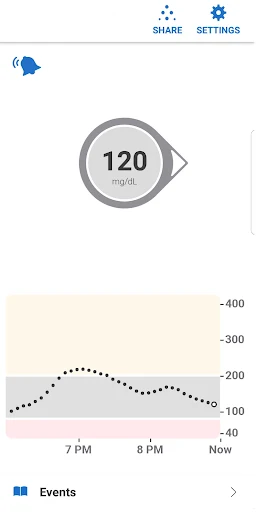
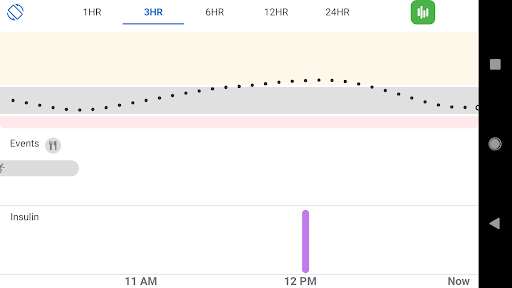
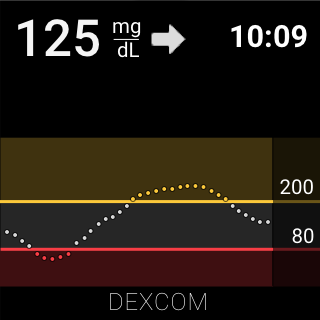
Dexcom G6 is a companion app for people using the Dexcom G6 or G6 Pro continuous glucose monitoring systems. It displays glucose readings and trends, with alerts designed to keep important changes visible during an ordinary day. I see its value in making monitoring easier to check at a glance, but it is purpose-built: without a compatible Dexcom system, there is little reason to install it.
A Day of At-a-Glance Checks
Imagine heading into a workday with meetings, errands, and a lunch break that never quite lands on time. With a compatible G6 system, the app provides glucose readings every five minutes, so I can check the current number and its direction on my phone rather than treating each check as a separate task. Alerts can draw attention to high or low readings, which is useful when a busy stretch makes it easy to forget to look.
The practical appeal is less about staring at a chart and more about keeping information available in the background. Quick Glance can show glucose data on the phone's lock screen, and the app offers customizable alert settings. If someone else needs to keep an eye on the data, Share can send it to as many as ten followers using the Dexcom Follow app. Sharing requires an internet connection, so it is not a substitute for a connection-free setup.
A Companion, Not a General Tracker
The obvious alternative is checking glucose another way, but Dexcom G6 is not a standalone tracking app that collects numbers you type in. Its purpose is to work with the Dexcom G6 or G6 Pro CGM Systems and present readings and alerts from them. That narrow focus is a strength for someone already using the system: the app is centered on the data and notifications that go with that hardware.
It is also not a general health dashboard or a replacement for a clinician's guidance. Its alerts and trend information can help a user stay aware of glucose changes, but the app itself is only one part of managing diabetes. The description says fingersticks are needed for management decisions if symptoms do not match readings. G6 Pro users should also note that some listed features, including Share and Alert Schedule, are not available with that system.
Small Settings, Better Fit
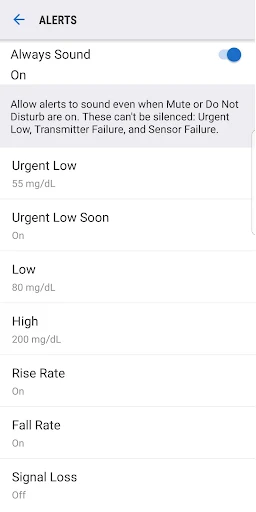
A useful first habit is to review the alert setup with your daily routine in mind. The Alert Schedule feature can create a second set of alert settings for different parts of the day, such as work hours and the rest of the evening. Custom sounds are available, including a phone vibrate-only option for glucose alerts. The Urgent Low Alarm cannot be turned off, so the app is not designed to make every alert fully optional.
I would also make a habit of checking the home-screen icon that indicates whether alerts will sound. Always Sound is on by default and can allow certain CGM alerts to sound when the phone is silent, vibrating, or in Do Not Disturb mode. Quick Glance can make a brief check simpler, while Wear OS integration offers another way to view alerts and alarms. These options help fit the app into a routine without changing what the system is for.
More From Our News Desk

Zoom Meetings, Google Meet, or Teams: Which Is Easiest to Join?

How I Build a Free Streaming Lineup With Tubi

Why Crunchyroll Is the Default Anime App for So Many Fans

YouTube TV: A Practical Guide to Cutting Cable

Rummikub and the Small Comfort of Phone Games

TeamViewer Remote Control or AnyDesk for Helping Family?
Who may find it useful
I would recommend Dexcom G6 to someone who already uses the G6 or G6 Pro system and wants its readings and alerts on an Android phone. It may particularly suit people who value quick checks during a full day, want different alert settings at different times, or have a reason to share data with followers. Wear OS integration may also be handy for a user who likes seeing alerts on a watch.
It is a poor fit for someone looking for a glucose log that works independently of Dexcom hardware, or for anyone who does not use one of the compatible systems. The choices may also feel like more than needed if a user prefers not to receive alerts or share readings. Because this is medical information, I would treat the app as a companion to the monitoring system and professional care, not as a source of medical advice.
Dexcom G6 is a free Android app from Dexcom. On Google Play, it has over 1 million installs and a 2.9-star rating from around 14,200 ratings. It is marked Everyone, contains no ads, and does not offer in-app purchases. Those store figures provide a quick sense of its reach and reception, though they do not say whether it will suit a particular user's phone or monitoring setup.
The supplied app details give version 1.17.0.331, a release date of April 25, 2018, and a last update date of October 22, 2026. An Android minimum version is not included in the available facts, so check Google Play for compatibility with a specific device. The app is intended for use with Dexcom G6 or G6 Pro systems, rather than as a standalone glucose tracker.
How Dexcom G6 Fits the Day
First Look and Setup
When I first opened the app, the most important point was also the simplest: it is for people using the Dexcom G6 or G6 Pro system. That context matters more than a long list of general phone features. The app's core job is to show readings and trends from the compatible CGM system, then help make alerts available on the smart device.
Before relying on it, I would spend time understanding which alert settings are enabled and how they behave alongside the phone's sound settings. Always Sound is on by default for certain alerts, while a home-screen icon indicates whether alerts will sound. That small status cue is useful because a phone set to silent does not necessarily mean every CGM alert will be silent.
The Everyday Check
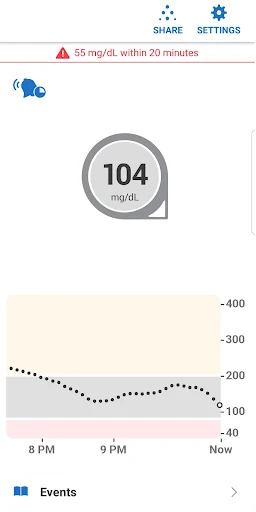
The day-to-day experience centers on frequent, bite-sized information. The G6 and G6 Pro systems provide readings every five minutes, and the app presents glucose data and trends on a smart device. Instead of waiting for a single check-in, a user can glance at the information during normal breaks and notice when a reading is moving toward a high or low level.
Alerts are the other half of that experience. Personalized trend alerts can flag glucose levels that are going too high or too low, and there are custom sound choices. The app also has alerts that cannot be silenced, including the Urgent Low Alarm and alerts for transmitter failure, sensor failure, or the app stopping. That design makes notification settings worth understanding, rather than treating them like ordinary app reminders.
Features With a Purpose
Alert Schedule is a practical option for people whose days have distinct routines. It allows a second set of alert settings, so someone could use one configuration during work hours and another at other times. Custom alert sounds include a vibrate-only option for glucose alerts, although the Urgent Low Alarm cannot be turned off. These settings offer flexibility without making every alert optional.
For supported setups, Share lets a user share glucose data in real time with up to ten followers. Followers use the Dexcom Follow app, and the sharing feature needs an internet connection. Health Connect access is available for sharing retrospective glucose data with third-party apps. These are different jobs: one supports real-time following, while the other concerns past data.
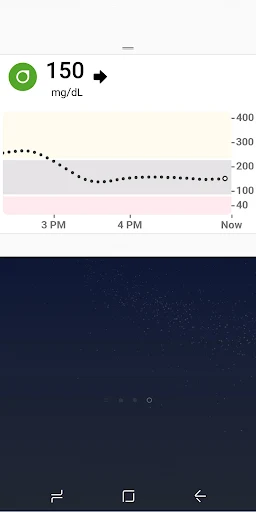
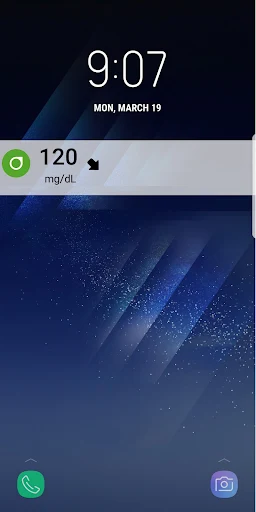
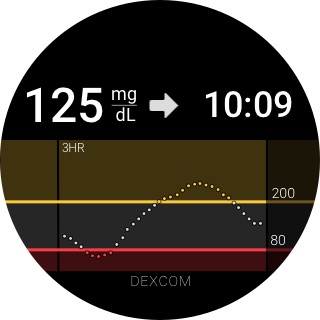
Quick Glance puts glucose data on the phone's lock screen, reducing the need to open the app for every look. Wear OS integration can show glucose alerts and alarms through the app, a watch face complication, or a Wear OS tile. Some features, including Share and Alert Schedule, are not available on the G6 Pro system, so the hardware version affects which options apply.
A Routine That Stays Simple
A sensible everyday rhythm might be to check the displayed data at natural pauses, such as before leaving home or during a lunch break, and let alerts call attention to changes in between. Quick Glance can make those short checks more convenient. If sharing is part of the setup, followers can view readings and trends through Dexcom Follow, provided there is an internet connection.
I would keep the alert configuration tied to real routines rather than changing it constantly. Someone with different work and off-hours patterns can use Alert Schedule, where available, to set a second group of alerts. Checking the sound-status icon is a useful final step after changing phone sound modes. This is a simple workflow, but it helps avoid assuming that the phone's general sound setting tells the whole story.
Limits to Keep in View
The most obvious limit is compatibility: the app is only for people with a Dexcom G6 or G6 Pro CGM system. It is not a general glucose diary, and downloading it alone does not provide the monitoring system's readings. Its value depends on that matching hardware and on having a smart device that can run the app.
Some conveniences depend on the specific system or a connection. Share and Alert Schedule are not available on G6 Pro, while Share and Follow require internet access. Also, a reading may not match how someone feels; the app's description says fingersticks are required for diabetes management decisions when symptoms do not match readings. That is an important boundary to keep in mind when using any displayed information.
Finally, the app's alert behavior is deliberately not all-or-nothing. Certain alarms and alerts cannot be silenced, and Always Sound can allow selected notifications to sound even when the phone is in Do Not Disturb mode. That can be useful, but it may not suit someone expecting a quiet phone at all times. I would review the settings before relying on the app in a particular routine.
Dexcom G6 has a focused role: it brings compatible system readings, trends, and alerts to a smart device, with useful options for quick checks, sharing, and different alert schedules. It is not a universal glucose app, and its features vary between G6 and G6 Pro. The low Play rating is worth noticing, but fit with the compatible system is the first question.
If you already use a Dexcom G6 or G6 Pro, the app is a relevant companion to consider for keeping readings and alerts close at hand. If you do not use that hardware, I would skip it. Before depending on any setting, take time to understand how its alerts work and check compatibility with your device.
Dexcom G6 Frequently Asked Questions
What is the Dexcom G6 app used for?
Dexcom G6 displays glucose readings and trends from the Dexcom G6 or G6 Pro continuous glucose monitoring systems. It also provides glucose alerts, with features such as Quick Glance and, on supported systems, sharing and scheduled alert settings. It is intended for use with compatible Dexcom hardware, not as an independent glucose logging app.
Which phones and devices support Dexcom G6?
Dexcom G6 is an Android app on Google Play and is designed for use with the Dexcom G6 or G6 Pro systems. Wear OS integration can show glucose alerts and alarms on a compatible watch. Phone compatibility and the minimum Android version can vary, so check the Google Play store details for your device before installing.
What Android version does Dexcom G6 require?
The Android minimum version can vary by app release and device. Check the Dexcom G6 page on Google Play for the current compatibility details for your phone. The app's purpose is to work with a Dexcom G6 or G6 Pro CGM system, so device compatibility is only one part of determining whether it will fit your setup.
Does Dexcom G6 cost money or include purchases?
Dexcom G6 is listed as free on Google Play, with no in-app purchases or ads in the supplied store details. The app is meant for people using a Dexcom G6 or G6 Pro CGM system, so the app price does not describe the cost of any separate monitoring hardware or related services. Check the store for current terms.
Is Dexcom G6 suitable for someone without a CGM?
No, the app is intended only for people who have a Dexcom G6 or G6 Pro CGM system. It displays readings and trends from that system rather than functioning as a standalone glucose tracker. If you are unsure whether your device or system is compatible, check Google Play and the product information for your specific setup.
Pros
- Shows glucose readings and trends from compatible systems every five minutes.
- Custom alert sounds and scheduling can fit different daily routines.
- Quick Glance and Wear OS integration offer convenient ways to view data.
- Sharing can let up to ten followers monitor readings in real time.
Cons
- Useful only with a Dexcom G6 or G6 Pro CGM system.
- Some features, including Share and Alert Schedule, are unavailable on G6 Pro.
- Certain alarms cannot be silenced, and sharing requires an internet connection.
- Category
- Medical
- Version
- 1.17.0.331