BioLife Plasma Services
- 3.85K
- 2.6
- Installs
- —
- Price
- Free
Screenshots
Analysis by Reviewed APKs
BioLife Plasma Services is a companion app for people who donate plasma through BioLife, with appointment scheduling, reward payment details, and promotional offers in one place. I see its appeal in the moments around a donation: finding a time to go, checking a payment balance, or keeping track of a promotion. It is a focused convenience tool, not a general health or wellness app.
Planning a Donation Visit
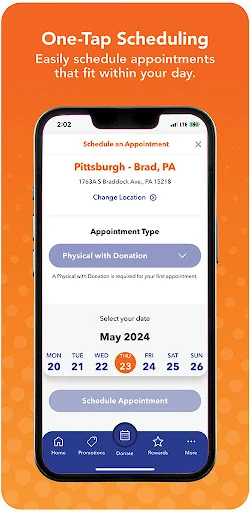
Picture a busy week when you want to fit a plasma donation around work or other plans. Instead of treating scheduling as a separate chore, you can use the app’s appointment feature to arrange a visit on the go. That makes it most useful at the point when you are figuring out your calendar, rather than as an app you need to check constantly throughout the day.
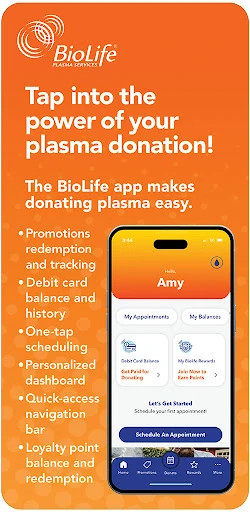
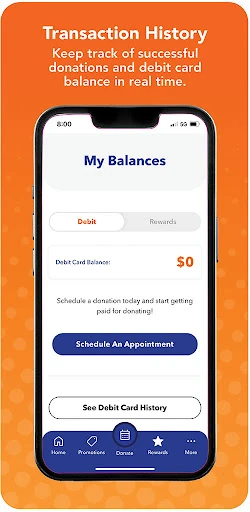
The same visit may bring a practical money-related question afterward: what is my reward payment balance, and what payments have I received before? BioLife puts the balance on the home screen and offers a payment history for quick reference. I like that these details sit alongside the scheduling tools, so the app supports both planning a visit and checking the related reward information.
A Focused Center Companion
Compared with a general calendar, BioLife is more specific to the donation routine. Its one-click scheduling is intended to make arranging an appointment easier, while the payment balance, payment history, and promotional progress are tied to BioLife visits. If you already donate through BioLife, that concentration can be useful: the app is designed around a particular service rather than trying to organize every part of your life.
It is not a broad health tracker, a medical reference, or a general-purpose payment app. The listed features focus on appointments, reward payments, promotions, and referrals. That distinction matters if you are looking for wellness measurements, medical guidance, or tools for managing appointments with unrelated providers. BioLife is best understood as a practical companion for its own donation process, not a substitute for those other tools.
Small Habits That Help
A useful habit is to check the appointment tool when you are planning the week, rather than waiting until a convenient time has already passed. Keeping the scheduling step close to your calendar planning can make it easier to see where a visit might fit. The app’s on-the-go scheduling is the feature that supports that routine; the details of available appointments will depend on what the app presents.
It can also help to check the home-screen balance and payment history when you want a quick record of reward payments, and to look at promotion progress when an offer is relevant. Notifications can bring promotional offers to your attention, while the referral feature lets you share by text, email, or social channels. These are useful occasional checks, not reasons to keep the app open all day.
More From Our News Desk

Zoom Meetings, Google Meet, or Teams: Which Is Easiest to Join?

How I Build a Free Streaming Lineup With Tubi

Why Crunchyroll Is the Default Anime App for So Many Fans

YouTube TV: A Practical Guide to Cutting Cable

Rummikub and the Small Comfort of Phone Games

TeamViewer Remote Control or AnyDesk for Helping Family?
Who May Find It Useful
I would recommend BioLife Plasma Services to people who already use BioLife and want a convenient place to handle a few donation-related tasks. Scheduling, checking reward payment details, following promotional progress, and sharing a referral are all specific, practical jobs. If those are things you find yourself doing, having them grouped in an app can be more convenient than looking for each detail separately.
It may be a poor fit if you do not donate through BioLife, or if you want a comprehensive health app with tracking and medical information. The feature set is deliberately narrow, so someone seeking a full appointment organizer or financial dashboard will need other tools. The App Store rating is 2.6 from 3,851 ratings, which is worth weighing alongside your own priorities before deciding whether it suits your routine.
BioLife Plasma Services is developed by Takeda Pharmaceuticals International AG. On the Apple App Store, it has a 2.6 rating from 3,851 ratings. The app is free to download. Its content rating is 4+. It is an iOS app, rather than an Android or desktop release, and requires iOS 15.1 or later.
The current version is 3.2.6(620). The App Store gives its release date as March 26, 2018, and its last update as October 26, 2026. The core listed tools are appointment scheduling, reward payment balance and history, promotional notifications and progress, and referrals. Store details and compatibility can change, so it is sensible to check the App Store before installing.
How the Donation Tools Fit Together
A Simple First Look
The app’s purpose is easy to understand from its feature set: help BioLife donors handle routine tasks connected with a visit. When I first look at it as a potential user, I would start with the two most immediate questions: how to schedule an appointment and where to check reward payment details. The home-screen balance gives one of those answers a particularly direct place.
There is no need to approach it as a complex health platform. The described tools are practical and specific, and the app’s value depends on whether you use BioLife’s donation service. For a new user, the sensible first step is simply to see whether the scheduling and payment information match the tasks they want to manage on a phone.
Day-to-Day Use
In everyday use, scheduling is the feature that can turn the app into a regular part of planning. One-click scheduling is intended to make arranging an appointment convenient while you are away from a computer. I would reach for it when deciding where a visit fits in the week, then return to the app when I wanted to review payment information or an offer.
The payment balance and history serve a different rhythm: they are quick-reference details rather than tasks that need constant attention. Keeping them together with scheduling reduces the number of separate places a donor needs to check for these BioLife-specific details. That is a modest convenience, but it is also the app’s central strength: it brings several related tasks into one focused tool.
Offers and Referrals
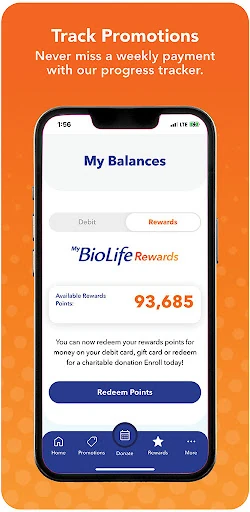
Promotional offers add a second reason to check in occasionally. The app can send notifications about exclusive offers, and it can track progress toward promotional rewards. That makes the feature most relevant when a promotion is active or when you want to know how far along you are, rather than as a daily destination in its own right.
The referral option lets you share with friends through text, email, or social channels and qualify for a Buddy Bonus. I appreciate that the sharing routes are straightforward and familiar. Still, promotions and referral rewards are extras around the main donation routine. Someone who only wants to schedule appointments and view payment history can focus on those core tools instead.
A Practical Check-In
A low-effort routine could begin with a quick appointment check while organizing the week. Once a visit is arranged, the app can be revisited later to look at the payment balance or history. If a promotional notification arrives, checking its progress is another occasional reason to open the app. This approach uses the features when they answer a real question, without turning them into unnecessary daily chores.
For someone who refers a friend, the sharing feature fits naturally into a separate moment: use text, email, or social sharing when there is a person who might be interested. The app does not need to be part of every conversation about donating. Its practical role is to make a few steps easier to handle when they come up, with promotions and referrals available when relevant.
Limits to Keep in Mind
The biggest limitation is the narrow focus. BioLife Plasma Services is for tasks related to BioLife donations; it does not claim to offer general health tracking, medical advice, or a universal calendar. People who want those broader features should not expect them from this app. That focus is reasonable, but it means the app’s usefulness depends heavily on being part of the BioLife donation routine.
The App Store rating is 2.6 from 3,851 ratings, so prospective users may want to consider that feedback alongside the convenience of the listed features. Ratings do not tell every user’s story, but they are a useful reminder that an app can be useful in concept and still not suit everyone’s experience. Check the current store details and compatibility before deciding.
BioLife Plasma Services has a clear job: make it easier for BioLife donors to schedule visits, check reward payment details, and keep up with promotions. I like that the app stays focused on those practical tasks rather than presenting itself as an all-purpose health tool. Its value is straightforward, but it depends on using the service it supports.
I would try it if I were already donating through BioLife and wanted those details close at hand. If you need broad health features or do not use BioLife, it is unlikely to add much to your routine. The low App Store rating is worth considering, and checking the current store information is a sensible final step.
BioLife Plasma Services Frequently Asked Questions
What is BioLife Plasma Services used for?
BioLife Plasma Services is a companion app for people who donate plasma through BioLife. Its listed features include scheduling appointments, checking a reward payment balance and history, receiving promotional offers, tracking progress toward promotional rewards, and referring friends through text, email, or social channels.
Which devices can run BioLife Plasma Services?
BioLife Plasma Services is available for iOS devices through the Apple App Store. It requires iOS 15.1 or later. Check the App Store listing for current compatibility details, since supported requirements can change over time.
What Android version does BioLife Plasma Services require?
The app is an iOS release, not an Android app, so an Android version requirement does not apply. For iPhone and other supported iOS devices, the stated minimum is iOS 15.1. The App Store is the place to check current device compatibility.
Does BioLife Plasma Services cost money?
BioLife Plasma Services is free to download on the Apple App Store. Store information can change, and any purchase details or other costs are worth checking directly in the current App Store listing before you install.
Who is BioLife Plasma Services best suited to?
It is best suited to people who use BioLife and want a mobile way to schedule appointments, check reward payment details, or follow offers and referrals. It may not suit someone seeking a general health tracker, medical information, or tools for appointments outside BioLife.
Pros
- Combines BioLife appointment scheduling with reward payment balance and history.
- Promotional notifications and progress tracking offer useful occasional check-ins.
- Referrals can be shared through text, email, or social channels.
Cons
- Its narrow feature set is useful mainly to people who use BioLife.
- The App Store rating is 2.6 from 3,851 ratings.
- It requires iOS 15.1 or later.
- Category
- Medical
- Version
- 3.2.6(620)











