ASDA Rewards
- 43.69K
- 2.6
- Installs
- 5.00M
- Price
- Free

Screenshots

Analysis by Reviewed APKs
ASDA Rewards is a companion for people who shop at Asda and want to keep track of Missions, coupons, Cashpot savings, and vouchers in one place. I like that it gives a grocery trip a clear rewards routine, from checking offers before I go to scanning at checkout. It is most useful to regular Asda shoppers; it is not a general-purpose coupon app for every supermarket.
A shop with a plan
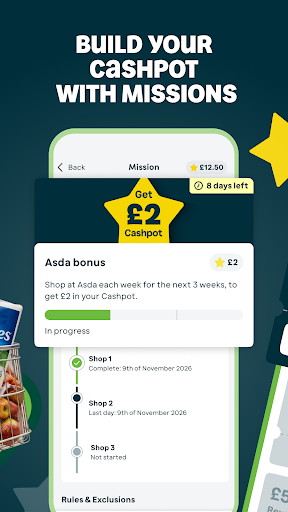
Before a grocery run, I would open ASDA Rewards and check the Missions and wallet coupons rather than browse the app while standing in a checkout queue. Missions are specific shopping challenges, so the app’s approach is different from earning a reward on every item. I can see how that could turn an ordinary shop into a small checklist: look over the available tasks, shop as usual, then scan the Rewards barcode at the till.
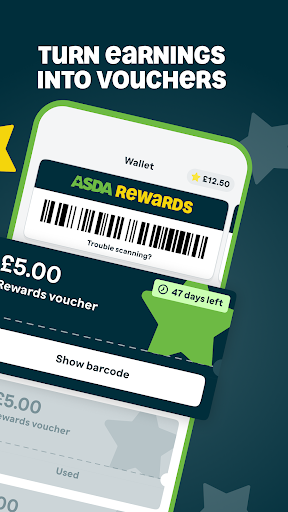
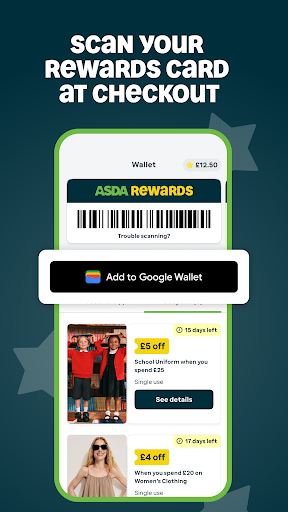
At checkout, the barcode is the practical link between the app and the shop. The description says scanning it can count toward Missions, while eligible coupons can be scanned alongside it. Afterward, the Cashpot balance can be converted into a voucher for an Asda store or Asda.com. That sequence gives the app a useful job before, during, and after shopping, instead of making it just a place to glance at promotions.
For Asda, not every shop
The obvious alternative is a supermarket’s general loyalty scheme, or simply checking shelf prices and buying what is on the list. ASDA Rewards is narrower: it brings together Asda Missions, digital wallet coupons, Cashpot vouchers, and Rollback prices. That focus suits someone who already shops at Asda and is willing to check the app as part of the routine. It is less compelling if most of the weekly shop happens elsewhere.
I would not treat it as a universal price-comparison tool or a way to earn rewards on every purchase. The app describes Cashpot growth as tied to completing particular Missions, not simply buying anything. Rollback prices cover products in Asda’s stores and online, while vouchers are for Asda spending. Those boundaries are important: the app can help organize Asda-specific savings, but it does not replace comparing a whole basket across retailers.
Small habits that help
The easiest habit is a quick pre-shop check. I would look at the wallet for new coupons, read the active Missions, and decide which ones naturally fit the list. That last part matters: adding items solely to chase a challenge can undermine the point of saving. When I reach the till, having the barcode ready avoids a last-second search, and coupons can be scanned with the Rewards barcode.
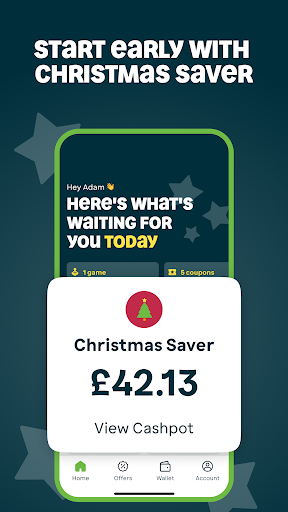
A second useful habit is checking the Cashpot and its timing rather than letting the balance become an afterthought. The app says savings need to be converted into vouchers within six months from the month they were earned. Someone who wants to set money aside for the festive period can also use the Christmas Saver Cashpot, which accepts transfers up until November 15. Push alerts can help flag Missions and new rewards, if notifications suit your routine.
More From Our News Desk

Zoom Meetings, Google Meet, or Teams: Which Is Easiest to Join?

How I Build a Free Streaming Lineup With Tubi

Why Crunchyroll Is the Default Anime App for So Many Fans

YouTube TV: A Practical Guide to Cutting Cable

Rummikub and the Small Comfort of Phone Games

TeamViewer Remote Control or AnyDesk for Helping Family?
Who may enjoy it
I would recommend ASDA Rewards to people who regularly shop at Asda, especially those who already remember to use a store barcode or check digital offers. Missions give those shoppers a reason to open the app before a trip, while the wallet and voucher conversion keep the rewards tied to a clear use. Online Asda shoppers can also link accounts by using the same email address for Rewards and grocery shopping.
It may not suit someone who wants automatic points on every purchase, dislikes checking offers, or shops mainly with other supermarkets. Missions require attention, and a coupon only helps when it fits what you were going to buy. The app also makes most sense as part of an Asda shopping routine, rather than as a standalone source of discounts or a place to plan a full grocery budget.
ASDA Rewards is a free shopping app from Asda Stores Ltd. Google Play shows more than 5 million installs and a 2.6-star rating from around 43,700 ratings. It is rated Everyone. The app is listed at version 1.66.1, with an update dated October 12, 2026. Those store figures offer useful context, though ratings reflect a range of individual experiences.
There is no purchase price, and the Google Play information says the app contains no ads and offers no in-app purchases. The description presents account registration or sign-in as the way to get started, with an existing Asda account available for login. It supports in-store barcode scanning and online shopping through a linked account. Check Google Play for device requirements before installing.
Making Rewards Part of the Shop
Opening the app
When I first opened ASDA Rewards, the appeal was easy to understand: it gathers shopping challenges, coupons, and a Cashpot in the same place. The app asks users to register or sign in, and people with an existing Asda account can use that account. For online grocery orders, using the same email address as the Rewards account links them automatically, according to the app’s description.
The main setup step is really a routine choice: will I remember to check the app before shopping and present its barcode at checkout? That is more important than filling the screen with settings. The app also offers the option to save the card to Google Wallet, which may suit people who prefer keeping a barcode near their other payment and pass tools.
The weekly rhythm
Day to day, the app revolves around preparation and checkout. Before shopping, I can check Missions and available wallet coupons. At the till, I can present the Rewards barcode, then scan eligible coupons as well. This is a simple flow, but it depends on remembering the phone and opening the right screen at the right moment. Having the barcode ready before joining the queue would make that part less rushed.
After a shop, the Cashpot is the place to see the outcome of completed Missions. When the balance is ready to use, it can be turned into a voucher for spending in-store or online at Asda.com, with a custom amount available. I appreciate that the app explains a real deadline too: Cashpot earnings must be converted within six months from the month they were earned.
What stands out
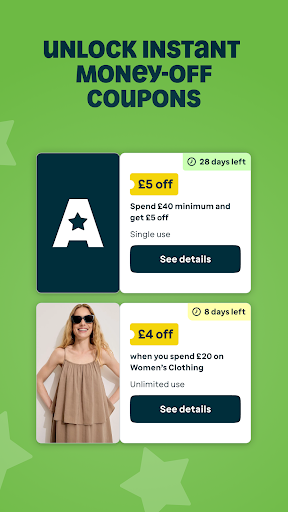
Missions are the defining feature, because they make rewards depend on completing specific shopping challenges rather than every purchase. Scanning the barcode at checkout is how the app connects those challenges to an in-store shop. Digital coupons add a more immediate kind of saving, and the app describes them as available in the wallet and redeemable at the till alongside the Rewards barcode.
There are a few other pieces around that core. Rollback prices can be explored across products in-store and online, and seasonal games may offer coupons or Cashpot earnings. Competitions are also available in the app. For shoppers saving toward the festive season, the Christmas Saver Cashpot provides a separate place to move earnings, with transfers accepted until November 15.
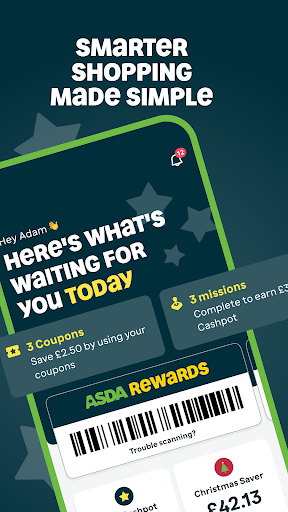
I also noticed how the app tries to keep savings visible: it has a personalized home screen, prompts, and optional push notifications for Mission reminders, reward drops, and updates. These are conveniences rather than reasons by themselves to install it. Their value depends on whether the user likes reminders and regularly shops at Asda.
A practical routine
For a normal weekly shop, I would start with the list already in mind, then check the app for Missions and coupons that match it. That order helps keep the app in its proper role: finding relevant savings on planned shopping, not deciding what to buy. If a Mission fits naturally, I can keep it in mind while shopping; if it does not, I can ignore it.
At checkout, I would open the barcode before reaching the till, scan it, and then use any suitable coupon. Later, I would check the Cashpot and make a note of the month earnings were added, so the six-month conversion window does not pass unnoticed. Online shoppers can use the same email for their Asda and Rewards accounts to link shopping activity.
A seasonal version of that routine is to move earnings into Christmas Saver before the November 15 cutoff. That keeps the festive goal separate from everyday voucher spending, according to the app’s description. I would still treat it as a choice within the app rather than an automatic setting: the useful part is remembering to make the transfer when it suits my plans.
Limits to keep in view
The biggest limitation is the Asda focus. Missions, coupons, Rollback prices, and vouchers all relate to shopping with Asda, so people who split their grocery spending across several retailers may have to manage separate schemes. The app also does not describe Cashpot earnings as automatic on every purchase; shoppers need to complete specific Missions to build the balance.
There is some attention involved, too. Checking the wallet, noticing which Missions are active, remembering the barcode, and converting earnings before they expire all make the scheme more hands-on than a discount applied without planning. That may be perfectly manageable for a regular shopper, but it is worth knowing if I prefer loyalty benefits that need little monitoring.
Finally, the app’s store rating is 2.6 stars, which is a mixed signal worth weighing alongside its features. A rating cannot explain every user’s experience, but it is a reason to keep expectations practical. I would install it for the Asda-specific rewards routine, not assume that every offer will suit my basket or that using the app will always make a shop cheaper.
ASDA Rewards has a clear purpose: it organizes Asda Missions, coupons, Cashpot earnings, vouchers, and Rollback browsing around the grocery shop. I like the practical barcode-to-voucher flow, especially for shoppers who already visit Asda often. Its trade-off is that rewards ask for attention and depend on specific Missions rather than every purchase.
I would try it if Asda is a regular part of my shopping routine and I am willing to check offers before heading out. If I want a universal grocery rewards app or do not want to track deadlines and challenges, I would look elsewhere. For the right Asda shopper, it is a useful companion, provided expectations stay realistic.
ASDA Rewards Frequently Asked Questions
What is ASDA Rewards used for?
ASDA Rewards is for Asda shoppers who want to complete Missions, check digital wallet coupons, and build a Cashpot balance. The balance can be converted into vouchers for spending in Asda stores or online at Asda.com. The app also includes Rollback browsing, seasonal games, competitions, and a Christmas Saver Cashpot.
Which phones and devices support ASDA Rewards?
ASDA Rewards is an Android app on Google Play. Its description also refers to saving the Rewards card to Google Wallet and using the app barcode at checkout. Check the Google Play store page for current compatibility details for your particular device, since supported devices and requirements can vary.
What Android version does ASDA Rewards require?
Check the ASDA Rewards page on Google Play for the current minimum Android version and your device’s compatibility. Requirements can vary as the app is updated. The app’s listed version is 1.66.1, but that number does not by itself describe which Android versions a phone can run it on.
Does ASDA Rewards cost money or include purchases?
ASDA Rewards is free to install on Google Play. The store information says it contains no ads and has no in-app purchases. The app’s savings features are tied to Asda shopping: Missions, coupons, and vouchers are not a general payment service, and Cashpot earnings need to be converted within the stated time window.
Is ASDA Rewards worth using for occasional shoppers?
It can be useful if occasional Asda trips line up with Missions or coupons, but it is most suited to people who shop there regularly and will check the app before a trip. It is less appealing if you expect rewards on every purchase or mainly shop elsewhere. Missions and the voucher deadline take some attention.
Pros
- Combines shopping Missions, wallet coupons, Cashpot earnings, and vouchers in one Asda-focused app.
- Lets users choose a custom voucher amount for eligible in-store or online spending.
- Offers barcode scanning at checkout and a Google Wallet saving option.
- Includes a separate Christmas Saver Cashpot for seasonal saving.
Cons
- Cashpot earnings depend on completing specific Missions, not every purchase.
- Savings require checking offers and converting earnings before the stated deadline.
- Its rewards and vouchers are focused on Asda shopping rather than multiple retailers.
- Category
- Shopping
- Version
- 1.66.1