Shopping List - Grocery & Todo
- 28.87K
- 4.8
- Installs
- —
- Price
- Free

Screenshots
Analysis by Reviewed APKs
Shopping List - Grocery & Todo is a deliberately simple iPhone and iPad app for keeping track of things to buy, from groceries to household supplies. I like its one-list approach: it gets the basics out of the way without asking me to organize every item into a system. It suits quick, everyday shopping and people who value a glanceable reminder more than detailed planning.
A List for the Next Errand
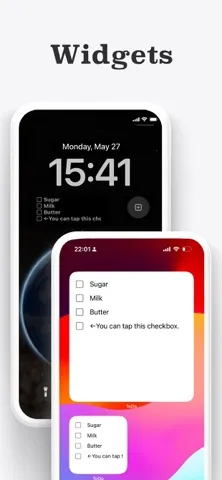
When I notice that we are low on coffee or dish soap, the useful part is being able to add it to the same list without deciding which list or category it belongs in. The Home Screen widget makes that especially handy: I can see what is on the list at a glance and check items off there while shopping. It feels closer to keeping a digital sticky note in view than managing a full pantry inventory.
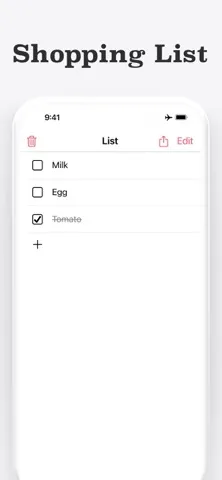
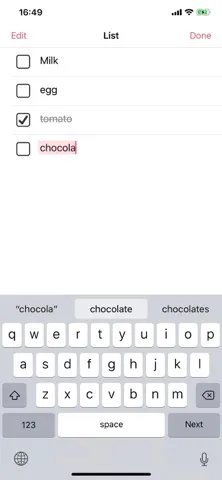
At the store, tapping an item marks it with a strikethrough, so I can tell what I have already picked up and what remains. Afterward, the trash button clears the checked items together, while anything unchecked can stay for another trip. I can also share the list as text if someone else is doing the shopping. Those small steps fit a normal grocery run without adding much ceremony.
Simple by Design
Compared with shopping apps built around categories, multiple lists, quantities, prices, or due dates, this one asks for less setup and offers fewer ways to organize. That trade-off is its main identity. If my goal is to jot down bread, batteries, and shampoo in one place and remember them later, the single-screen approach is appealing. I do not have to maintain a detailed system just to keep track of a few errands.
It is not the right fit for someone who wants separate lists for different stores, a categorized pantry, or a record of item costs and quantities. There is no multi-list organization or built-in due-date planning. Sharing is available by exporting the list as text, rather than setting up account-based syncing. I see it as a lightweight checklist for everyday shopping, not a stock tracker or a collaborative household planner.
Small Habits That Help
I would keep the widget somewhere easy to notice and add items as soon as I think of them, rather than trying to remember everything right before leaving. Since the list saves automatically and works offline, it can serve as a running note at home and remain useful in a store. Voice input through iOS Dictation is another practical option when typing feels inconvenient.
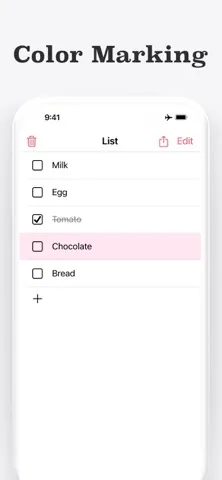
A little personal system can make the one list easier to scan. I can use its six item colors to distinguish, say, urgent purchases from household supplies, then drag items into an order that suits a particular trip. These are modest tools rather than formal categories, but they can help. When shopping is finished, clearing only the checked items gives me a fresh starting point without discarding anything I missed.
More From Our News Desk

Zoom Meetings, Google Meet, or Teams: Which Is Easiest to Join?

How I Build a Free Streaming Lineup With Tubi

Why Crunchyroll Is the Default Anime App for So Many Fans

YouTube TV: A Practical Guide to Cutting Cable

Rummikub and the Small Comfort of Phone Games

TeamViewer Remote Control or AnyDesk for Helping Family?
Who Will Appreciate It
I would recommend Shopping List - Grocery & Todo to someone who wants a straightforward reminder for groceries, household essentials, errands, or things to pick up on the way home. It is also useful as a basic checklist for packing or small tasks. The widget, offline use, automatic saving, and ability to share a text version make it convenient without requiring an account or a complicated setup.
It may frustrate people who rely on multiple lists, product categories, quantities, prices, or due dates to plan their shopping. The app deliberately leaves those features out, so a large or carefully managed household inventory may become awkward as one long list. If the appeal is simply writing down what is needed and checking it off, though, its restraint is a genuine advantage rather than a missing layer to work around.
Shopping List - Grocery & Todo is made by Komorebi Inc. and is available for iPhone and iPad through the Apple App Store. The store shows a 4.8-star rating from 28,869 ratings. It is free to download and use, and the app description says it displays ads; a one-time purchase can remove them, with no subscription.
The App Store age rating is 4+, and the stated minimum operating system requirement is iOS 15.0. The current version is 5.1.0. The app was released on June 9, 2016, and its most recent update is dated August 29, 2026.
A Closer Look at One-List Shopping
A Quick First Impression
When I first opened the app, the appeal was how little it asked me to decide. Its central idea is one list on one screen, without a setup process built around accounts or elaborate organization. I can start writing down purchases instead of spending time configuring how I want to manage them. That directness is a good match for an app meant to catch everyday reminders.
The widget is the setup choice worth considering early. Put it on the Home Screen and the list can remain visible between shopping trips; items can also be checked off from the widget itself. The app supports Dark Mode, and it saves automatically. Together, those details make it feel suited to being kept around as a small utility rather than opened only for a dedicated planning session.
The Everyday Loop
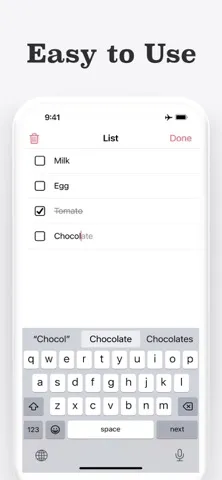
The routine is easy to understand: add an item with the keyboard or iOS Dictation, refer to the list when shopping, and tap each purchase to mark it done. A strikethrough provides a quick visual distinction between what is in the cart and what is still needed. I do not have to learn a more elaborate workflow before the list becomes useful.
When the trip is over, clearing checked items in one go tidies the screen. Unchecked items can remain for the next time, which is useful when I could not find something or decided to leave it for later. Because the app works offline, this basic add-and-check routine does not depend on having a connection while I am using the list.
Useful Little Touches
The widget is the feature that most changes how I would use the app. Instead of needing to remember to open it at home, I can keep the list in view and mark purchases directly from the Home Screen. Tapping the widget opens the app. It is a small convenience, but it suits the common moment when I remember an item between errands.
Color-coding gives the list a bit of flexibility without turning it into a category system. Swiping right assigns one of six colors, which I could use to flag something urgent or visually separate food from household goods. I can also press and hold an item to drag it into a different order, or swipe left to delete it.
For sharing, the app exports the list as text through its share button. That makes it possible to pass a set of items to family through a message, email, or chat app without an account or sync setup. Dictation, Dark Mode, and automatic saving round out the practical touches while leaving the basic list easy to follow.
A Routine That Sticks
I would use the list as a running record of things that are getting low, adding them as they come to mind rather than rebuilding a grocery list each weekend. A widget can keep those reminders visible during the week. Before heading to the store, I can scan what is there, rearrange items if a different order feels more convenient, and use colors to make a priority stand out.
During the trip, checking off each purchase helps me avoid rereading the whole list and wondering what is already in the cart. If someone else is going, I can share the text version; if I am shopping myself, the widget can be enough for quick checks. Afterward, clearing completed items leaves anything still outstanding in place. It is a simple loop that also works for errands or packing checklists.
The Limits of One List
The central limitation is also the central design choice: there is only one list. Shopping List - Grocery & Todo does not provide multiple lists, categories, due dates, quantities, or prices. That keeps the screen uncomplicated, but it means people with different shopping plans or detailed tracking needs will have to accept a flatter, less structured view of their items.
Color-coding and rearranging can add some order, but they are not substitutes for dedicated categories or separate store lists. Sharing text is convenient for passing along a list, though it is not the same as account-based shared editing. I would keep those distinctions in mind before relying on it as a household planning system rather than a personal, lightweight checklist.
The app description also says it shows ads and offers a one-time purchase to remove them. That is worth factoring into the experience if ads are a distraction for you. For someone who mainly wants a quick place to jot down a few things, the simpler feature set may matter more than the limits; for a more structured workflow, it may feel too spare.
Shopping List - Grocery & Todo does its best work when the job is modest: remember a handful of things, keep them visible, and check them off as I shop. The widget, offline access, text sharing, and quick cleanup support that routine without demanding an account or a complicated setup.
I would recommend it to anyone who prefers one tidy list over a feature-heavy shopping organizer. If you need separate lists, categories, prices, or quantities, I would look for a more structured tool. For everyday reminders and quick errands, this app’s simplicity is the point.
Shopping List Frequently Asked Questions
What is Shopping List - Grocery & Todo used for?
Shopping List - Grocery & Todo is for keeping one simple list of things to buy, such as groceries and household essentials. You can add items, check them off while shopping, and use it as a basic checklist for errands, packing, or small tasks. It also supports a Home Screen widget and sharing the list as text.
Which devices can run Shopping List - Grocery & Todo?
The app is available through the Apple App Store for iPhone and iPad. Its stated minimum requirement is iOS 15.0. Check the App Store entry for current device compatibility and requirements, since these details can vary with the device and software version.
Does Shopping List - Grocery & Todo work offline?
Yes. The app description says it works offline and saves items automatically, so you can use its shopping list without an internet connection. It does not require an account or sign-up. Sharing a text version uses the sharing options on your device.
Is Shopping List - Grocery & Todo free?
The app is free to download and use. Its description says it displays ads and offers a one-time purchase to remove them, with no subscription. Check the Apple App Store entry for current purchase details and pricing, which may vary.
Who is Shopping List - Grocery & Todo best for?
It is best suited to people who want a quick, uncomplicated list for shopping and everyday errands. The app keeps everything in one list and does not include multiple lists, categories, quantities, prices, or due dates. If you need those organizational tools, its deliberately simple approach may not suit you.
Pros
- One-screen list is quick to use for ordinary shopping and errands.
- Home Screen widget shows items and lets you check them off.
- Works offline, saves automatically, and needs no account.
- Color coding, reordering, and text sharing add useful flexibility.
Cons
- Only one list, with no categories or separate shopping plans.
- No built-in quantities, prices, or due dates.
- The app displays ads unless removed with a one-time purchase.
- Category
- Shopping
- Version
- 5.1.0











