Reverb: Buy & Sell Music Gear
- 202.45K
- 4.9
- Installs
- —
- Price
- Free

Screenshots
Analysis by Reviewed APKs
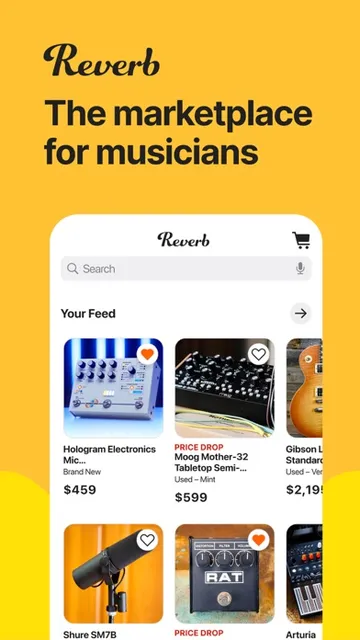
Reverb: Buy & Sell Music Gear is a marketplace for musicians looking to shop for instruments and audio equipment or sell gear they no longer use. I like that it combines practical shopping tools, such as saved searches and price-drop alerts, with videos and articles for browsing between purchases. It feels most useful for people who already have a type of gear in mind, but still enjoy discovering something unexpected.
Finding the Right Gear
When I want to track down a particular pedal or guitar, I can use Reverb to browse new, used, and vintage gear from brands, retailers, boutique builders, and musicians. Rather than relying on one broad browse session, I can narrow a search by details such as condition, year, and price. That makes the app a practical place to compare the kinds of listings that might fit a real playing or recording setup.
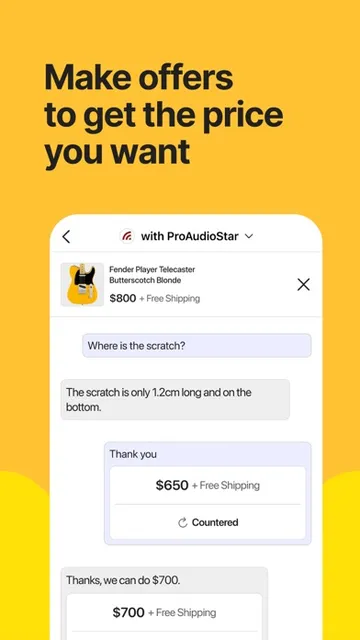
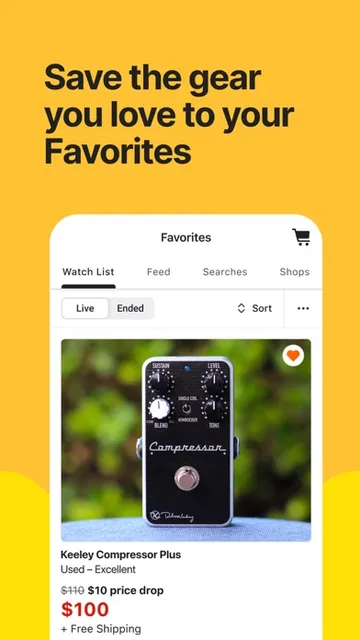
I’d save a search for something specific, then watch individual listings that catch my eye. Reverb can send notifications when watched gear drops in price or when items matching a saved search become available. If a listing needs clarification, I can message its seller, and I can make an offer rather than treating the displayed price as the only possible route. Those features give a gear hunt some useful follow-through.
A Marketplace, Not a Studio
Reverb’s main job is buying and selling music gear. Its selection spans guitars, pedals, synthesizers, drums, microphones, and more, with new, used, and vintage listings. Compared with browsing a single retailer, the app brings together different kinds of sellers and gear in one marketplace. I’d use it when I want to compare listings or look beyond standard new stock, especially if I have a particular model or category in mind.
It is not a music-making app, a recording workspace, or a substitute for trying equipment in person. The videos, lessons, interviews, and articles add useful discovery and learning material, but the central experience is still shopping and selling. I’d also treat a listing as a starting point for checking the details: the app supports messaging sellers, which is handy when a description leaves a practical question unanswered.
Make Browsing Count
A little structure helps when I’m browsing a large gear category. I’d save searches with filters for condition, year, and price, then let availability notifications bring relevant listings back to my attention. Watching individual items is useful for a different reason: it keeps an eye on a specific listing and can alert me if its price changes. Separating those two habits makes a casual browse less likely to become endless scrolling.
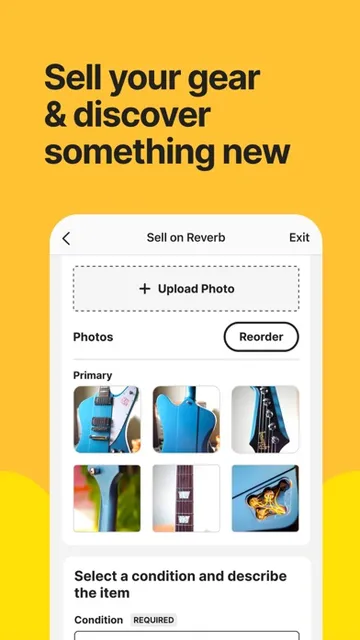
For a purchase I’m seriously considering, I’d read the listing closely, compare it with other options, and message the seller if I need more detail. If I’m selling, the app’s basic listing process is to take photos, write a description, and set a price. After posting, I can respond to offers and messages, update prices, and promote listings with Bump. That gives both sides a straightforward set of next steps.
More From Our News Desk

Zoom Meetings, Google Meet, or Teams: Which Is Easiest to Join?

How I Build a Free Streaming Lineup With Tubi

Why Crunchyroll Is the Default Anime App for So Many Fans

YouTube TV: A Practical Guide to Cutting Cable

Rummikub and the Small Comfort of Phone Games

TeamViewer Remote Control or AnyDesk for Helping Family?
Who Will Get the Most Out of It
I’d recommend Reverb to musicians who enjoy comparing gear and want one place to browse everything from familiar instruments to vintage finds. It should also suit people clearing out unused equipment and hoping to put it in front of a community of musicians. Search alerts are particularly appealing if you’re waiting for a certain model or price range rather than shopping on a fixed schedule.
It may be less compelling if you only want a local shop’s catalog, or if you’re looking for an app to record, compose, or practice music. Reverb does include gear demos, artist interviews, video lessons, and articles, but those sit alongside a marketplace rather than replacing dedicated learning or creative tools. If you prefer making a decision only after handling an instrument, online listings may be a starting point, not the whole process.
Reverb: Buy & Sell Music Gear is developed by Reverb.com, LLC and is available for iOS through the App Store. The app requires iOS 17.0 or later. Its App Store rating is 4.9 out of 5, based on 202,447 ratings. The supplied release date is August 4, 2013, and the current version is 7.20.0.
The app is free to download. Its content rating is 12+. The supplied last update date is November 3, 2026. I’ve left out other store details that aren’t provided in the available facts.
A Closer Look at the Gear Hunt
A Clear First Impression
When I first opened Reverb, its purpose felt easy to understand: it is a place to find music gear, sell equipment, and explore material about the tools musicians use. The range is broad, covering instruments and audio equipment rather than just one product category. That makes the app feel relevant whether I’m casually browsing pedals or looking for a microphone.
I’d start by searching for a category or item I already know, then use the available filters to make the results more manageable. Condition, year, and price are among the details that can shape a search. I appreciate that this supports a focused first session without requiring me to know exactly which seller or brand I want before I begin.
Shopping Day to Day
The most useful part of the everyday experience is being able to keep an eye on gear after the initial search. I can save searches for the sort of item I want, and Reverb can notify me when matching gear becomes available. I can also watch particular listings for price changes. Those are distinct ways to stay informed: one follows a category of interest, the other follows an item.
When a listing looks promising, messaging the seller gives me a way to ask for more details. The app also supports making offers, with updates about offers and deals available from the Home tab. I like that these steps connect browsing to a possible purchase, rather than leaving me to remember every listing I viewed. The experience still depends on the individual listing, so reading its description matters.
More Than Listings
Reverb’s discovery material gives me a reason to open the app even when I’m not ready to buy. It includes gear demos, artist interviews, video lessons, and articles about subjects such as gear history and recording or production techniques. These don’t change the app’s marketplace focus, but they add context for people curious about how equipment is used and what makes certain pieces interesting.
I also like the idea of browsing staff-curated collections alongside ordinary searches. A direct search is best when I know what I want; a collection or a piece about rare gear can help when I’m open to ideas. That mix gives the app room for both deliberate shopping and relaxed exploration, without making me treat every visit as a purchase mission.
A Useful Selling Routine
If I had unused gear to sell, I’d approach the app as a small, repeatable workflow. I’d take photos, write a description, and set a price to create a listing. Reverb says gear can be listed for free, which makes trying the process less of a commitment than paying simply to post an item. I’d take care to make the description clear so interested buyers have useful information to consider.
Once a listing is up, the routine shifts to keeping up with responses. The app lets sellers respond to offers and messages, update prices, and promote listings with Bump. That is a practical set of tools for managing a shop from a mobile device. I’d make a habit of checking for questions and reviewing the listing details when I update the price, rather than posting once and forgetting about it.
Keep Expectations Practical
A broad marketplace is valuable, but it can also mean taking time to compare options. Reverb offers filters and alerts that help narrow the hunt, yet they don’t remove the need to inspect each listing’s description and decide whether it suits your needs. Messaging a seller is there for questions, though the app’s tools can’t tell you whether a particular piece of gear is right for your setup.
The app is focused on buying, selling, and discovering gear, so someone seeking a dedicated music production or practice tool should look elsewhere. Its learning content is a welcome extra, not the same thing as a full course or a creative workspace. Also, the App Store requirement is iOS 17.0 or later, so device compatibility is worth checking before downloading.
Reverb earns its place on my phone as a focused gear marketplace with helpful ways to keep track of searches, listings, offers, and seller conversations. Its videos and articles add some browsing value beyond shopping, while the selling tools give musicians a clear path to list equipment.
I’d recommend it to musicians who want to compare new, used, or vintage gear, or sell equipment they no longer use. If you’re after a recording app or prefer to shop only after handling an instrument, it won’t be a complete answer. For gear discovery and marketplace browsing, though, it is a strong fit.
Reverb Frequently Asked Questions
What is Reverb: Buy & Sell Music Gear used for?
Reverb is a marketplace app for shopping for and selling music gear, including guitars, pedals, synthesizers, drums, and microphones. It also offers gear demos, artist interviews, video lessons, articles, and curated collections. Buyers can save searches, watch listings, message sellers, and make offers; sellers can create listings and manage responses.
Which devices can run Reverb: Buy & Sell Music Gear?
Reverb: Buy & Sell Music Gear is available on iOS through the App Store and requires iOS 17.0 or later. Check the App Store listing for current compatibility details for your specific device, since requirements can vary as the app is updated.
Does Reverb: Buy & Sell Music Gear cost money?
The app is free to download, and Reverb says sellers can list gear for free. Other costs or terms associated with buying or selling may vary, so check the App Store listing and the relevant details in the app before proceeding.
Can I sell my instruments with Reverb: Buy & Sell Music Gear?
Yes. Reverb lets users create a gear listing by taking photos, writing a description, and setting a price. Sellers can respond to offers and messages, update prices, and promote listings with Bump. It is intended for selling music gear, not for creating or recording music.
Who is Reverb: Buy & Sell Music Gear best for?
It should suit musicians who want to browse or compare new, used, and vintage equipment, follow particular searches, or sell gear they no longer use. It may not suit someone looking for a recording or practice app. The App Store listing is the place to check current device requirements and other store details.
Pros
- Search alerts and watched listings help keep a gear hunt organized.
- Covers a wide range of instruments and audio equipment.
- Supports messaging sellers and making offers.
- Includes gear demos, interviews, lessons, and articles.
Cons
- Browsing a broad marketplace can take time and comparison.
- Not a music-making, recording, or practice app.
- Requires iOS 17.0 or later.
- Category
- Shopping
- Version
- 7.20.0











