PayRange
- 99.11K
- 4.4
- Installs
- 1.00M
- Price
- Free
Screenshots
Analysis by Reviewed APKs
PayRange is a mobile payment app for vending, laundry, arcade, parking, coffee and other machines equipped to accept it. It suits people who regularly use shared machines and would rather pay by phone than hunt for coins or small bills. I like how focused the idea is: find a supported machine, select it, and swipe to pay. The main catch is simple but important: the machine has to support PayRange.
A Quick Stop, Without Coins
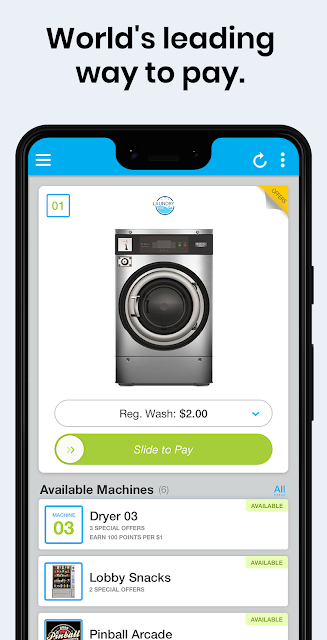
Picture stopping at a vending machine during a busy day and realizing your wallet has no small bills. With PayRange, the first thing I would check is whether the machine has the PayRange icon. If it does, the app can detect enabled machines when I enter their range. I can swipe left or right on the app screen to select a machine, then swipe up to send payment. That is the whole appeal: fewer steps between being thirsty and getting on with my day.
The same basic routine applies to a laundry machine or a supported coffee or arcade machine. I do not have to find an exact coin amount or deal with a bill accepter that will not take my cash. The app’s job is deliberately narrow: it connects a phone payment to compatible equipment. That makes it handy in places where I use these machines, but it does not turn every vending machine or laundromat into a PayRange location.
For Compatible Machines Only
PayRange is best compared with carrying coins and bills for shared machines, rather than with a general-purpose shopping or wallet app. It is designed for payments at supported vending, laundry, arcade, parking, coffee and other machines. When I am heading to a place where those machines are available, the app could spare me the small change scramble. Its usefulness depends less on how often I shop in general and more on whether the specific equipment around me accepts PayRange.
That distinction sets a clear boundary. PayRange will not work on a machine without PayRange hardware, so it cannot replace cash everywhere or pay for an ordinary purchase at an unsupported counter. It also is not a budgeting tool or a broad marketplace. I would treat it as a practical extra for certain everyday stops, not as the only payment method I carry. Keeping another way to pay makes sense when machine support is uncertain.
Make the Swipe Routine Easy
A useful habit is to look for the PayRange icon before opening the app. That quick check avoids wasting time trying to use a phone payment on equipment that cannot accept it. Once I am near a supported machine, the app is intended to detect enabled options automatically, without pairing or configuration. I can then use the left-or-right swipe to choose the machine and the upward swipe to send the payment.
I would also make the payment step part of the same small routine every time: check the icon, confirm the machine selection on screen, then swipe up. This is especially helpful when several enabled machines are close together, since the app lets me choose which one to pay. If I regularly do laundry or use vending machines in one building, remembering which equipment carries the icon can make the app feel more useful than opening it only when I am already stuck without change.
More From Our News Desk

Zoom Meetings, Google Meet, or Teams: Which Is Easiest to Join?

How I Build a Free Streaming Lineup With Tubi

Why Crunchyroll Is the Default Anime App for So Many Fans

YouTube TV: A Practical Guide to Cutting Cable

Rummikub and the Small Comfort of Phone Games

TeamViewer Remote Control or AnyDesk for Helping Family?
Who Might Find It Handy
I would recommend PayRange to people who often use shared machines in places such as a laundry room, workplace, school, arcade or parking area, provided those machines are enabled for the service. It is particularly appealing if carrying coins is inconvenient or if small-bill payment can be a hassle. The swipe-based interaction is straightforward, and automatic detection is intended to remove the need to pair with or configure each supported machine.
It may be a poor fit if the machines you use do not display the PayRange icon, or if you rarely pay for vending, laundry, coffee, parking or similar machine-based services. Someone looking for a general shopping wallet would also need a broader tool. I would not rely on PayRange as my only way to pay, since compatibility is tied to the equipment at each location. For the right routine, though, its narrow focus is a strength rather than a drawback.
PayRange is developed by PayRange Inc. and is available on Google Play as a free app. The store information gives it a 4.4-star rating from about 99,000 ratings, with over one million installs. It is marked for Everyone. The app supports payments at PayRange-enabled machines across categories including vending, laundry, arcade, parking and coffee.
The current version shown is 7.1.0, with a release date of October 20, 2014, and a last update dated August 27, 2026. The app is listed without in-app purchases or ads. Its description says it accepts major credit cards and Android Pay, and says payments are handled by a PCI-compliant processor. The minimum Android version is not included in the supplied app details, so check Google Play for the requirement that applies to your device.
A Small Payment Routine With a Clear Catch
A Focused First Impression
When I first opened PayRange, the appeal was easy to understand: this is a phone-based way to pay at certain machines, not a complicated system for all purchases. The central interaction is described in plain terms. Swipe left or right to select a supported machine, then swipe up to send payment. That kind of direct instruction suits a task I might want to finish quickly while standing in front of a vending machine.
Getting started is meant to be light on setup at the machine itself. PayRange says enabled machines are detected when the phone enters their range, with no pairing or configuration required. I appreciate that distinction because it keeps the process focused on selecting the right equipment. The first thing I would still look for is the PayRange icon; without compatible hardware, there is no payment to make through the app.
The Everyday Payment Flow
The day-to-day experience revolves around a small sequence rather than a long list of tasks. I check that the machine accepts PayRange, open the app near it, select the machine with a sideways swipe and send payment with an upward swipe. For a quick snack or a laundry cycle, reducing the need to carry exact change is the practical benefit. The payment method is most convincing when it saves a small but annoying interruption.
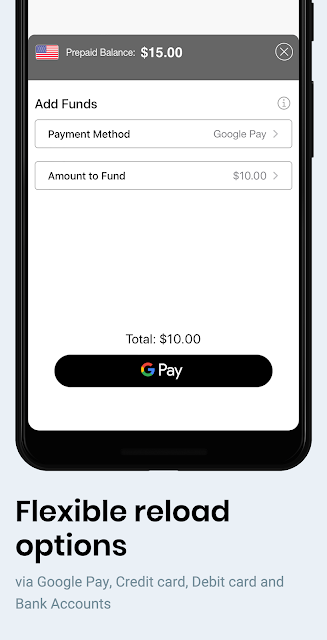
The app describes support for a range of payment options, including major credit cards and Android Pay. It also says personal information is not sent to the machine. Those details explain the intended payment setup, but the machine remains the key part of the experience. A simple phone interaction cannot overcome incompatible hardware, so the app’s usefulness may differ sharply between two buildings or even two nearby machines.
Machine Detection and Choice
Automatic detection is one of the features that makes PayRange feel suited to quick stops. According to the app description, enabled machines can appear when I enter their range, rather than requiring me to pair the phone with each one or configure the equipment. That can cut down on fiddling when I am already standing in a laundry room or by a row of vending machines.
The selection gesture matters most when more than one enabled machine is nearby. Swiping left or right lets me choose the machine I intend to pay at before sending payment with an upward swipe. I like that the interaction separates choosing from paying. It gives the user a moment to make sure the selected machine is the right one, while keeping the overall flow short.
A Routine for Laundry Day
For a laundry-day routine, I would start by checking the machines for the PayRange icon before loading clothes or counting on the app. If the equipment is enabled, I can open PayRange within range, select the machine on screen and send payment. The convenience is not dramatic, but it removes one familiar chore: figuring out whether I brought enough coins or the right bills for a machine.
I would keep the same habit for vending or coffee stops at work or school. Before relying on PayRange, I would confirm that the particular machine supports it, then use the app’s selection and payment gestures. That small check is the difference between a useful backup and a frustrating dead end. The app works best when I already know the places where its hardware is installed.
Compatibility Sets the Limits
The biggest limitation is not hidden: PayRange only works with machines equipped with PayRange hardware. That means its coverage depends on the machines around me, not simply on whether I have installed the app. Someone who mostly uses unsupported equipment may rarely get a chance to use it, however simple the swipe-based flow sounds.
I would also avoid treating it as a universal substitute for cash or as a general mobile wallet. Its stated uses center on supported vending, laundry, arcade, parking, coffee and other machines. Carrying another payment option is sensible for everything else. That is a modest limitation, but it should shape expectations before the first time I need to pay at a machine.
PayRange makes a specific everyday task simpler: paying at compatible machines without needing coins or small bills. Its automatic detection and short swipe sequence are easy to understand, and the range of machine types gives it more than one possible use. The trade-off is that the hardware has to be there, so convenience depends on the places I visit.
I would try it if I regularly use supported laundry, vending, coffee, arcade or parking machines, while keeping another way to pay for unsupported ones. If those machines are rare in my routine, PayRange will probably have limited value. For people who encounter its equipment often, it is a focused, practical option.
PayRange Frequently Asked Questions
What is PayRange used for?
PayRange lets users pay by phone at machines equipped to accept it. The app describes support for vending, laundry, arcade, parking, coffee and other enabled machines. Users select a machine with a sideways swipe and send payment with an upward swipe. It will not work on equipment without PayRange hardware, so check for the PayRange icon.
Which phones and devices can run PayRange?
PayRange is listed on Google Play, so this app is for Android devices. The supplied app information does not give a minimum Android version. Requirements can vary as the app is updated, so check the Google Play page for the version needed by your phone. The app description also refers to using the phone near a supported machine.
Does PayRange cost money to use?
PayRange is listed as a free app, with no in-app purchases or ads shown in the supplied store details. The description says it accepts major credit cards and Android Pay, but it does not explain every possible payment arrangement. Check Google Play and the payment information in the app for details that may vary.
Does PayRange work at every vending machine?
No. PayRange requires the machine to have PayRange hardware. The app says it can detect enabled machines when the phone enters their range, but that does not make an unsupported machine compatible. Look for the PayRange icon on the equipment before relying on the app, and keep another payment method available.
Who is PayRange best suited for?
PayRange is most useful for people who regularly use compatible vending, laundry, arcade, parking, coffee or other machines and want to avoid carrying coins or small bills for them. It may not suit someone whose usual locations lack enabled equipment or who needs a general-purpose mobile payment app. Its value depends on local machine support.
Pros
- A short swipe-based payment flow is easy to understand at a supported machine.
- Automatic detection is designed to avoid pairing or configuration at enabled machines.
- Works across several types of machine-based services, including laundry and vending.
Cons
- Only works when the machine has PayRange hardware.
- Not a general-purpose replacement for cash or other payment methods.
- Its usefulness depends on whether enabled machines are part of your routine.
- Category
- Shopping
- Version
- 7.1.0











