Market 32 and Price Chopper
- 5.58K
- 4.6
- Installs
- 100.00K
- Price
- Free

Screenshots
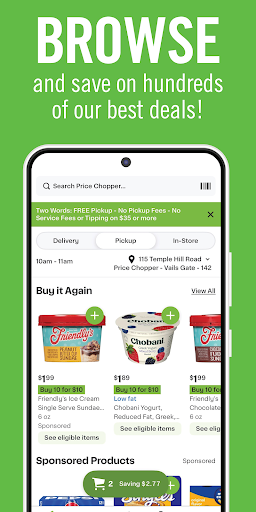
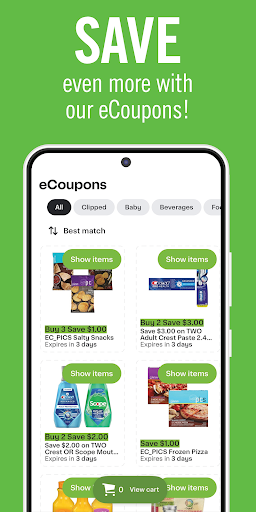
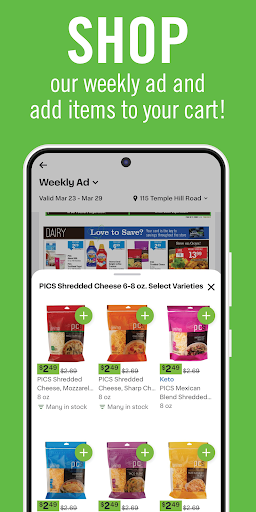
Analysis by Reviewed APKs
Market 32 and Price Chopper is a grocery companion for checking weekly specials, building a shopping list, finding recipes, and locating a nearby store. I’d recommend it to shoppers who already use these supermarket brands and want a little preparation help before heading out. Its appeal is practical rather than ambitious: it puts useful trip-planning tools in one place, without trying to replace the in-store grocery run.
Before the Grocery Run
When I’m planning a grocery run, I like to check what’s on special before deciding what to cook. This app brings Market 32 and Price Chopper weekly offers and promotions together with recipes, so I can browse for ideas and make a list of what I need. It’s a straightforward way to turn a vague “we’re running low” feeling into a more organized trip, especially when I’m already familiar with the stores.
The shopping list is the part I’d expect to use most often. I can add items as I think of them during the week, then check the list when I’m ready to leave. I also find the store locator useful when I’m away from my usual neighborhood or making plans around a different location. Those simple jobs give the app a natural place in the routine without requiring a major change to how I shop.
A Store Companion, Not a Cart
Compared with a general recipe app or a notes app used for groceries, Market 32 and Price Chopper brings store-specific promotions, recipes, lists, and location finding together. That combination makes the most sense if these are already the supermarkets you visit. Instead of switching between a store website, a recipe search, and a handwritten list, I can use one app to prepare for the same familiar shopping trip.
It isn’t presented as a full online grocery marketplace, and I wouldn’t choose it expecting to order groceries for delivery or curbside pickup. Its described strengths are browsing specials, managing a list, finding recipes, and locating a store. If I want a broad comparison across retailers or a way to shop from home, I’d look for a service built specifically around those needs.
Small Habits That Help
I get more value from the app when I add list items as soon as they come to mind instead of trying to remember everything at the last minute. A quick check of weekly promotions before meal planning can also help me spot relevant offers while I’m deciding what to buy. The list then becomes a handy bridge between browsing at home and walking through the store.
Recipes can be useful as a starting point when I’m tired of repeating the same meals. I can browse for an idea, note the ingredients I need, and then check the list before leaving. I’d also look up the nearest store when I’m planning a trip in an unfamiliar area. These are modest habits, but they make the app more useful than opening it only once I’m already in the parking lot.
More From Our News Desk

Zoom Meetings, Google Meet, or Teams: Which Is Easiest to Join?

How I Build a Free Streaming Lineup With Tubi

Why Crunchyroll Is the Default Anime App for So Many Fans

YouTube TV: A Practical Guide to Cutting Cable

Rummikub and the Small Comfort of Phone Games

TeamViewer Remote Control or AnyDesk for Helping Family?
Who Might Find It Useful
I’d recommend Market 32 and Price Chopper to regular shoppers at either chain who want store promotions, recipes, a shopping list, and nearby-location information in one app. It suits people who like to do a little planning before they go, but still expect to shop in person. If your grocery routine already revolves around these stores, its focused set of tools should feel relevant rather than cluttered.
It may be a less natural fit if you shop across many different grocery chains, want a comprehensive price-comparison tool, or expect to place an online order through the app. The description centers on planning and store discovery, not those broader shopping services. I’d also look elsewhere if the main thing you need is a dedicated recipe manager or a general-purpose list app that works across all your errands.
The app is developed by The Golub Corporation. On Google Play, it has more than 100,000 installs and a 4.6-star rating from 5,580 ratings. It is free to download, with no in-app purchases or ads indicated in the supplied app details. Its content rating is Everyone, making the stated rating suitable for a general audience.
The supplied app details give version 18.38.1 and a release date of May 21, 2012. The last update is dated October 26, 2026. A minimum Android version is not included in the available specifications, so check Google Play for device compatibility before installing. The app is intended for Android.
A More Organized Store Trip
A Practical First Look
When I first opened Market 32 and Price Chopper, the purpose felt clear: it’s designed to help with the next grocery trip, rather than serve as a general food or lifestyle hub. The core set of tools—specials, lists, recipes, and store locations—covers the questions I tend to have while planning: what’s on offer, what should I buy, and where should I go?
The app’s focus is its strongest first impression. I don’t have to guess whether it’s meant for recipes alone or store information alone; it brings both alongside list-making. I’d start by looking through the current promotions, then build a small list for the next visit. That gives me a quick feel for the main use without expecting a complicated setup.
Useful Between Trips
The day-to-day value comes from having a place to collect shopping thoughts before they become urgent. I might notice I’m out of an ingredient after dinner, then add it to my list for later. When I’m ready to shop, I can check the list and browse the current promotions in the same app. It’s a modest convenience, but it helps keep planning connected to the store I use.
I’d treat the app as a companion to an in-person grocery run, not as a substitute for deciding what I need or checking the shelves myself. The list helps me remember, and the specials give me something to browse before I leave. That division of labor feels sensible: the app handles preparation, while the actual trip remains a familiar store visit.
Four Handy Tools
Weekly specials and promotions are useful when I’m trying to plan around what’s available at Market 32 or Price Chopper. Rather than start with a blank meal plan, I can browse the offers and see whether anything suggests a dish or a needed staple. The app also includes recipes, which gives that browsing a practical next step instead of leaving me with a list of promotions and no meal idea.
The shopping list is the simplest feature to appreciate. It gives me a spot to collect items and refer back to them on the way to the store. Store-location finding rounds out the toolkit, particularly when I’m somewhere outside my normal routine. None of these features needs a long explanation, and together they cover several small decisions that come up around a grocery trip.
A Simple Weekly Routine
A workable routine might start when I’m deciding what to cook for the next few days. I can browse the weekly specials, look through recipes for an idea, and add the ingredients I need to the shopping list. Later, if I run out of something, I can add it right away rather than trusting myself to remember it during the next trip.
Before heading out, I’d check the list once more and use the store-location feature if I need to find a nearby Market 32 or Price Chopper. This routine doesn’t require a big planning session; it’s just a few short visits to the app spread across the week. That’s where the convenience lies. The tools are most useful when they fit into habits I already have.
Keep Expectations Focused
The app is tailored to two supermarket brands, so its usefulness depends on whether they are part of your shopping life. If I’m comparing many retailers or trying to organize every household purchase in one place, the focused approach may feel limiting. Its described toolkit is about planning a trip to Market 32 or Price Chopper, not managing a broader shopping routine.
I’d also keep expectations grounded around what the app is designed to do. It offers promotions, a list, recipes, and store locations; the description doesn’t frame it as a way to complete an online grocery order. For shoppers who want an in-person trip to feel better prepared, that’s a reasonable scope. For someone seeking delivery or curbside ordering, it may not cover the central need.
Market 32 and Price Chopper earns its place as a focused grocery-planning companion. I like that it brings promotions, recipes, lists, and store finding together around the practical task of getting ready to shop. It doesn’t try to be every kind of grocery service, and that narrower purpose makes its everyday role easy to understand.
I’d recommend it to shoppers who regularly visit Market 32 or Price Chopper and want help preparing for their next store run. If you need retailer-agnostic planning or online ordering, look for an app built around those priorities instead. For the right shopper, this is a useful, uncomplicated addition to the routine.
Market 32 and Price Chopper Frequently Asked Questions
What is Market 32 and Price Chopper used for?
Market 32 and Price Chopper helps shoppers browse weekly specials and promotions, manage a shopping list, find recipes, and locate a nearby store. I’d think of it as a preparation tool for a grocery trip, especially if you already shop at one of these chains. Its described purpose is trip planning and store information, rather than online grocery ordering.
Which devices can run Market 32 and Price Chopper?
The app is for Android, and the supplied details identify it as a Google Play app. They do not give a minimum Android version, so compatibility can vary by device and software version. Check the Google Play page on your phone for the current requirements before downloading, particularly if you use an older Android device.
Does Market 32 and Price Chopper cost money?
The app is free to download, and the supplied details indicate no in-app purchases or ads. Store policies and app details can change, so it’s worth checking the Google Play page before installing if you want the latest information. The listed price is zero, with no paid purchase required to get the app.
Can I order groceries through Market 32 and Price Chopper?
The app’s described features are weekly promotions, a shopping list, recipes, and store-location finding. It is not presented as a grocery ordering service, so I wouldn’t rely on it for delivery or curbside pickup. If ordering is your main goal, check the current Google Play description or the store’s available services for details.
Who should use Market 32 and Price Chopper?
It’s best suited to people who shop at Market 32 or Price Chopper and want to plan an in-person grocery run. The list and promotions can help organize a visit, while recipes offer meal ideas and store finding helps locate a nearby branch. Shoppers who need broad retailer comparisons or online ordering may prefer another app.
Pros
- Combines store promotions, shopping lists, recipes, and location finding.
- Free to download, with no in-app purchases or ads indicated.
- Useful for planning an in-person trip to either supermarket brand.
Cons
- Focused on Market 32 and Price Chopper rather than multiple retailers.
- Not presented as a way to order groceries for delivery or pickup.
- Minimum Android version is worth checking on Google Play.
- Category
- Shopping
- Version
- 18.38.1











