Keepa - Amazon Price Tracker
- 5.83K
- 4.2
- Installs
- 1.00M
- Price
- Free

Screenshots
Analysis by Reviewed APKs
Keepa - Amazon Price Tracker helps me check how an Amazon product’s price has changed, follow availability, and get an alert when it reaches a price I choose. It suits patient shoppers and people who watch Amazon listings more closely than a quick checkout requires. After using its charts and tracking tools as a counterweight to sale labels, my take is that it’s a useful research companion, though not a general-purpose shopping app.
A Better Way to Wait
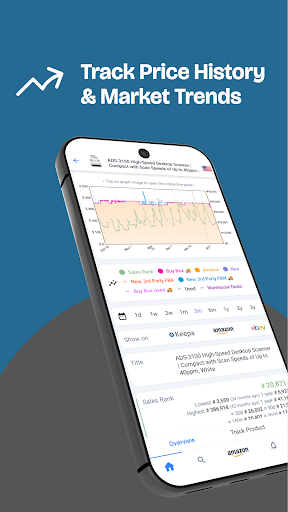
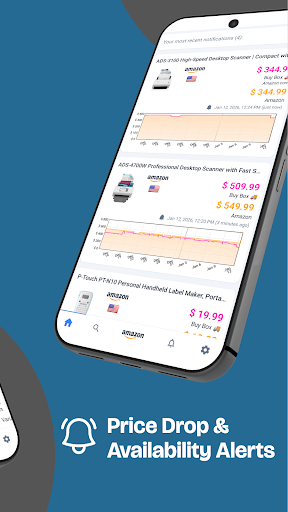
When I’m considering a more expensive purchase, I don’t always need it that day. Keepa gives me a way to check the product’s price history before deciding whether the current price feels reasonable. I can look at the chart, choose a target price, and let the app notify me if the price drops or the item becomes available again. That turns “I’ll check back later” into a simple tracking routine.
The everyday value is less about chasing every discount and more about adding context. A price that looks unusually low on a product page may not be unusual over time. Keepa’s history charts let me zoom in on daily changes or out across years, helping me judge whether a sale is worth acting on. I still make the buying decision myself, but I have more than a single moment’s price to consider.
A Shopping Research Companion
Keepa fits alongside Amazon rather than replacing it. I use it to research a product, review price and sales-rank history, or set an alert; Amazon remains where I browse and buy. For a shopper who already has a particular item in mind, that extra layer can be more useful than repeatedly refreshing a product page and hoping to catch a price change.
It is not a broad shopping app for comparing every retailer, nor is it a substitute for deciding whether a product is right for me. Its focus is Amazon product data, including price history, availability, seller offers, and other listing trends. That focus is helpful if Amazon is where I shop, but less compelling if I want a general deal-finding service or a cross-store comparison tool.
Small Habits, Better Context
I get the most from Keepa when I add a product as soon as I start considering it, rather than waiting until I’m ready to buy. Setting a target price gives me a clear reason to return, and an availability alert can help when an item is temporarily out of stock. This works especially well for purchases that are planned but not urgent, where waiting is genuinely an option.
I also try to read the chart with a specific question in mind. Is today’s price unusual? Has the price varied sharply? Are there several offers competing on the listing? Keepa includes histories for different conditions and seller-related measures, so a quick look at the relevant line or statistic is more useful than treating every chart as a single verdict.
More From Our News Desk

Zoom Meetings, Google Meet, or Teams: Which Is Easiest to Join?

How I Build a Free Streaming Lineup With Tubi

Why Crunchyroll Is the Default Anime App for So Many Fans

YouTube TV: A Practical Guide to Cutting Cable

Rummikub and the Small Comfort of Phone Games

TeamViewer Remote Control or AnyDesk for Helping Family?
Who Will Get the Most From It
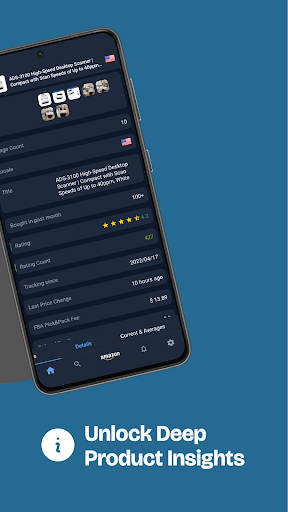
I’d recommend Keepa to people who shop on Amazon and are comfortable waiting for the right price. It is especially useful for anyone who buys the same kinds of products regularly, follows a few specific items, or wants to check whether a discount has meaningful history behind it. Sellers and market watchers may also appreciate the sales-rank, Buy Box, and offer-count histories when examining a listing.
It may be more detail than a casual shopper wants for an inexpensive item they need right away. The charts and historical measures are there to interpret, so the app rewards a little curiosity rather than offering a one-tap answer to every buying question. If you mainly want to browse a wide range of stores or shop without looking at price patterns, Keepa’s Amazon-centered approach may not suit your routine.
Keepa - Amazon Price Tracker is a shopping app from Keepa.com. Google Play shows over one million installs and a 4.2-star rating from about 5,800 ratings. The app is free, with no listed in-app purchases or ads, and its content rating is Teen. Its listed version is 6.7.0.
The app was released on April 7, 2020, and its listed last update is November 2, 2026. Keepa’s Android version requirement can vary by device and app release, so it’s worth checking the Google Play details on the device where you plan to install it. The practical fit also depends on whether the Amazon product information and tracking tools match how you shop.
A Closer Look at Keepa’s Tracking
Opening With a Purpose
My first impression is that Keepa is built around looking things up, not browsing for entertainment. I came to it with products in mind, which made the charts and tracking tools easier to understand. The app’s central promise is straightforward: inspect a product’s history, then decide whether to watch it or move on.
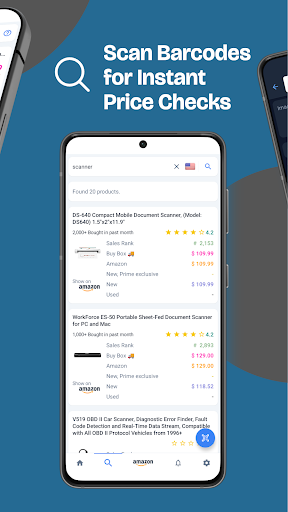
A useful first step is to search for a product or scan its barcode while shopping in a physical store. That gives the app a role beyond browsing at home: I can check an Amazon price while standing in front of an item and decide whether to compare further. The scanner is particularly practical when I have the packaging in hand and don’t want to type a long product name.
The Everyday Check-In
In day-to-day use, I treat Keepa as a quick research stop. I search for an Amazon product, look over its price history, and decide whether to set a target price. If I’m already interested, the alert keeps the item on my radar without requiring me to revisit the product page over and over.
The chart’s zoom range makes a difference to the question I’m asking. A close view can show short-term fluctuations, while a broader view helps me notice longer patterns. I don’t need to inspect every available measure on every visit. A glance at the price history is often enough for routine shopping, with the more detailed data there when I want to dig deeper.
More Than Price Lines
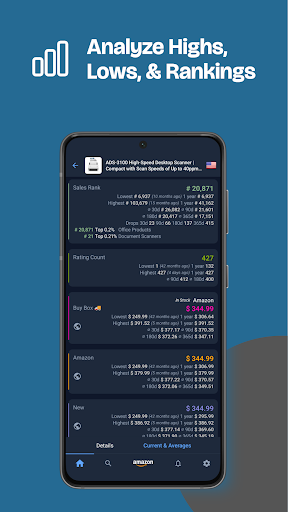
The price history can distinguish between new, used, and Warehouse Deals prices, which helps when the condition matters to my decision. Keepa also shows sales-rank history, Buy Box history, and offer counts. Together, these give a fuller picture of what has been happening on a listing than a single current price can provide.
Rating and review history adds another angle: it lets me follow changes in a product’s reputation over time. These figures are useful context, not a replacement for reading reviews or checking the item’s details. I like that Keepa offers several kinds of history, but I get more value by focusing on the ones relevant to the product I’m considering.
A Patient-Buyer Routine
For a planned purchase, I’d start by finding the product in Keepa and checking its history before deciding on a target. If I’m willing to wait, I set the price I’d be happy to pay and let an alert tell me when it drops. That keeps my decision tied to a personal budget rather than a sale banner or a short-lived rush.
The same routine can help with an item that isn’t currently available. Keepa can alert me when it comes back in stock, so I don’t have to check repeatedly. For international shoppers, the app supports Amazon locales including the US, UK, Canada, Germany, France, Italy, Spain, Japan, India, Mexico, and Brazil. I’d choose the relevant marketplace when tracking products.
Keep the Scope in Mind
Keepa’s strengths depend on its narrow focus. It is designed around Amazon products and their listing histories, not broad comparisons across competing retailers. If I want to compare the same item across many shops, I need another approach. The app also presents data for me to interpret rather than deciding whether a price is good on my behalf.
There is a learning curve to reading several chart lines and seller measures, particularly if I only want a quick answer. I find it manageable when I begin with one question, such as whether the price has been lower before. The app’s depth is useful for deliberate shopping, but it can feel unnecessary when I need an item immediately or don’t care about its history.
Keepa earns a place in my shopping routine when I have time to wait and want context before buying from Amazon. Price history, target-price alerts, and availability notifications make it practical, while the sales and seller data offer extra depth for people who want it.
I’d try it if you regularly track specific Amazon products or want a more informed way to judge discounts. If you prefer fast purchases or broad retailer comparisons, its focused, data-heavy approach may be more work than you need.
Keepa Frequently Asked Questions
What is Keepa - Amazon Price Tracker used for?
Keepa is used to check Amazon product price histories, review trends such as sales rank and offer counts, and set alerts for a chosen price or a product coming back in stock. It also includes product search and a barcode scanner for checking Amazon prices while shopping in a store.
Which devices and platforms support Keepa - Amazon Price Tracker?
Keepa - Amazon Price Tracker is an Android app available through Google Play. It supports Amazon locales in several countries, but that does not change the app’s platform. For device compatibility, check the Google Play details for the phone or tablet you intend to use.
What Android version does Keepa - Amazon Price Tracker require?
The Android version requirement can vary with the device and app release. Check the Google Play details from your Android device to see whether the current version is compatible. Keepa’s listed app version is 6.7.0.
Does Keepa - Amazon Price Tracker cost money?
Keepa is listed as a free app on Google Play, with no in-app purchases or ads shown in its store details. Store information can change, so check the current Google Play page for the latest cost and availability details before installing.
Who is Keepa - Amazon Price Tracker best for?
It suits Amazon shoppers who want to monitor particular products, compare current prices with past trends, or wait for a price or availability alert. Its charts also offer useful listing information for sellers and market watchers. It may be less appealing if you want broad retailer comparisons or very simple, immediate shopping.
Pros
- Price history charts make it easier to put current Amazon prices in context.
- Price-drop and back-in-stock alerts reduce the need to keep checking manually.
- Barcode scanning helps check Amazon prices while shopping in a physical store.
- Additional histories cover sales rank, Buy Box activity, offers, and ratings.
Cons
- Its Amazon focus does not replace broad comparisons across competing retailers.
- Several chart measures may take time to interpret if you want a quick answer.
- The detailed research tools are less useful for purchases that cannot wait.
- Category
- Shopping
- Version
- 6.7.0











