Harbor Freight Tools
- 60.16K
- 4.7
- Installs
- 5.00M
- Price
- Free
Screenshots
Analysis by Reviewed APKs
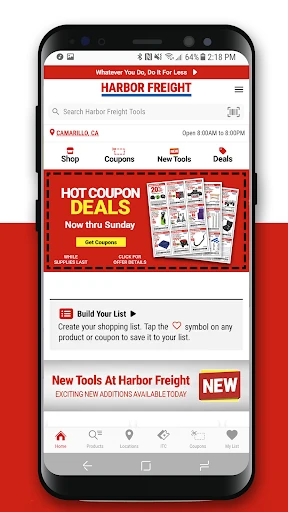
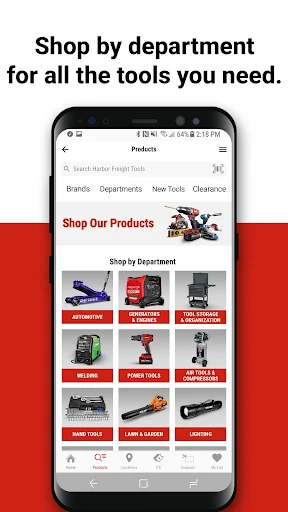
Harbor Freight Tools is a shopping app for browsing tools, checking local in-stock availability, saving products, and finding coupons and member deals. I’d recommend it to people who already shop at Harbor Freight or want to plan a store visit before starting a project. After exploring what it offers, my take is that it works best as a practical shopping companion, not as a tool-use or project-planning app.
Plan a Store Run
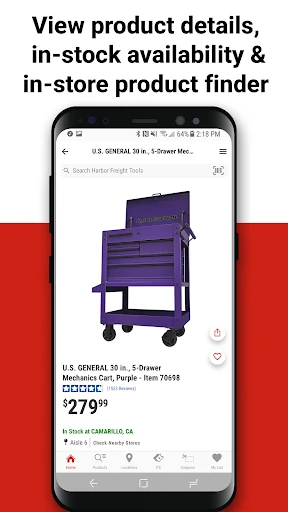
Imagine I’m getting ready to tackle a weekend repair and need a tool I don’t own. Before driving to a Harbor Freight store, I can browse products in the app and check whether an item is in stock in my area. That makes the app useful at the point when a shopping decision is still flexible: I can look at options, check availability, and avoid treating a store trip as a guess.
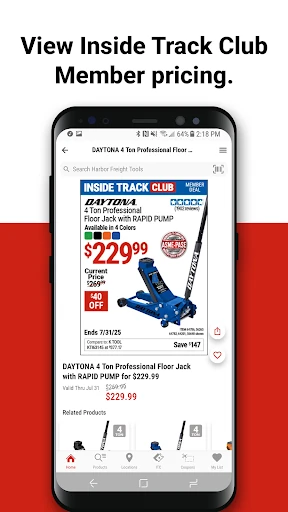
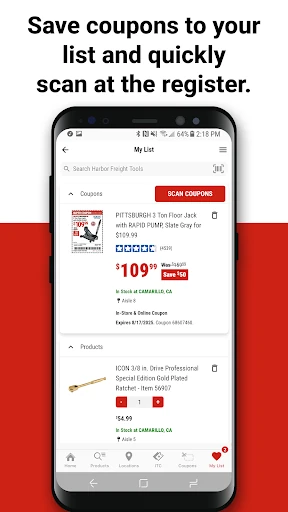
I’d also use the wish list to keep possible purchases together rather than trying to remember product names while shopping. If I find a coupon or an Inside Track Club deal that fits something I’m considering, the app lets me save the deal to that list. That small connection between browsing, savings, and a future store visit is the app’s most practical everyday idea.
A Shopping Companion, Not a Workshop
The obvious alternative is browsing Harbor Freight’s products while already in a store or looking at them during a shopping trip. This app is more useful when I want to compare what’s available beforehand, check local stock, or collect ideas for a later visit. The barcode and QR scanner also gives it a role in the aisle: scanning a product can help me quickly learn more about that tool.
It is still a retailer’s shopping app, rather than a general tool reference or a guide to completing a repair. The description focuses on browsing products, videos, coupons, availability, accounts, and wish lists; it doesn’t present the app as a source of step-by-step project instruction. I’d use it to decide what to shop for, then turn elsewhere for advice on how to do the job.
Make Browsing More Useful
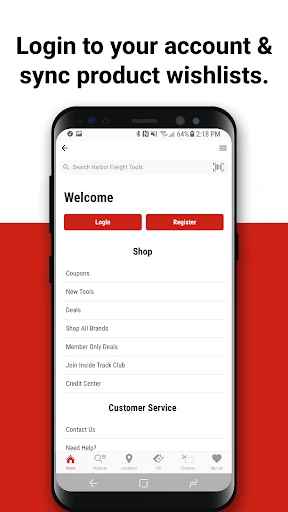
A simple habit is to add products to the wish list as soon as they catch my attention, especially when I’m browsing without an immediate purchase in mind. That gives me one place to revisit them before a store trip. Signing in lets the app sync the wish list across devices, which is handy if I switch between a phone at home and another device while planning.
I’d also check coupons and Inside Track Club offers alongside the products I’m considering, instead of treating savings as a separate browsing session. In-store, the scanner provides another quick way to look up a product. Harbor Freight’s videos can help me see a tool in action, so browsing those before deciding may be more useful than judging a product name alone.
More From Our News Desk

Zoom Meetings, Google Meet, or Teams: Which Is Easiest to Join?

How I Build a Free Streaming Lineup With Tubi

Why Crunchyroll Is the Default Anime App for So Many Fans

YouTube TV: A Practical Guide to Cutting Cable

Rummikub and the Small Comfort of Phone Games

TeamViewer Remote Control or AnyDesk for Helping Family?
Who Will Get the Most From It
I’d recommend Harbor Freight Tools to regular customers, budget-conscious DIYers, and anyone who likes to check product availability before visiting a store. The mix of coupons, member deals, product browsing, and saved wish-list items suits people who make shopping decisions over time rather than buying everything in one hurried trip. It can also be useful for someone already in a store who wants to scan a barcode or QR code for more product information.
It may be less useful if you rarely shop at Harbor Freight or want an app devoted to repair instructions, project tracking, or tool education. The app can show videos and help with shopping research, but its central job is connecting customers with the retailer’s products and offers. If I only needed general guidance for a repair, I’d look for a more specialized resource instead of expecting this shopping app to fill that role.
Harbor Freight Tools is developed by Harbor Freight Tools USA, Inc. On Google Play, it has over 5 million installs and a 4.7-star rating from about 60,000 ratings. The app is free to download, and the supplied store information says it contains no ads and offers no in-app purchases. Its content rating is Everyone.
The supplied app information gives version 11.23.2, a release date of September 28, 2020, and a last update date of October 23, 2026. No minimum Android version is provided in the facts, so I’m leaving that requirement out. Google Play can show the device compatibility and version details relevant to a particular phone.
A Closer Look at Shopping Tools
A Practical First Look
When I first explored Harbor Freight Tools, the clearest purpose was shopping preparation: find products, look for current savings, and decide what might be worth picking up in a store. That’s a straightforward starting point for an app tied to a retailer with a broad range of tool categories. I didn’t have to imagine it as a project hub; the product browsing and store-oriented features explain its role.
The app’s account features are relevant if I want to keep a wish list across devices. Signing in can sync that list, while saved products and deals give me something concrete to return to later. I’d treat the account as a convenience for ongoing shopping rather than a requirement for understanding what the app is for.
The Day-to-Day Experience
The everyday value comes from keeping several shopping tasks together. I can browse tools, check in-stock availability in my area, and build a wish list for an eventual visit. Those are small steps, but they address a familiar annoyance: seeing something interesting and then forgetting its name or whether it was available nearby when it’s time to buy.
Coupons and instant savings add a reason to check the app before buying, while Inside Track Club members can keep up with member deals and save those deals to a wish list. I like that the savings features sit alongside product discovery. They make the app more relevant to an actual purchase decision instead of limiting it to a digital catalog.
Features That Earn Their Place
The barcode and QR scanner is one of the more distinctly in-store features. If I’m standing by a product and want to learn more, scanning gives me a quick route to product information. It’s a modest feature, but it fits the moment well: I’m already looking at an item and deciding whether it belongs on my list or in my cart.
Product videos give browsing another dimension. A name and description may tell me what a tool is, but a video can show it in action. The app also brings together coupons, instant savings, and Inside Track Club deals, so there are several ways to explore offers while considering products. These features support shopping research without turning the app into a technical manual.
A Useful Shopping Routine
For a planned project, I’d start by browsing for the tools I might need and saving likely options to my wish list. Then I’d check coupons or member deals that apply to the things I’m considering. Before leaving for a store, I’d check in-stock availability in my area. That sequence makes the app useful before a purchase, rather than something I open only after I’m already shopping.
At the store, I could use the scanner to look up a product that catches my eye, then decide whether it belongs on my list. Later, signing in can keep the wish list synchronized across devices. I wouldn’t expect this routine to answer every project question, but it can make the shopping portion more organized and help me keep possible purchases from slipping out of mind.
Keep Its Role in Mind
The main limit is also the app’s focus: it is built around Harbor Freight shopping. Its products, offers, and store availability are most useful to someone who expects to shop with that retailer. If I’m comparing tools across many unrelated stores or looking for broad, independent product research, this app’s retailer-specific purpose may not be enough on its own.
The videos and product information can support a buying decision, but the description doesn’t frame them as comprehensive repair lessons. I’d avoid downloading it with the expectation that it will replace project instructions or a dedicated tool reference. It is better understood as a way to browse, save, scan, and check offers around a Harbor Freight purchase.
Harbor Freight Tools makes the most sense when I’m already considering a purchase from the retailer. Product browsing, local availability, coupons, saved deals, and a synced wish list all support a more organized store visit. The scanner and videos add useful context without changing the app’s basic role as a shopping companion.
I’d recommend it to Harbor Freight customers who want to plan purchases and keep an eye on savings. If you need general repair instruction or a retailer-neutral catalog, it is not the right fit. For its intended audience, though, it brings several useful parts of the shopping process into one place.
Harbor Freight Tools Frequently Asked Questions
What is Harbor Freight Tools used for?
Harbor Freight Tools is a shopping app for browsing tools, checking in-stock availability in your area, finding coupons and savings, and creating a wish list for a store visit. It also offers product videos and an in-store barcode or QR scanner. Inside Track Club members can follow member deals and save them to a wish list.
Which devices can run Harbor Freight Tools?
The supplied platform information identifies Harbor Freight Tools as an Android app available through Google Play. Device compatibility can depend on the phone and app version, so check the Google Play store page for the details that apply to your device.
What Android version does Harbor Freight Tools require?
The minimum Android version is not included in the supplied app facts. Requirements can vary with updates and device compatibility, so check the Google Play store page before installing if you need to confirm that it supports your phone.
Does Harbor Freight Tools cost anything?
The app is free to download. The supplied store information says it has no in-app purchases and contains no ads. Store details can change, so it is worth checking the Google Play page for current information before downloading.
Is Harbor Freight Tools useful if I’m not a regular customer?
It may still help if you’re considering a Harbor Freight purchase and want to browse products, check availability, or look for savings. The app is centered on that retailer, though, so it may not suit someone looking for general repair instruction or a shopping catalog covering multiple stores.
Pros
- Combines product browsing, local availability checks, and savings for store-trip planning.
- Wish lists can sync across devices after signing in.
- Barcode and QR scanning helps look up products while shopping in-store.
- Product videos offer another way to explore tools before buying.
Cons
- Its shopping features are centered on Harbor Freight rather than multiple retailers.
- It is not presented as a comprehensive source of repair instructions.
- A minimum Android requirement is not included in the supplied app details.
- Category
- Shopping
- Version
- 11.23.2











