Giant Food
- 6.54K
- 3.8
- Installs
- 500.00K
- Price
- Free
Screenshots
Analysis by Reviewed APKs
Giant Food is a grocery shopping app for checking local deals, using rewards, and handling parts of a store visit from your phone. I’d recommend it most to people who already shop at Giant Food and want coupons and their shopper card in one place. Its strongest appeal is practical convenience, though it is more useful as a companion to Giant Food shopping than as a general-purpose meal-planning app.
A quicker grocery run
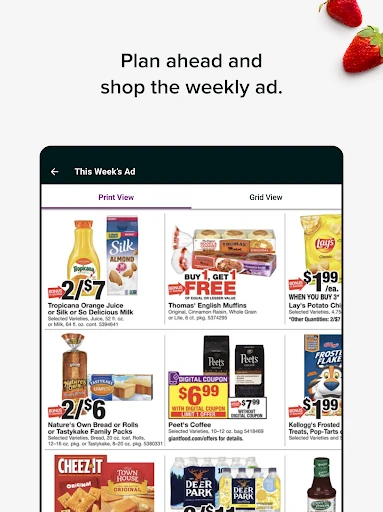
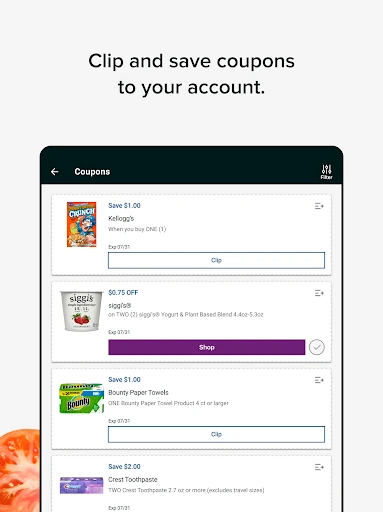
When I’m planning a regular grocery run, the useful starting point is the local weekly ad and the app’s coupons and specials. I can look over the offers before heading out, save relevant ones to my account, and then use my Giant Food card at checkout. That makes the app feel less like a separate shopping project and more like a way to prepare for the trip I already have planned.
The in-store tools matter once I’m actually at the store. I can sign in to access a digital Giant Food card, save it to my phone’s wallet, and scan it to use clipped coupons and rewards. If I’m stopping by for deli food, Deli Order Ahead offers another practical option; SCAN IT! is there for shoppers who want to bypass the checkout line. Those features give the app a role beyond browsing deals at home.
A store-specific companion
Compared with a general-purpose shopping list or meal-planning app, Giant Food is focused on the retailer’s own shopping experience. Its deals, Flexible Rewards, digital card, and in-store tools all connect to shopping at Giant Food. That focus is helpful if the store is already part of your routine: your coupons and points are close at hand instead of being separate from the trip.
That narrow focus also sets a boundary. I wouldn’t choose it as a universal grocery organizer for shopping across several chains, and the described features aren’t centered on recipe discovery or broader meal planning. It can help with savings and parts of a Giant Food visit, whether shopping online or in person, but it isn’t a replacement for every tool someone might use to plan meals or manage household groceries.
Make savings a habit
A small routine makes the app more worthwhile: check the weekly ad and specials before making a shopping trip, then save the offers that fit what you intend to buy. The app says saved offers can be redeemed automatically in-store or online when checking out with a Giant Food card. That keeps the process tied to the account and checkout rather than relying on me to remember every offer at the last minute.
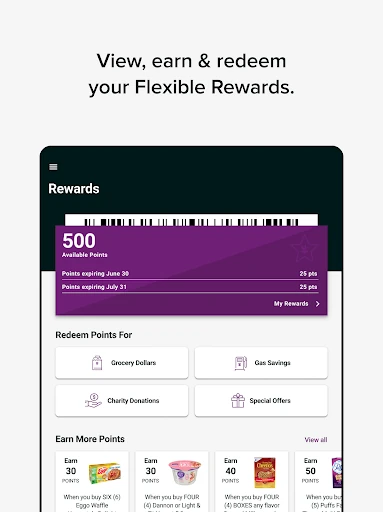
I’d also make a point of checking Flexible Rewards when signing in, especially if I’m already opening the app to look at coupons. Points accrue for each dollar spent online or in-store, and can be redeemed for fuel and grocery savings or special offers. Keeping the digital card accessible on the phone can help at the register, while Deli Order Ahead or SCAN IT! may be useful when the timing or checkout situation calls for them.
More From Our News Desk

Zoom Meetings, Google Meet, or Teams: Which Is Easiest to Join?

How I Build a Free Streaming Lineup With Tubi

Why Crunchyroll Is the Default Anime App for So Many Fans

YouTube TV: A Practical Guide to Cutting Cable

Rummikub and the Small Comfort of Phone Games

TeamViewer Remote Control or AnyDesk for Helping Family?
Who will get the most from it
I’d recommend Giant Food to regular Giant Food shoppers who want a convenient place to check current offers, use Flexible Rewards, and bring up a digital shopper card in-store. It makes particular sense for someone who already plans to shop at the chain and would rather prepare on a phone than keep track of store offers separately. The in-store options add value for people who order deli items ahead or want to use SCAN IT! to avoid the checkout line.
It may be less compelling if you rarely shop at Giant Food or want one app to organize grocery trips across multiple retailers. The app’s strongest tools are tied to the store’s own deals, card, rewards, and shopping experience. I’d also look elsewhere if your main priority is recipes or extensive meal planning, since those aren’t among the features described here. For occasional Giant Food customers, it can still be handy, but its value depends on using the store.
Giant Food is a free Android shopping app from Giant of Maryland LLC. Google Play shows over 500,000 installs and a 3.8-star rating from 6,543 ratings. The app contains ads, and it has no in-app purchases. Its content rating is Everyone. Those details give a useful sense of its reach and store classification, while the main practical question is whether its Giant Food-specific tools fit your own shopping routine.
The supplied app details give version 9.4.3 and a release date of March 3, 2011. The last update date is October 6, 2026. No minimum Android version is provided in the supplied details, so it’s worth checking the Google Play entry on the device you plan to use. The app supports online and in-store Giant Food shopping, including coupons, rewards, a digital card, and selected in-store services.
A closer look at the shopping flow
Getting started
When I first opened Giant Food, the clearest reason to use it was the connection between store offers and the shopper account. The app’s updated navigation includes a dedicated Shop section, with coupons, the local weekly ad, and specials among the shopping options. That gives me a straightforward place to begin when I’m preparing for a trip, rather than treating the app as a collection of unrelated tools.
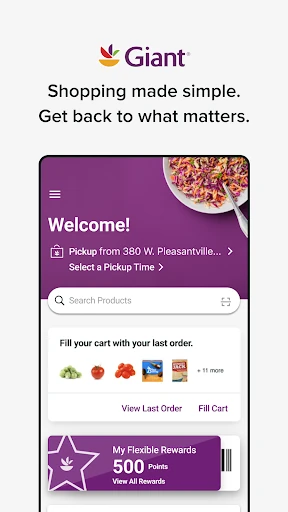
Signing in is useful for the account-based parts of the experience. The app provides access to Flexible Rewards and a Giant Food card, which can be saved to a phone’s wallet. I’d set up that access before arriving at the store, so the card and any saved offers are ready when needed. The overall setup is centered on making the retailer’s existing shopping and rewards experience easier to reach from a phone.
The daily shopping flow
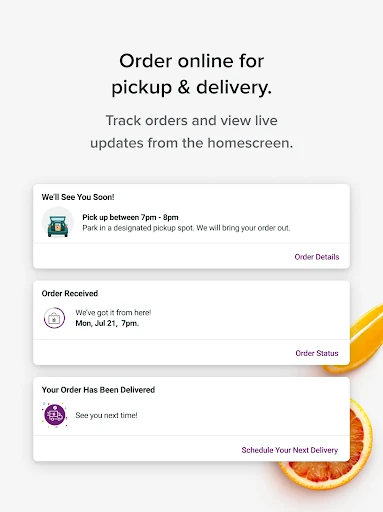
For day-to-day use, I’d treat the app as a companion before, during, and after a Giant Food trip. Beforehand, I can check the weekly ad and browse coupons or specials. While shopping in-store, the digital card can be scanned to use clipped coupons and rewards. For online shopping, saved offers can also be redeemed at checkout when using a Giant Food card.
That flow is practical because the tools connect to actual shopping rather than requiring a separate savings routine. I can review offers when I’m already thinking about what to buy, then use the account at checkout. The app also covers two specific moments in the store: placing a deli order ahead and using SCAN IT! to bypass the checkout line. Those options are useful additions, though they’re not necessary for every grocery trip.
Rewards and store tools
Flexible Rewards are one of the app’s more distinctive features. After signing in, shoppers can access their rewards, earn points for every dollar spent online or in-store, and redeem points for fuel or grocery savings and special offers. I like that the reward system is described as applying across both ways of shopping, rather than being limited to a single type of order.
The other notable feature is how the app brings store access onto the phone. A digital Giant Food card can be saved to the phone’s wallet and scanned in-store to use clipped coupons and rewards. Deli Order Ahead and SCAN IT! extend that usefulness to specific in-store tasks. Together, these features make the app more than a place to read promotions, even if their value depends on how often I use those services.
A useful weekly routine
A sensible routine would be to open the app before a planned grocery trip, browse the local weekly ad, and save coupons or specials that match the shopping I expect to do. I’d then sign in and keep the Giant Food card accessible on my phone. At checkout, the saved offers can be redeemed with the card, and the same account gives me access to Flexible Rewards.
I’d check the rewards as part of that same routine instead of letting points become an afterthought. Since points are earned for dollars spent both online and in-store, it’s worth remembering the account whichever way I shop. If I’m ordering deli food or want to bypass checkout, I can consider the corresponding in-store tools too. The point is to use the app around an existing shopping plan, not to turn every trip into a hunt for features.
Limits to keep in mind
The main limitation is the app’s close connection to one grocery retailer. Its best-known tools revolve around Giant Food’s offers, card, and rewards, so shoppers who divide their spending among several chains may still need other apps or methods. I’d judge it by how often I shop at Giant Food, rather than expecting it to serve as a complete grocery hub for every store.
It is also worth keeping expectations focused. The supported features cover shopping offers, rewards, a digital card, deli ordering ahead, and SCAN IT!, but they don’t establish a broad recipe or meal-planning experience. The app contains ads, which is a practical detail for anyone who prefers an ad-free shopping tool. For regular customers, those trade-offs may be reasonable; for everyone else, the store-specific benefits may not come up often enough.
Giant Food earns its place on my phone when I’m shopping at Giant Food regularly. Checking offers, accessing Flexible Rewards, and bringing up a digital card all support the same everyday task, while deli ordering ahead and SCAN IT! cover a couple of useful in-store situations. It is focused rather than all-purpose, and that focus is both its strength and its main limitation.
I’d try it if Giant Food is already one of my regular stops and I want its deals and rewards close at hand. If I shop across many chains or mainly want recipes and meal planning, I’d look for a broader option instead. For the store’s own customers, it’s a practical shopping companion with a clear purpose.
Giant Food Frequently Asked Questions
What is the Giant Food app used for?
Giant Food is used to shop online or in-store with access to coupons, the local weekly ad, specials, and Flexible Rewards. Shoppers can access a digital Giant Food card, save it to a phone’s wallet, and scan it in-store. The app also includes Deli Order Ahead and SCAN IT! for specific in-store shopping tasks.
Which phones and platforms support Giant Food?
The app is available for Android through Google Play. It supports Giant Food shopping online and in-store, with features such as a digital shopper card and rewards access on the phone. The supplied details don’t specify a minimum Android version, so check the Google Play entry for the requirements that apply to your device.
What Android version does Giant Food require?
The minimum Android version can vary by app release and device. The supplied app details don’t give a specific requirement, so check the Google Play entry before installing or updating Giant Food. That is the best place to confirm compatibility with your phone’s current Android version.
Does Giant Food cost money or include purchases?
Giant Food is free to download and use, and the supplied details show no in-app purchases. The app contains ads. Store information can change over time, so it’s worth checking Google Play for the current cost and purchase details before installing.
Is Giant Food useful for occasional shoppers?
It can be useful if you shop at Giant Food occasionally and want to check offers or access your card and rewards. Its strongest benefits are tied to the retailer, so regular customers are more likely to use it often. If you mainly shop at other chains or want broad meal-planning tools, it may not suit you as well.
Pros
- Brings coupons, weekly ads, specials, and rewards together for Giant Food shoppers.
- Digital Giant Food card can be saved to a phone’s wallet for in-store use.
- Deli Order Ahead and SCAN IT! support specific in-store errands.
- Flexible Rewards apply to spending online or in-store.
Cons
- Most features are useful only if Giant Food is part of your shopping routine.
- The app contains ads, which may bother shoppers who prefer a cleaner experience.
- Its described tools focus on shopping and rewards, not broad meal planning.
- Category
- Shopping
- Version
- 9.4.3











