Flybuy
- 8.41K
- 4.9
- Installs
- 100.00K
- Price
- Free

Screenshots
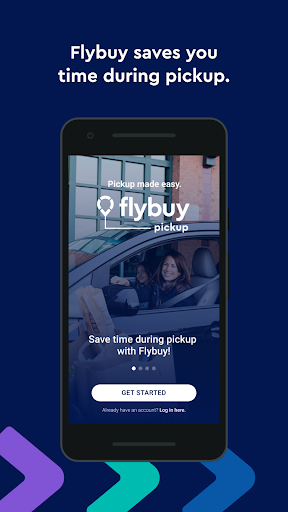
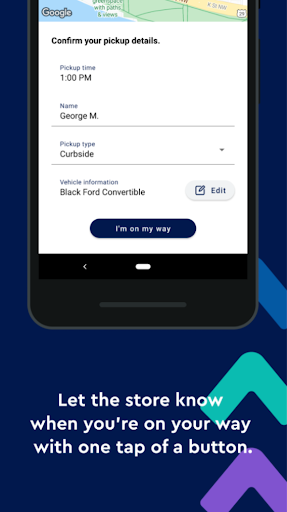
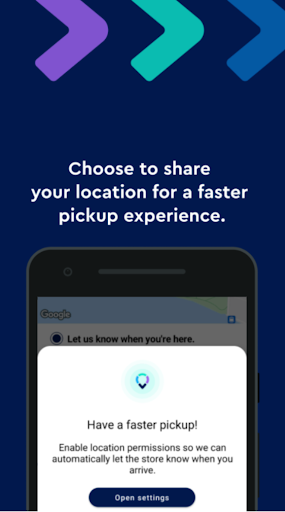
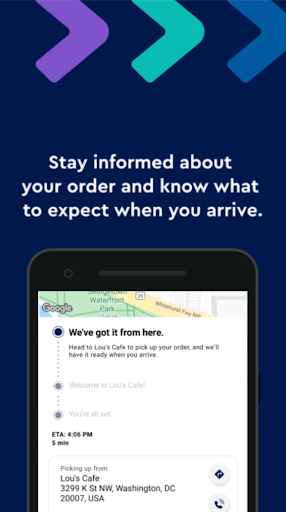
Analysis by Reviewed APKs
Flybuy is a pickup companion for people who want a store to know they are on the way and where they are waiting. After an order is ready, an email or text prompts you to set location-sharing preferences in the app. I like how clearly it focuses on one part of the pickup routine, though that narrow purpose means it is best alongside a separate way to place and manage orders.
A Smoother Pickup Arrival
Picture a familiar errand: I have an order ready for pickup, and I receive an email or text prompting me to use Flybuy. I can set my location-sharing preferences in the app so the store can prepare for my arrival. The practical benefit is easy to understand. Instead of arriving without the store knowing I am close, my progress can help staff get ready before I reach the pickup area.
The useful moment comes after the order is ready, not while I am deciding what to buy. That makes Flybuy feel like a small handoff between the order notification and the actual collection. If I am juggling a busy day, letting the store know when and where I am waiting could make the final stretch less uncertain. The app's stated job is focused: communicate arrival information to the store.
A Pickup Tool, Not a Store
Compared with a retailer's shopping app or a general delivery service, Flybuy is about coordinating pickup after an order is ready. It does not replace the process of choosing items or placing an order; the description begins with an order already being ready and an email or text arriving. I would treat it as a companion for that last leg, rather than as an all-purpose shopping destination.
That narrower role is also the main reason it will not suit everyone. If I rarely collect orders in person, or prefer not to share location information, there is less reason to add another app to my phone. For someone who does use pickup, the distinction is useful: Flybuy communicates progress and waiting location, while the order itself remains the starting point.
Make the Handoff Easier
A simple habit is to wait until the order-ready email or text arrives, then follow its prompt to set location-sharing preferences in Flybuy. That keeps the app tied to a real pickup rather than turning it into something I need to check throughout the day. When I am heading out, the store can use the enabled sharing to prepare for my arrival and know where I am waiting.
I would also make the sharing decision deliberately each time it comes up. The app's description makes location sharing central to its purpose, so the choice is not a minor extra setting. If I am comfortable enabling it for a pickup, the store gets the information Flybuy is designed to provide. If I am not, I should not expect the same arrival coordination from the app.
More From Our News Desk

Zoom Meetings, Google Meet, or Teams: Which Is Easiest to Join?

How I Build a Free Streaming Lineup With Tubi

Why Crunchyroll Is the Default Anime App for So Many Fans

YouTube TV: A Practical Guide to Cutting Cable

Rummikub and the Small Comfort of Phone Games

TeamViewer Remote Control or AnyDesk for Helping Family?
Who Will Find It Useful
I would recommend Flybuy to people who already order items for pickup and want the store to know when they are arriving. It makes most sense for someone who receives an order-ready email or text and is comfortable setting location-sharing preferences in an app. The value is practical rather than broad: helping a store prepare for the customer's arrival and identify where that person is waiting.
It may not be a good fit if you rarely use pickup, do not want to share location information, or expect one app to handle the entire shopping journey. Flybuy's described role starts once an order is ready, so it is not a substitute for the retailer or service used to place that order. I would consider it a focused convenience, not a must-have for every shopper.
Flybuy is a free Android shopping app from Radius Networks, Inc. Google Play shows over 100,000 installs and a 4.9-star rating from 8,414 ratings. The app contains ads, and the supplied store facts say it does not offer in-app purchases. Its content rating is Everyone.
The current version is 2.12.7. The supplied release date is May 23, 2019, and the last update date is October 28, 2026. The minimum Android version is worth checking on the Google Play page before installing, since a requirement is not included in the available app facts.
A Focused Tool for Pickup
A Clear Starting Point
When I first opened the idea of Flybuy, its purpose was easy to grasp: it is meant to help with the arrival part of pickup. The setup is prompted by an email or text after an order is ready, and the customer sets location-sharing preferences in the app. That gives the experience a clear starting point instead of asking me to invent a reason to open it.
I appreciate that the prompt is tied to an actual order status. In an ordinary week, I do not need to think about Flybuy until a pickup is ready and I receive the message. That keeps the app's role understandable, though it also means the experience depends on having an order and receiving the prompt in the first place.
The Arrival Routine
Day to day, the central action is sharing location so the store can prepare for the customer's arrival. The store can also know where the customer is waiting. I can see the appeal when timing matters: rather than reaching the pickup point with no arrival context, I can let the store know that I am approaching or already there.
The practical experience is intentionally narrow. Flybuy is not described as a place to browse products or track rewards; its job is to pass along arrival information for pickup. That makes it easier to understand what I should expect from it. I would open it because an order is ready, not as a general shopping habit.
Location Sharing at the Center
Location sharing is the feature that makes Flybuy distinct in the supplied description. Once it is enabled, stores can prepare for a customer's arrival and know where that person is waiting. That is a concrete use of location information rather than a vague promise of convenience, and it explains why the app asks customers to set sharing preferences after the order-ready message.
What stands out is the connection between the information shared and the pickup task. The app is not described as using location for unrelated shopping features. For someone who wants a store to have arrival context, that direct purpose can be helpful. For someone who prefers not to share location, the same feature is an important consideration before relying on Flybuy.
A Practical Pickup Sequence
My sensible routine would be straightforward: place an order through the relevant service, wait for the message saying it is ready, then use the prompt to set location-sharing preferences in Flybuy. When I head over, enabled sharing gives the store a way to prepare and know where I am waiting. Each step has a clear connection to the next, without requiring the app to become part of every shopping trip.
This flow seems most useful on days when I am fitting pickup between other errands. I can make the location-sharing decision at the point it matters, rather than keeping the app in mind all afternoon. The main thing I would keep in view is that the described benefit depends on enabling sharing; it is not simply a pickup notification on its own.
Keep the Scope in Mind
Flybuy's biggest limitation is also its defining choice: it focuses on pickup arrival coordination. The available description does not present it as the place to place orders, browse a catalog, or manage a broader shopping account. I would not install it expecting those jobs. Its usefulness depends on having an order ready for pickup and a reason to let the store know about arrival.
Location sharing also deserves a moment of thought. The feature is central to how the app helps stores prepare, so it may not suit people who do not want to share that information. And because Flybuy is an additional step after an order-ready message, it may feel unnecessary for quick pickups where arrival coordination is not a concern.
The store facts also note that the app contains ads, which is worth knowing before installing. I would weigh that alongside the focused use case rather than expecting a full shopping suite. For regular pickup users who are comfortable with the sharing step, the trade-off may be reasonable; for everyone else, the benefit may be too occasional.
Flybuy has a clear, limited purpose: it helps a store prepare for a pickup by sharing a customer's progress and waiting location. I like that the app's role begins with an order-ready message and does not pretend to be a complete shopping platform. Its usefulness depends on whether pickup is already part of my routine.
I would try Flybuy if I regularly collect ready orders and am comfortable setting location-sharing preferences. If I rarely use pickup or do not want to share location, I would skip it. It is a practical companion for a specific handoff, rather than an essential app for every shopper.
Flybuys Frequently Asked Questions
What is Flybuy used for?
Flybuy helps coordinate the arrival part of a pickup. After an order is ready, an email or text prompts you to set location-sharing preferences in the app. With sharing enabled, the store can prepare for your arrival and know where you are waiting. It is focused on pickup coordination, not described as a place to place orders.
Which phones can run Flybuy?
Flybuy is an Android app available through Google Play. The minimum Android version can vary by app release or device, so check the Google Play page for the current requirement before installing. The available app information does not describe an iOS or desktop version, so I would not assume those versions are available.
Does Flybuy cost money?
Flybuy is listed as free, and the supplied store facts say it does not offer in-app purchases. The app does contain ads. Store details can change, so it is sensible to check the Google Play page for current pricing and purchase information before downloading.
What Android version does Flybuy require?
The minimum Android version is not included in the app facts available for this review. Requirements can vary as an app is updated, so check Flybuy's Google Play page on your device before installing. That page is the best place to confirm whether your particular Android phone or tablet is supported.
Is Flybuy a good fit for every shopper?
Flybuy is most relevant to people who order for pickup and are comfortable setting location-sharing preferences so the store can prepare for their arrival. It may not suit people who rarely collect orders or prefer not to share location information. Its described role is narrow, so shoppers looking for a broader shopping app should consider that limitation.
Pros
- Gives stores arrival information so they can prepare for pickup.
- The order-ready email or text provides a clear starting point.
- Focused purpose makes its role in the pickup routine easy to understand.
- Free to install, with no in-app purchases listed.
Cons
- Its main benefit depends on enabling location sharing.
- Focused on pickup arrival rather than the full shopping process.
- Contains ads, according to the supplied store facts.
- Category
- Shopping
- Version
- 2.12.7











