Fingerhut Mobile
- 90.59K
- 4.7
- Installs
- 1.00M
- Price
- Free

Screenshots
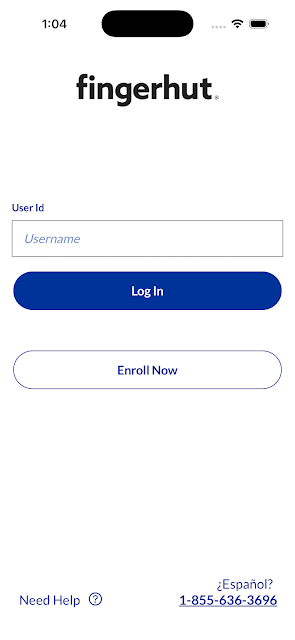
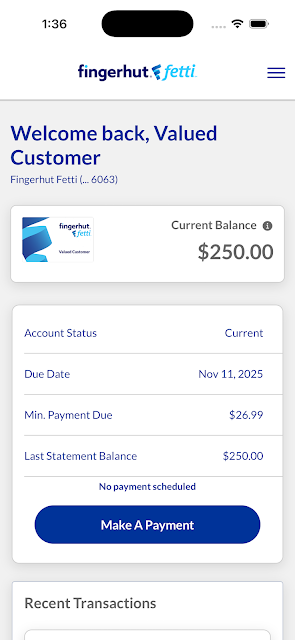
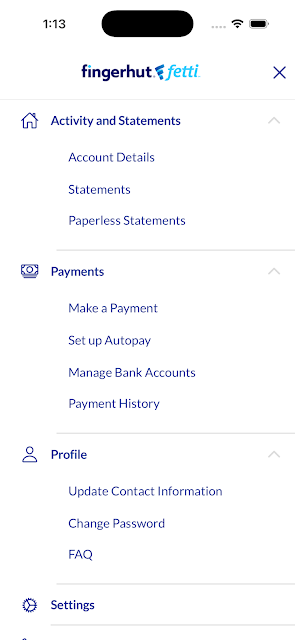
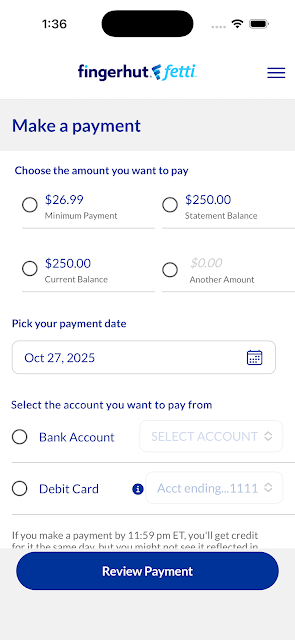
Analysis by Reviewed APKs
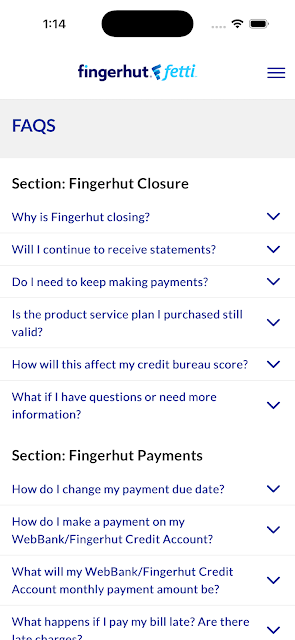
Fingerhut Mobile is now focused on managing a Fingerhut account rather than browsing a shopping catalog. I see it suiting customers who want to check available credit, review a balance, or handle payments from their phone. Its purpose is narrower than a typical shopping app, but that focus can be useful when a quick account check or payment fits more naturally into a daily routine than a trip to a website.
A Quick Account Check
Picture checking your account between errands, then remembering you wanted to see whether a recent payment went through. Fingerhut Mobile is built for that sort of practical check-in: once signed in, you can view your available credit and current balance, and review past payments. I like that these are concrete account tasks rather than a broad set of shopping distractions when all I need is a quick look.
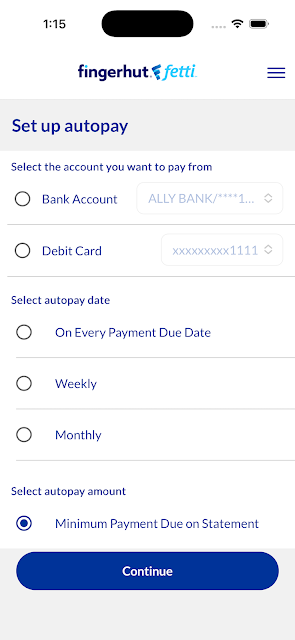
A payment routine is another straightforward fit. I could use the app to make a payment on a Fingerhut Fetti or Advantage account, then check the payment history later. Recurring payment schedules can also be set up and viewed. Those options make the app relevant at bill-paying time, though it is still important to review the account details carefully before confirming a payment.
An Account Tool, Not a Store
The biggest difference from a conventional retail app is right in the product’s current purpose: the shopping experience has been removed. I would not open Fingerhut Mobile expecting to browse products, compare items, or track an order. Instead, it is an account-management companion for people who already have a Fingerhut account and want access to balance, credit, and payment information on a phone.
That narrower job makes it different from a general banking app, too. The supported tasks here concern Fingerhut Fetti and Advantage accounts, not a full view of someone’s finances or a broad set of money-management tools. If you want to shop the catalog, the app’s current description does not make it sound like the right destination. If your goal is simply handling Fingerhut account tasks, the focus is clearer.
Make It Part of a Routine
I would get the most out of Fingerhut Mobile by using it at moments when I already have a reason to think about the account: after making a payment, when reviewing a balance, or while checking a recurring payment schedule. Keeping those checks tied to an existing routine can make the app feel useful without turning it into something I open constantly just to browse.
A simple workflow is to sign in, check the available credit and current balance, and then look at past payments if I need context. If a recurring schedule is relevant, I can review it as part of the same account check. The app requires new credentials to be set up, with Face ID and Touch ID also part of the setup, so I would allow a little time for that before relying on it for a quick task.
More From Our News Desk

Zoom Meetings, Google Meet, or Teams: Which Is Easiest to Join?

How I Build a Free Streaming Lineup With Tubi

Why Crunchyroll Is the Default Anime App for So Many Fans

YouTube TV: A Practical Guide to Cutting Cable

Rummikub and the Small Comfort of Phone Games

TeamViewer Remote Control or AnyDesk for Helping Family?
Who Will Find It Useful
I would recommend Fingerhut Mobile to existing Fingerhut customers who want a direct way to review their account information on an Android phone. Its strongest appeal is practical: checking available credit and balance, making a payment on supported accounts, viewing recurring payment schedules, and looking back at past payments. If those are tasks you handle regularly, a dedicated account app can be more convenient than waiting until you are at a computer.
It may not suit someone who wants to shop from a phone, browse a broad catalog, or use one app to oversee finances across different providers. The shopping experience has been removed, so expectations matter here. I would also be cautious about treating it as a general budgeting tool; its described role is managing Fingerhut accounts. For that specific purpose, the feature set is easier to understand and judge.
Fingerhut Mobile is a free Android app from Bluestem Mobile Apps. Google Play shows over one million installs and a 4.7-star rating from about 91,000 ratings. The app is listed with an Everyone content rating. Those figures offer a useful snapshot of its reach and feedback, although they do not tell me whether it will fit an individual customer’s account-management habits.
The listed version is 4.46.3, with a release date of November 19, 2015, and a last update date of August 4, 2026. The app is free to download, has no listed in-app purchases, and contains ads. Fingerhut Mobile requires setting up new credentials, Face ID, and Touch ID. The minimum Android version is worth checking on Google Play for the device you plan to use.
A Closer Look at Account Management
Getting Started
When I first considered what the app asks of a new user, the setup stood out before any account task does. The description says users will need to set up new credentials, Face ID, and Touch ID. That is important to know if you are downloading it while in a hurry to make a payment. I would set it up ahead of time, when I can give the sign-in process my attention.
The initial impression is shaped by the app’s narrower role. This is not a catalog-first experience with account tools tucked away in a corner; the shopping experience has been removed. I find that clarity helpful, as long as a new user understands what the app is for before installing it. The sensible first step is simply getting signed in and locating the account information you expect to check.
Everyday Account Tasks
Day to day, the core appeal is having several useful account tasks together. I can view an available-credit figure and current balance, then make a payment on a Fingerhut Fetti or Advantage account. If I want to check what I have paid before, past payments are available to review as well. That gives the app a practical sequence: check the account, take an action if needed, and look back for context.
The experience sounds most valuable in short visits rather than long sessions. I might open it when a payment is on my mind, confirm the current balance, and then leave once I have handled the task. That is a different rhythm from an app designed to encourage browsing. For someone who wants a focused account check, the limited scope could be a benefit rather than a missing attraction.
Schedules and Payment History
Recurring payment schedules are one of the more useful details in the feature set. Users can set up and view schedules, which gives a regular payment routine a place in the app alongside one-time payments. I appreciate that both creating and reviewing a schedule are mentioned; setting something up is only half the job if I later need to check what I arranged.
Past-payment review adds another small but meaningful piece. When I am trying to make sense of an account’s recent activity, having a place to revisit payments is more useful than relying on memory alone. I would still check the details shown in the account before taking action, but the combination of payment history and schedule viewing makes the app more than a single-purpose pay button.
A Useful Monthly Check-In
A practical routine could be to open Fingerhut Mobile when I am already doing regular account housekeeping. I would review the current balance and available credit, look over past payments if I wanted a quick record, and check any recurring payment schedule. If I needed to make a payment, the app supports payments for Fingerhut Fetti and Advantage accounts. That keeps the session centered on account upkeep, not browsing.
I would also make the sign-in setup part of that routine, rather than leaving it until the last minute. New credentials and Face ID and Touch ID setup are required, so a first visit may take more attention than later check-ins. Once I have access ready, the app’s described tasks lend themselves to brief, purposeful visits that fit around an existing bill-paying habit.
Limits to Keep in Mind
The most important limitation is that the shopping experience is gone. Anyone looking for product discovery or a catalog on their phone should not assume Fingerhut Mobile still serves that purpose. I would set expectations accordingly: it is an account tool for checking information and handling certain payment tasks, not a general shopping destination. That distinction explains both its usefulness and why it may feel sparse to some users.
Its account focus also means the features are specific rather than broad. The described payment support covers Fingerhut Fetti and Advantage accounts, and the app’s role is not presented as managing finances across multiple services. The required setup may be an extra step for someone who only wants an occasional check. And because the app contains ads, the experience is not entirely ad-free, even though its main job is account management.
Fingerhut Mobile makes the most sense when I judge it as an account companion, not as a shopping app. Checking balances and available credit, making supported payments, viewing recurring schedules, and reviewing past payments are a focused set of everyday tasks. The required sign-in setup is worth planning for, but the app’s purpose is easy to grasp once that distinction is clear.
I would recommend it to Fingerhut customers who want those account tasks on Android and do not expect to browse products in the app. If you came looking for a mobile catalog or a broad financial dashboard, this is not the fit. For a focused way to keep up with a Fingerhut account, it covers the essentials described.
Fingerhut Mobile Frequently Asked Questions
What is Fingerhut Mobile used for?
Fingerhut Mobile is for managing a Fingerhut account. After signing in, users can view available credit and current balance, make payments on Fingerhut Fetti and Advantage accounts, set up or view recurring payment schedules, and review past payments. The shopping experience has been removed, so it is not currently described as a product-browsing app.
Which phones and platforms support Fingerhut Mobile?
Fingerhut Mobile is an Android app available through Google Play. The app description says users need to set up new credentials, Face ID, and Touch ID. Check the Google Play page for the Android version requirement and device compatibility that apply to your phone, since requirements can vary.
Does Fingerhut Mobile cost anything?
Fingerhut Mobile is free to download and has no listed in-app purchases. It does contain ads. Store details can change, so it is sensible to check the Google Play page for current information before installing or using the app.
What Android version does Fingerhut Mobile require?
The minimum Android version can vary with app updates and device compatibility. Check Fingerhut Mobile’s Google Play page on the device you plan to use for the current requirement. The app is for Android, and its description also says new credentials, Face ID, and Touch ID must be set up.
Is Fingerhut Mobile right for someone who wants to shop?
Probably not if your main goal is browsing products: the shopping experience has been removed. The app is better suited to Fingerhut customers who want to check account information, make supported payments, view recurring payment schedules, or review past payments. Its current purpose is account management rather than shopping.
Pros
- Puts available credit, current balance, and past payments in one account-focused app.
- Supports payments on Fingerhut Fetti and Advantage accounts.
- Lets users set up and view recurring payment schedules.
- Free to download with no listed in-app purchases.
Cons
- The shopping experience has been removed, so product browsing is not its purpose.
- New credentials, Face ID, and Touch ID setup are required.
- The app contains ads.
- Category
- Shopping
- Version
- 4.46.3











