Ace Hardware: Home Improvement
- 88.26K
- 4.7
- Installs
- 1.00M
- Price
- Free

Screenshots

Analysis by Reviewed APKs
Ace Hardware: Home Improvement is a shopping app for people planning repairs, upgrades, and outdoor projects who want to browse supplies and connect purchases with a local Ace store. I like that it brings shopping, store details, and Ace Rewards into one place rather than treating them as separate errands. It is most useful when you already have a project in mind and want practical ways to shop for it.
A project-day shopping run
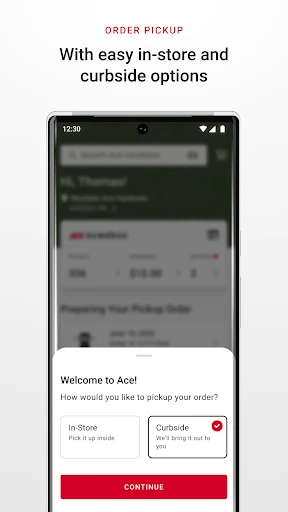
When I first opened Ace Hardware: Home Improvement, I pictured using it before a Saturday repair run. I could browse for supplies, add what I need to a cart, and choose a way to receive the order: in-store, store pickup, curbside pickup, or delivery. That sequence suits the familiar jobs that start with a short list and end with a trip to the hardware store.
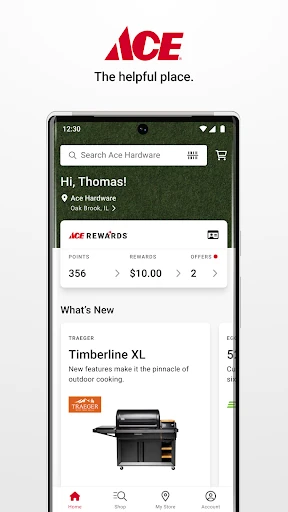
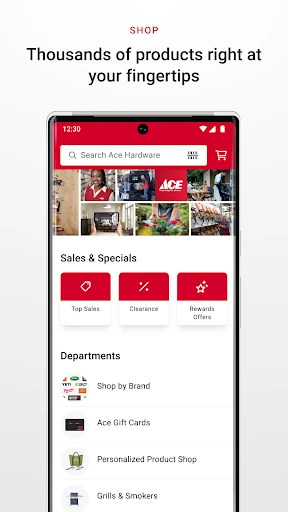
The range is broad enough for a mixed project list. One visit might involve paint supplies and plumbing parts; another might be about lawn equipment, grill accessories, or automotive items. I also like having store hours, services, local ads, brands, and events tied to a preferred store. That makes the app useful both for planning a purchase and for checking the details before heading out.
A store companion, not a planner
Compared with browsing a general online shop, Ace Hardware: Home Improvement is organized around home improvement, maintenance, lawn and garden, and outdoor living. Its local-store connection is a particular strength: you can find a preferred store and use calling or mapping capabilities, alongside details such as hours and services. For someone who likes shopping at Ace, that combination is more relevant than a generic product feed.
I would not treat it as a project-management tool or a replacement for deciding what a repair requires. The app focuses on shopping, store information, purchase history, and rewards; it does not describe itself as a source of step-by-step project instruction. If you are still figuring out the scope of a renovation, you may need other resources. It makes more sense once you have a list to shop from.
Small habits that help
A useful habit is to select your preferred store before a shopping trip, then check its hours and services while reviewing your list. The app also provides local ads, brands, and events, so a quick look can help you see what is happening at that location. If you want to avoid an unnecessary visit, the available order options give you another way to plan how to receive a purchase.
I would also link an Ace Rewards account and check its offers and points when I shop. The app brings rewards into one place, lets you add offers to a digital wallet, and shows recommended items related to reaching a reward or Premier status. After a purchase, purchase history and My Products can help keep product references, warranty details, extra parts, and paint colors or sheens handy.
More From Our News Desk

Zoom Meetings, Google Meet, or Teams: Which Is Easiest to Join?

How I Build a Free Streaming Lineup With Tubi

Why Crunchyroll Is the Default Anime App for So Many Fans

YouTube TV: A Practical Guide to Cutting Cable

Rummikub and the Small Comfort of Phone Games

TeamViewer Remote Control or AnyDesk for Helping Family?
Who will get the most from it
I would recommend Ace Hardware: Home Improvement to regular Ace shoppers and people who tend to handle their own household upkeep. It has a practical mix of shopping categories, several order-receiving options, local store information, and a place to follow rewards. It can be especially handy when a project involves more than one kind of supply, or when you want to check a store detail before making a trip.
It may be less compelling if you rarely shop at Ace, prefer to plan projects in a dedicated organizer, or only need a single store visit now and then. The app’s value leans on its shopping and rewards features, so the benefits are easier to appreciate when you use them regularly. People looking for renovation instructions rather than a way to browse and manage purchases may want a different kind of app.
Ace Hardware: Home Improvement is developed by Ace Hardware Corporation and is listed in the Shopping category on Google Play. It is free to download, has no in-app purchases, and does not contain ads. Its content rating is Everyone. The app has more than 1 million installs and a 4.7-star rating from 88,258 ratings.
The current version is 4.1.4. It was released on February 17, 2020, and was last updated on September 17, 2026. The Android version requirement is worth checking on Google Play, since it can vary by device and app updates.
A practical companion for home projects
A straightforward first look
My first impression is that this is an app built around getting from a project idea to a shopping choice. The categories cover familiar needs, from home repair and paint to outdoor power equipment, patio items, landscaping, and automotive supplies. That breadth is useful when a household to-do list is more varied than one neat renovation project.
I would start by choosing a preferred store and linking an Ace Rewards account if I use one. The store connection helps make the local details relevant, while the account brings rewards and offers into the same experience. There is also an advertised one-time bonus coupon for first-time app downloaders who link an account, subject to exclusions and the terms shown in the app.
Shopping between errands
Day to day, the app’s main job is to help browse products and move a planned purchase toward checkout. Once items are in the cart, the described choices include in-store, store pickup, curbside pickup, and delivery. I appreciate having those options because a quick repair run and a larger planned order do not always fit the same routine.
The local-store details add a useful layer beyond product browsing. I can check a store’s hours, services, brands, local ad, and events, or use the calling and mapping capabilities to connect with it. These features make the app feel more tied to a nearby shopping trip than a catalog that ends at the product page.
Rewards and useful records
The Ace Rewards tools are among the app’s more distinctive features. Members can view points and offers together, add offers to a digital wallet, and see recommended items related to their next reward and Premier status. There is also an option to invite friends for bonus points. For someone who already shops at Ace, putting those details in one place can make rewards easier to keep track of.
Purchase history is another practical inclusion. My Products can hold other purchases for reference, including warranty information, additional parts, and paint colors or sheens. I can see the appeal after a small repair: when I need to revisit a product detail later, having a record is more convenient than trying to remember which item I bought.
A routine for project days
For a weekend job, I would use the app in a few short passes rather than leave everything until I reach the store. First, I would browse the relevant categories and build a cart around the supplies already on my list. Then I would check the preferred store’s hours and services, and decide whether pickup, curbside pickup, delivery, or an in-store visit fits the day.
After shopping, I would make a habit of checking purchase history and saving relevant purchases in My Products. That is particularly useful for items I may need to match later, such as paint colors or sheens, or for products where warranty details and additional parts matter. Checking rewards at the same time keeps offers and points connected to the shopping routine.
Keep expectations grounded
The app is most convincing when you already know what kind of supplies you need and have a reason to shop at Ace. It is a shopping and store companion, not a substitute for project planning or hands-on guidance. I would not open it expecting a renovation checklist or instructions for diagnosing a household problem; those are not the features it describes.
The usefulness of local information and order options naturally depends on the store and the purchase. The app describes pickup, curbside pickup, delivery, and in-store shopping, but a particular choice may not suit every item or location. I would check the details shown for the selected store before making plans, especially when timing or a specific product matters.
Ace Hardware: Home Improvement earns its place on my phone as a focused shopping companion, especially for people who already visit Ace. Product browsing, local store details, order choices, rewards, and purchase records all support ordinary home and garden errands without pretending to be a project guide.
I would try it if I shop at Ace and want a more organized way to handle supplies and rewards. If I rarely use the store or need detailed project instruction, its strengths may matter less. For regular customers, though, it is a practical way to connect a to-do list with a local shopping routine.
Ace Hardware Frequently Asked Questions
What is Ace Hardware: Home Improvement used for?
Ace Hardware: Home Improvement is a shopping app for home improvement, repair, paint, lawn and garden, power tools, patio and grill, and other supplies. It also connects shoppers with a preferred store, offers store information and order options, and includes Ace Rewards tools, purchase history, and My Products for keeping product details handy.
Which devices can I use Ace Hardware: Home Improvement on?
Ace Hardware: Home Improvement is an Android app available through Google Play. The Android version requirement can vary with app updates and device compatibility, so check the Google Play store page for the current requirement before installing. The app’s described features include shopping, local store information, rewards, and purchase records.
Does Ace Hardware: Home Improvement cost money?
The app is free to download on Google Play, and it has no in-app purchases or ads. The app describes a one-time bonus coupon for eligible first-time downloaders who link an Ace Rewards account; exclusions apply, and the coupon is available the day after downloading. Check the app for the offer’s terms and details.
Can I use Ace Hardware: Home Improvement to get orders?
Yes. After adding items to a cart, the app describes in-store shopping, store pickup, curbside pickup, and delivery as ways to receive an order. Which choices are available can depend on the selected store and purchase, so check the options shown in the app when arranging an order.
Who is Ace Hardware: Home Improvement best for?
It is a good fit for Ace shoppers who want to browse supplies, check local store details, follow rewards, and keep purchase references together. People who rarely shop at Ace or want project-planning instructions may find it less useful, since its focus is shopping and store-related tools rather than step-by-step renovation guidance.
Pros
- Combines shopping, local store details, and Ace Rewards in one app.
- Offers several ways to receive purchases, including curbside pickup and delivery.
- Purchase history and My Products help keep useful product details accessible.
- Covers a broad range of home, garden, outdoor, and automotive shopping needs.
Cons
- Its strongest benefits are aimed at people who shop at Ace regularly.
- It focuses on shopping rather than project planning or repair instructions.
- Order options and store details may depend on the selected location.
- Category
- Shopping
- Version
- 4.1.4











