Click Wood
- 3.37K
- 4.6
- Installs
- —
- Price
- Free

Screenshots
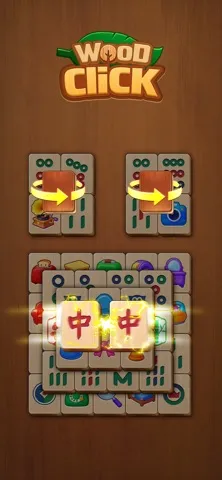
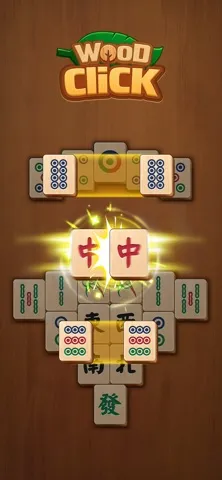
Analysis by Reviewed APKs
Click Wood is a quiet mahjong solitaire game built around matching pairs of wooden tiles and clearing each board. I found its appeal easy to understand: it offers a simple puzzle to pick up when I want a calmer break, without timers pushing me to rush. It should suit casual puzzle fans and players who enjoy steady, unhurried challenges, though anyone looking for a story or fast action should look elsewhere.
A Quiet Tile-Matching Loop
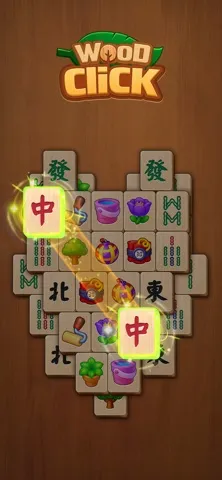
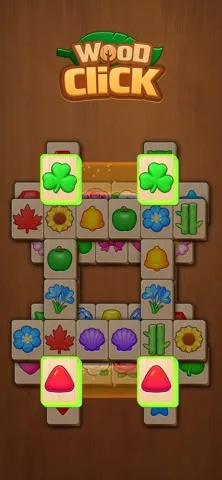
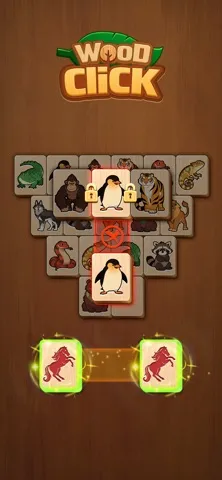
A typical round starts with a board of wooden tiles. I look for two identical tiles that are free and not blocked, then tap or slide to remove the pair. The aim is to clear the whole board. That makes each move easy to understand, while the blocked-tile rule gives me a small puzzle to solve before I can reach the pairs I want.
The rhythm is calm: scan the layout, make a match, and reassess what the move has opened up. I can take my time instead of racing a countdown, which suits a short pause during the day or a few rounds before bed. When I hit a snag, hints, undo, and shuffle are available as helpers. They give me ways to keep going without changing the basic matching loop.
Mahjong Without The Rush
Click Wood is a good fit for someone who likes mahjong solitaire but wants a gentler presentation and an unhurried pace. Its wooden tile look and large, clear pieces make the board feel approachable, while the rules stay familiar: find matching pairs and work around tiles that are blocked. The description also frames it as suitable for older adults, though its simple puzzle format can appeal to players of different ages.
This is not a competitive or action-heavy game, and the material does not describe a story, multiplayer play, or timed challenges. I would not choose it for dramatic progression or a constant stream of new mechanics. Its strength is repetition with a little planning: each board asks me to look carefully and make sensible matches, rather than learn a complicated system or react under pressure.
Good Habits For Early Boards
In the first hours, I would make a habit of checking which tiles are actually free before choosing a pair. A matching tile can be visible and still be unavailable if another piece blocks it. Looking across the board first helps me avoid tapping impulsively and gives me a clearer sense of which match might open up more choices.
I would also save the hint, undo, and shuffle tools for moments when I genuinely feel stuck. They are available as helpers, but the core satisfaction comes from reading the layout myself. Since there is no timer described, there is little reason to hurry. Taking a moment to compare the available pairs makes the game feel more like a relaxed puzzle than a test of speed.
More From Our News Desk

Zoom Meetings, Google Meet, or Teams: Which Is Easiest to Join?

How I Build a Free Streaming Lineup With Tubi

Why Crunchyroll Is the Default Anime App for So Many Fans

YouTube TV: A Practical Guide to Cutting Cable

Rummikub and the Small Comfort of Phone Games

TeamViewer Remote Control or AnyDesk for Helping Family?
Who Might Settle In
I would recommend Click Wood to players who enjoy solitaire-style puzzles, familiar tile matching, and a softer visual mood. It is especially suited to someone who wants to play at their own pace, whether that means one board during a break or a longer session at home. The clear wooden tiles and straightforward rules also make it an approachable option for people who prefer games that explain themselves through a simple, repeated action.
Players who need a lot of variety, competition, narrative, or high-pressure goals may bounce off. The game’s appeal depends on enjoying the small decisions inside a board and not minding a steady pace. I would also set expectations accordingly: its relaxation framing does not make it a different kind of game; it remains a tile-matching puzzle. If that loop is satisfying to you, the calm presentation is a welcome fit.
Click Wood is made by HEARTSNET PTE. LTD. on iOS, and it is free to download on the App Store. It has a 4.6-star rating from 3,368 ratings. The listed content rating is 4+, and the minimum operating system requirement is iOS 15.0. The current version in the supplied store details is 1.11.10.
The supplied release date is March 15, 2026, and the last update date is October 20, 2026. The game’s description says it supports phones and tablets and can be played offline, including without Wi-Fi. Its store details provide no install count, so there is no install figure to report. I’ve left out advertising and purchase details that are not provided in the facts.
How Click Wood Finds Its Calm
A Gentle First Look
When I first opened Click Wood, the wooden theme gave the puzzle a softer feel than a plain set of matching symbols. The basic goal is direct: pair identical tiles that are free and not blocked, then clear the board. That straightforward start makes it easy to understand what I am meant to do without needing to absorb a long list of rules.
The large, clear tiles are a practical part of that first impression. They make the board easier to scan, which matters in a game where noticing available pairs is the main task. The description presents the interface as clear and friendly, particularly for older adults. I found that this design emphasis fits the slow, attentive style of play rather than asking me to react quickly.
There is no timer pressure described, so onboarding does not need to become a race to learn the controls. I can spend a few moves simply seeing how blocked tiles shape the board. That kind of low-stakes introduction works well for casual players, though anyone expecting a tutorial-driven campaign or a dramatic opening should keep expectations modest.
Progress At Your Pace
The basic progression is board by board: make pairs and clear all the tiles to complete a level. The description promises millions of levels, which points to a large supply of puzzles, but the moment-to-moment structure remains consistent. I would approach that as an invitation to play as much or as little as I like, not as a reason to race toward a finish line.
Difficulty comes from the layout and the order in which I uncover usable matches. A careless choice can leave fewer obvious options, so a little forward thinking helps. Hints, undo, and shuffle provide ways to recover when I am stuck, but they do not replace the central task of reading the board. That balance keeps the puzzle approachable without making every move feel automatic.
Because the game describes itself as having no timers and no pressure, its pacing should suit players who want to pause and think. I would not expect the tension of a countdown or a competitive score chase. Instead, the satisfaction is in gradually clearing a board. That makes the game easy to fit into a relaxed routine, although players who crave escalating urgency may find it too even-tempered.
The Features That Matter
The wooden design is the most distinctive part of Click Wood’s presentation. Natural-looking textures, clear tiles, and an uncluttered feel support the calm tone. It is a visual choice that matches the familiar mahjong solitaire format, rather than a major change to how the puzzle works. I appreciated that the theme stays connected to the activity instead of competing with it for attention.
The available helpers are practical: hints can point me toward a move, undo lets me take back a choice, and shuffle can rearrange the board. Together, those tools offer different ways through a difficult moment. They are useful to know about early, but I would treat them as optional support; the main game remains about matching free pairs and clearing the layout.
The description also says Click Wood supports offline play and phones and tablets. That makes it sound suited to both a quick session on a phone and a more leisurely look at a larger screen, without requiring Wi-Fi to play. Its emphasis on large tiles and calm presentation gives it a clear identity, even though the central mahjong solitaire rules will feel familiar to fans of the genre.
Cost And Store Details
Click Wood is free to download on the App Store. That makes it easy to try the basic puzzle loop before deciding whether the game’s pace and presentation suit me. The supplied facts do not give a price for optional purchases or say whether the game contains ads, so I would check the App Store details on my device for the latest information about those points.
From a fairness perspective, I can describe what is clear: the game’s central activity is matching tiles, and the listed download price is zero. Hints, undo, and shuffle are described as available helpers, but the supplied information does not explain any purchase terms for them. I would avoid assuming how those features are funded and simply review the store information before downloading if that matters to me.
The store details report a 4.6-star rating from 3,368 ratings. That provides a useful snapshot of player feedback, though it does not tell me whether every player will enjoy the slow pace. I would weigh the rating alongside the game’s actual format: a calm, repeated puzzle loop rather than a broad collection of modes or a high-intensity challenge.
A Few Practical Limits
The biggest limitation is also part of the design: Click Wood stays focused on mahjong solitaire. Its description supports tile matching, helpers, a wooden look, and many levels, but not a wider set of game modes. If I want a story, social competition, or frequent changes to the core rules, I may need a different kind of game.
The lack of timers is welcome for a relaxed session, but it also means the game may feel too gentle for players who like time pressure. There is no need to squeeze in a move before a clock runs out, so the challenge depends on the board and my choices. That creates a comfortable routine, but not the adrenaline or urgency some puzzle fans seek.
Click Wood is described as playable offline, so a Wi-Fi connection is not required for play according to its description. For device compatibility, the store facts specify iOS 15.0 or later, while the description says it supports phones and tablets. Those details make the basic requirements clear, but I would still check the App Store on my own device before installing.
Click Wood works best when I treat it as a quiet, repeatable puzzle rather than a game that needs to constantly surprise me. Its clear wooden tiles, simple matching rules, offline play, and lack of timer pressure all support an easygoing session. The helpers are useful when a board gets awkward, while the core challenge still comes from choosing pairs thoughtfully.
I recommend it to casual mahjong solitaire fans and anyone who enjoys solving boards at their own pace. I would skip it if I wanted competition, story, or fast-moving action. For players who value a calm tile puzzle they can pick up in short sessions, Click Wood offers a clear and approachable option.
Click Wood Frequently Asked Questions
Is Click Wood free to download?
Yes. Click Wood is free to download on the App Store. The supplied store details do not give a price for optional purchases, so check the App Store information on your device for current details before downloading if that is important to you.
Does Click Wood have in-app purchases or ads?
The available store facts do not specify whether Click Wood has in-app purchases or advertising. Its description mentions hints, undo, and shuffle as available helpers, but does not provide purchase terms. Check the current App Store details for the latest information about spending and ads.
Can I play Click Wood offline?
Yes. Click Wood’s description says it supports offline play, so you can play without Wi-Fi. The main activity is matching identical free tiles and clearing the board. If you want to confirm how the game behaves on your particular device, the App Store information is worth checking.
Which devices can run Click Wood?
Click Wood is an iOS game that requires iOS 15.0 or later, and its description says it supports phones and tablets. Check the App Store on your device for compatibility before installing, especially if you are unsure which operating system version it uses.
Is Click Wood suitable for children?
Click Wood has a 4+ content rating in the supplied store facts. It is a tile-matching puzzle with a calm presentation and no timed pressure described. Parents can review the current App Store information and the game’s details to decide whether it suits a particular child.
Pros
- Clear wooden tiles and a calm presentation suit unhurried puzzle sessions.
- Simple pair-matching rules make it easy to understand and start playing.
- Offline play and phone and tablet support add everyday flexibility.
- Hints, undo, and shuffle offer help when a board gets tricky.
Cons
- The focused mahjong solitaire loop may feel repetitive to some players.
- Its gentle pace may disappoint players who want competition or time pressure.
- Store details supplied here do not explain ads or optional purchase terms.
- Category
- Card
- Version
- 1.11.10