Spades Plus - Card Game
- 410.92K
- 4.7
- Installs
- 10.00M
- Price
- Free
Screenshots






Analysis by Reviewed APKs
Spades Plus - Card Game is an online take on partnership Spades, with several rule variations, tournaments and social tables alongside the familiar trick-taking game. I’d recommend it most to players who already enjoy bidding and coordinating with a partner, or who want a steady place to learn against other people. Its variety is appealing, though the online focus and coin-based extras make it less suited to a completely casual, offline card break.
A hand, a bid, a partnership
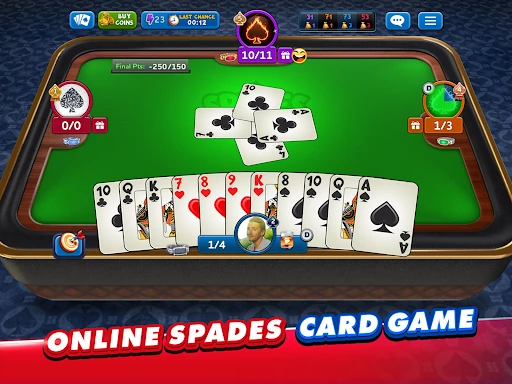
A typical session starts with the central Spades decision: estimate how many tricks your hand can take, make a bid, then try to meet it while playing alongside a partner. Spades are always trump, so timing the suit matters as much as counting high cards. The basic loop is easy to recognize if you know the card game, but a bid can make even a short hand feel like a small team puzzle.
I like that the game offers a natural reason to play one more hand: each round gives you a fresh deal, a new estimate to make and a different partnership problem to solve. In Classic, you bid with a partner against another team. Other modes change the calculation, so a familiar card table can feel more demanding without asking you to learn an entirely different game.
For Spades fans, not solitaire breaks
Compared with a simple digital card table, Spades Plus is built around online opponents, teams and a community. That suits players who enjoy reading a partner’s bids and adjusting to what other people play. The range of modes is a welcome bonus for regular Spades players: Solo removes the partnership, while Mirror and Whiz alter how you approach bidding.
This is not the best fit if you want a quiet, self-contained solitaire game or a way to play without an internet connection. The description emphasizes online multiplayer and recommends a good connection. It also isn’t just a basic rules reference: the focus is playing hands, joining events and interacting with other players. If you prefer cards without competition or social features, that emphasis may wear thin.
Start with familiar rules
If you’re new to Spades, begin with Classic so you can concentrate on the core rhythm: bid with your partner, follow suit when possible and remember that spades are trump. I’d focus first on making realistic bids rather than trying to predict every card. A modest, defensible estimate is easier to learn from than a bold guess that leaves your team scrambling to make its contract.
Once the basic hand makes sense, try a variation at a time instead of jumping between every table type. Mirror asks you to bid the number of spades in your hand; Whiz allows a Nil bid or that same count. Private tables can be configured with different rules and options, so they’re a sensible place to explore a preferred setup with invited players. Keep an eye on your coins as you choose tables and challenges.
More From Our News Desk

Zoom Meetings, Google Meet, or Teams: Which Is Easiest to Join?

How I Build a Free Streaming Lineup With Tubi

Why Crunchyroll Is the Default Anime App for So Many Fans

YouTube TV: A Practical Guide to Cutting Cable

Rummikub and the Small Comfort of Phone Games

TeamViewer Remote Control or AnyDesk for Helping Family?
Who will enjoy the table
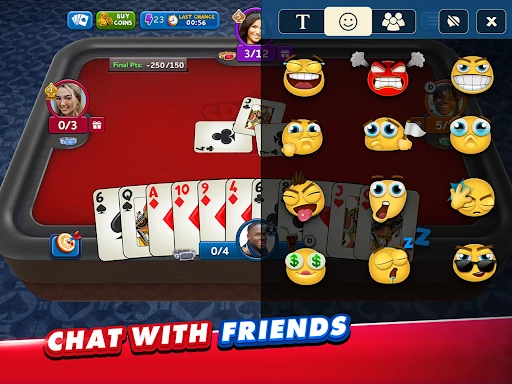
I’d point experienced Spades players toward this first. The partnership structure, bidding and trump suit are the main attraction, and the different modes give people who know the basics a reason to vary their routine. Players who like a little social texture around a card game may also enjoy public or private chat, adding friends and playing with other people rather than against a fixed solo puzzle.
Newcomers can still find their footing by starting with Classic and learning one decision at a time, but anyone expecting a guided tutorial should know the description doesn’t promise one. Players who dislike online competition, chat, or the pressure of making a bid in front of a partner may bounce off. It’s also a weaker match for people seeking an offline game to fill a few minutes without an internet connection.
Spades Plus - Card Game is developed by Zynga and is free to download on Google Play. The store shows over 10 million installs and a 4.7-star rating from about 411,000 ratings. It contains ads and offers in-app purchases; listed item prices range from $0.49 to $219.99. The content rating is Teen, which is worth considering before choosing the game for a younger player.
The listed minimum requirement is Android 7.0, and the current version is 6.69.2149. The game was released on July 24, 2014, with its latest listed update dated January 30, 2026. The description recommends a good internet connection for the best experience and says in-app purchases can add content or in-game currency.
The Decisions Behind Every Hand
Learning the table
When I first opened the game, the most useful starting point was the underlying card routine, not the menu of modes. Spades is a partnership trick-taking game, and the suit is always trump. That gives newcomers a clear first goal: understand bids and tricks in a Classic hand before worrying about variations or tournament formats.
The available description doesn’t detail a step-by-step tutorial, so new players should expect to learn by playing and paying attention to the rules at the table. That’s manageable for people who know card games, but less hand-holding than a dedicated teaching app might provide. A familiar partner format also gives you a practical way to see how bids affect the team’s result.
Progress and pacing
The game’s pace comes from a steady stream of hands and the choice to move between formats. Classic provides the baseline; Solo makes each player responsible for their own points; Mirror and Whiz put a different emphasis on the hand’s spades and the bid. That variety helps keep regular play from feeling like the exact same partnership calculation every time.
Tournaments and Knock-Out Challenges add a more competitive destination beyond an ordinary match. The description presents a 16-player tournament, while the challenge formats promise prizes. These events may appeal to players who like a clear contest, but they can also make the experience feel more goal-driven than a relaxed one-off hand. I’d settle into the rules before treating events as the main attraction.
Modes beyond Classic
There’s a useful spread of ways to play. Classic keeps the partner-versus-partner structure; VIP offers custom tables for partnership Spades; Solo removes partnerships; and Mirror and Whiz alter the bidding rules. Rather than relying on a pile of unrelated mini-games, the options stay close to the same card game while changing what you need to consider.
Table creation gives players some control over the setup. The description says you can choose a mode and set a bet amount and final point, with options for Nil, Blind Nil and chat. Private tables can be invite-only. Seasonal competitions also offer new deck designs, which are a visual reward for players who like collecting variations on the cards they see during matches.
Coins, purchases and ads
The game is free to play, with a welcome bonus of 20,000 coins and daily bonuses described as another way to collect coins. Those rewards give new players a starting cushion, while tournaments and challenges add potential prizes. The game also contains ads and offers in-app purchases for currency or additional content, so it is not an entirely purchase-free experience.
Google Play lists in-app item prices from $0.49 to $219.99. That is a broad range, and I would treat purchases as optional rather than necessary to enjoy the card rules. Since tables can involve a bet amount, it’s sensible to pay attention to the coin cost before joining. Ads and currency mechanics are the main trade-offs alongside the otherwise straightforward appeal of playing Spades.
Online play and other limits
The central limitation is connectivity: this is presented as online multiplayer with players from around the world, and the description recommends a good internet connection. It isn’t framed as an offline card game. If you’re hoping to play during a commute with unreliable service, that may interrupt the routine, so it’s better suited to a place where a connection is available.
The social side is another preference call. Public and private chat, friends and invite-only tables can make the game feel welcoming when you want company, but players seeking a strictly solitary experience may prefer another card app. The Teen content rating is also a practical point for families to check. As with any online community, the social features are part of the experience, not just decoration.
Spades Plus - Card Game has a strong foundation: familiar partnership Spades, several meaningful variations and enough online formats to give regular players options. I especially like that the modes change the way you think about a hand rather than replacing the card game with unrelated distractions.
I’d recommend it to Spades fans who want online opponents, tournaments and social tables, and to curious newcomers willing to learn by playing. Skip it if you need offline play or a quiet solo game. Ads, purchases and coin-based tables are worth keeping in mind, but the card play itself is the reason to try it.
Spades Plus Frequently Asked Questions
Is Spades Plus - Card Game free to play?
Yes. Spades Plus - Card Game is free to download and play on Google Play. It contains ads and offers optional in-app purchases, so free access does not mean the game has no paid extras. The store currently lists item prices from $0.49 to $219.99.
Does Spades Plus - Card Game have in-app purchases?
Yes. The game offers in-app purchases for additional content and in-game currency, and Google Play lists items from $0.49 to $219.99. It also contains ads. You can check the current store page for the available items and prices, which may change over time.
Can I play Spades Plus - Card Game offline?
The game is described as online multiplayer, and its developer recommends a good internet connection for the best experience. Offline play is not described, so I would plan on having a connection available. If offline access is essential, check the current Google Play information before installing.
What devices support Spades Plus - Card Game?
Spades Plus - Card Game is an Android game, and the listed minimum requirement is Android 7.0. Device performance and compatibility can vary, so it’s worth checking the Google Play page from the device you plan to use. A reliable internet connection is also recommended.
Is Spades Plus - Card Game suitable for children?
Google Play gives Spades Plus - Card Game a Teen content rating. The game includes online play and public or private chat features, so families should consider those social elements when deciding whether it suits a particular player. Ratings and guidance can vary by region, so check the current store page.
Pros
- Several Spades variations keep the familiar card game fresh for regular players.
- Private tables offer rule and match settings for invited games.
- Tournaments, challenges and seasonal deck designs add goals beyond ordinary hands.
- A free welcome coin bonus gives new players a starting balance.
Cons
- Online multiplayer and a good connection are central to the experience.
- Ads and a broad range of in-app purchase prices may not suit everyone.
- The social chat features may be unwelcome for players seeking solitary card play.
- Category
- Card
- Version
- 6.69.2149