Space Waves - CrazyGames
- 45.24K
- 4.6
- Installs
- 5.00M
- Price
- Free

Screenshots
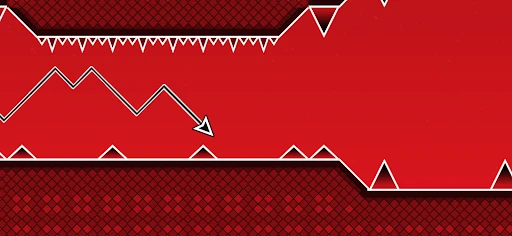
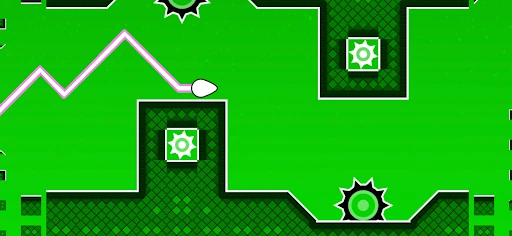
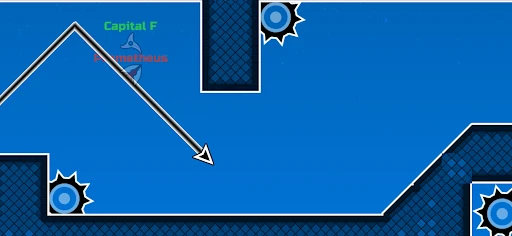
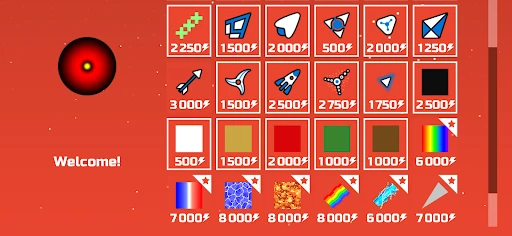
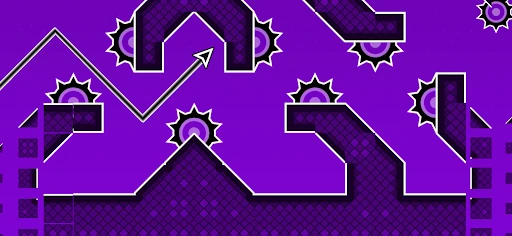
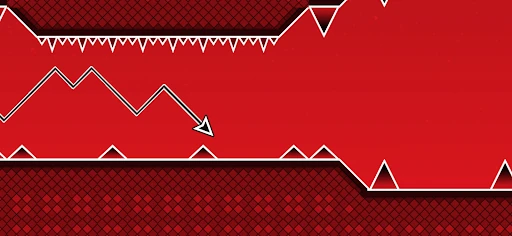
Analysis by Reviewed APKs
Space Waves - CrazyGames is a quick-restart arcade game about steering an arrow through geometric obstacle courses. I like the appeal of being able to pick a level and get straight into a run, without needing to work through a long campaign first. Its simple premise suits players who enjoy testing their timing and reflexes, though the harder stages can make a casual five-minute break feel surprisingly demanding.
A Run Through The Obstacles
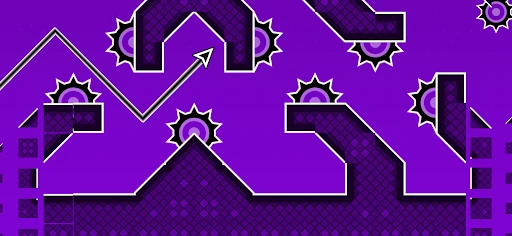
A typical session is built around guiding an arrow through a course of walls, spikes, sharp turns, moving hazards and narrow gaps. The controls are described as responsive, and the focus is on making small adjustments at the right moment rather than managing a complicated set of actions. Each level is a compact challenge: watch the route, react to what is ahead and try to keep the arrow moving without crashing.
When I think about the rhythm of a run, the instant-restart design stands out. A mistake does not have to end the session; you can go straight back in and try the same section again. That keeps the focus on learning a pattern instead of waiting around. The levels become more difficult and introduce new patterns, so a run can shift from a comfortable warm-up to a test of quick reactions.
Arcade Challenge, Not A Space Sim
The space theme is a visual frame for a geometric arcade challenge, not an invitation to explore planets or learn astronomy. The central appeal is steering through hazards, finding a rhythm and improving your timing. Compared with arcade games built around a long chain of unlocks, Space Waves gives you the option to choose any level at any time, which makes it easier to focus on the kind of challenge you want.
That open level selection also means this is not necessarily a game for players who need a carefully guided campaign or a steady stream of story revelations. Its description emphasizes handcrafted courses and increasing difficulty, rather than characters, narrative or a broad collection of game modes. I would look at it as a focused reflex test: a good fit for short bursts, but a narrower experience than a large arcade collection.
Tips For Your First Hours
I would start with easier levels even though the game lets you jump to any stage. The green-to-red difficulty colors offer a quick indication of challenge, and practicing on gentler courses can help build a feel for the movement. Pay attention to how a level’s turns and gaps fit together rather than trying to rush through every obstacle. Getting comfortable with the timing makes the later patterns less intimidating.
For tight spaces, the game’s own guidance suggests zigzagging to gain better control, and it encourages syncing movement to each stage’s rhythm. I would treat that as a practical reminder to make deliberate corrections instead of one long, frantic movement. If a run ends at a tricky obstacle, restart and focus on that sequence. Since levels are selectable, you can also switch to another course when you want a change of pace.
More From Our News Desk

Zoom Meetings, Google Meet, or Teams: Which Is Easiest to Join?

How I Build a Free Streaming Lineup With Tubi

Why Crunchyroll Is the Default Anime App for So Many Fans

YouTube TV: A Practical Guide to Cutting Cable

Rummikub and the Small Comfort of Phone Games

TeamViewer Remote Control or AnyDesk for Helping Family?
Who Will Enjoy The Challenge
I would recommend Space Waves to players who enjoy compact arcade challenges and the satisfaction of getting a little farther after a failed attempt. The level selection suits people who want to choose their own difficulty, while instant restarts are handy when there is only a few minutes to play. It also has a clear premise for anyone who likes geometric obstacle courses and games that reward attention and timing.
Players who prefer relaxed exploration, detailed stories or a broad range of distinct activities may find the repeated focus on navigation too narrow. The higher-difficulty courses are designed to challenge reflexes, so they may not be the best choice when you want a game that stays gentle throughout. I would also be cautious about expecting the space setting to mean astronomy content: the core experience is arcade action through geometric hazards.
Space Waves - CrazyGames is an arcade game from CrazyGames.com. On Google Play, it has over 5 million installs and a 4.6-star rating from around 45,000 ratings. The game is free to download, with in-app purchases priced from $1.99 to $9.99 per item, and it contains ads. Those store details give a useful snapshot of the offering before you decide whether its quick arcade format suits you.
Google Play gives Space Waves a content rating of Everyone. The current version is 1.7.5, and its release date is September 22, 2025. The supplied store information does not give a minimum Android version, so it is worth checking the Google Play page against your device before installing. The version and store details can change over time, so I would check the current page for the latest information.
Finding The Flow In Every Level
Straight Into The Action
The onboarding is easy to understand because the objective is immediate: guide the arrow through a level without crashing. The obstacles provide the challenge, with walls, spikes, turns, moving hazards and tight gaps asking you to react as the course unfolds. There is no need to learn a sprawling set of systems before starting. That straightforward setup makes the first attempt approachable even if you have only a short break.
One useful choice is that the game lets you start at any level. That freedom avoids making every player repeat a fixed opening sequence, but it also puts more responsibility on you to pick a sensible starting point. I would use the difficulty colors as a guide and begin with easier green levels if the controls feel unfamiliar. Jumping directly to a red challenge is possible, but it may be a rough introduction.
Learning The Course Rhythm
Difficulty rises through more challenging levels and new obstacle patterns. The progression is less about building a character or collecting upgrades and more about improving your own timing and control. That gives each repeat attempt a clear purpose: notice where the route becomes difficult, make a more measured adjustment, and see whether you can pass the same section on the next run.
The pacing benefits from instant restarts, since a crash can lead directly into another attempt rather than a long interruption. I find that design especially suited to short sessions, when I want a quick challenge rather than a lengthy commitment. Still, repeated retries can become demanding if a narrow passage keeps catching you out. Switching to an easier or simply different level is a sensible way to keep the session from feeling stuck.
A Wide Choice Of Courses
The game offers more than 80 handcrafted levels, with difficulty indicated by color from easier green zones to extreme red challenges. New patterns appear as difficulty increases, giving the courses room to test different reactions rather than relying on a single obstacle arrangement. The option to choose any level means you can decide whether to practice, take on a tougher course or skip around according to your mood.
Its standout features are practical rather than sprawling: level selection, quick restarts, smooth controls and a geometry-inspired presentation built around rhythm and flow. I like that those pieces reinforce the same central activity instead of distracting from it. The game description also encourages syncing movement to a stage’s rhythm, which gives the obstacle courses a sense of cadence. It remains a focused arcade game, rather than a collection of unrelated modes.
Free Play And Purchases
Space Waves is free to download and includes ads, with in-app purchases priced from $1.99 to $9.99 per item. Those are the spending details I would keep in mind before playing. The level selection and core obstacle-course premise are the main reasons to try it, but the presence of purchases and advertising means the experience is not entirely free of commercial elements.
I would decide whether the game suits me based on its play rather than assuming that a purchase is necessary or that ads appear in a particular way. The available facts do not specify exactly what each item does or when advertising appears. If either detail matters to your decision, check the current Google Play page. In practical terms, the free download makes it easy to sample the format before considering any optional spending.
A Focused Reflex Test
The main limitation is also the game’s identity: most of the experience revolves around guiding an arrow through increasingly difficult geometric courses. That is a good match for players who want a clear reflex challenge, but it offers less variety than a game built around several different activities. If you are hoping for exploration, a story or astronomy lessons, the space-themed presentation should not set the wrong expectation.
The description does not specify whether play requires an internet connection, and it does not provide a minimum Android version or detailed device requirements. I would check the Google Play page for compatibility and connection information before relying on it in a particular setting. The supplied materials also do not describe accessibility options or device performance, so players with specific needs should verify those details rather than assume the controls or demands will suit every phone.
Space Waves - CrazyGames has a clear, appealing loop: choose a course, steer through its hazards, and restart quickly when a run goes wrong. I like the freedom to pick a level and the emphasis on learning patterns at my own pace. Its strongest fit is someone who enjoys reflex challenges more than stories or broad collections of modes.
I would recommend giving it a try if a free arcade game with more than 80 geometric levels sounds appealing, while keeping the ads and in-app purchases in mind. Start with easier courses, build a sense of timing, and move up when you are ready. If you want a relaxed or highly varied experience, this focused obstacle-dodging format may not hold your attention for long.
Space Waves Frequently Asked Questions
Is Space Waves - CrazyGames free to play?
Space Waves - CrazyGames is free to download on Google Play. The game also contains ads and offers in-app purchases, so free access does not mean there are no commercial elements. I would check the current Google Play page for the latest details before installing, since store information can change.
Does Space Waves - CrazyGames have in-app purchases?
Yes. Space Waves - CrazyGames offers in-app purchases, with items priced from $1.99 to $9.99. The available details do not explain what each item includes, so check the Google Play page if you want to know what a specific purchase provides. The game also contains ads.
Can I play Space Waves - CrazyGames offline?
The available game information does not say whether Space Waves - CrazyGames can be played offline or requires an internet connection. If offline access matters for a commute or another setting, check the current Google Play page or test the game’s connection requirements before relying on it.
What devices support Space Waves - CrazyGames?
Space Waves - CrazyGames is an Android game on Google Play. The supplied details do not give a minimum Android version or specific device requirements, so compatibility may vary by phone or tablet. Check the Google Play page on your device for its current compatibility information before installing.
Is Space Waves - CrazyGames suitable for children?
Google Play gives Space Waves - CrazyGames a content rating of Everyone. Its described play centers on steering an arrow around geometric obstacles such as walls and spikes. Parents can review the current store page for further details, including information about ads and in-app purchases, before deciding whether it suits their child.
Pros
- More than 80 levels provide plenty of geometric courses to explore.
- Choose any level instead of following a fixed stage order.
- Instant restarts make it easy to learn from a failed run.
- Difficulty colors help players choose a comfortable starting challenge.
Cons
- The focused obstacle-dodging loop may feel repetitive to some players.
- Ads and in-app purchases are part of the free game.
- Offline access and minimum Android requirements are not specified.
- Category
- Arcade
- Version
- 1.7.5